Complete Event Automation Playbook: RSVP to Post-Event Nurture
Automate your entire event lifecycle from RSVP capture to post-event nurture. Complete playbook with tool stack, workflow diagrams, and implementation timeline.
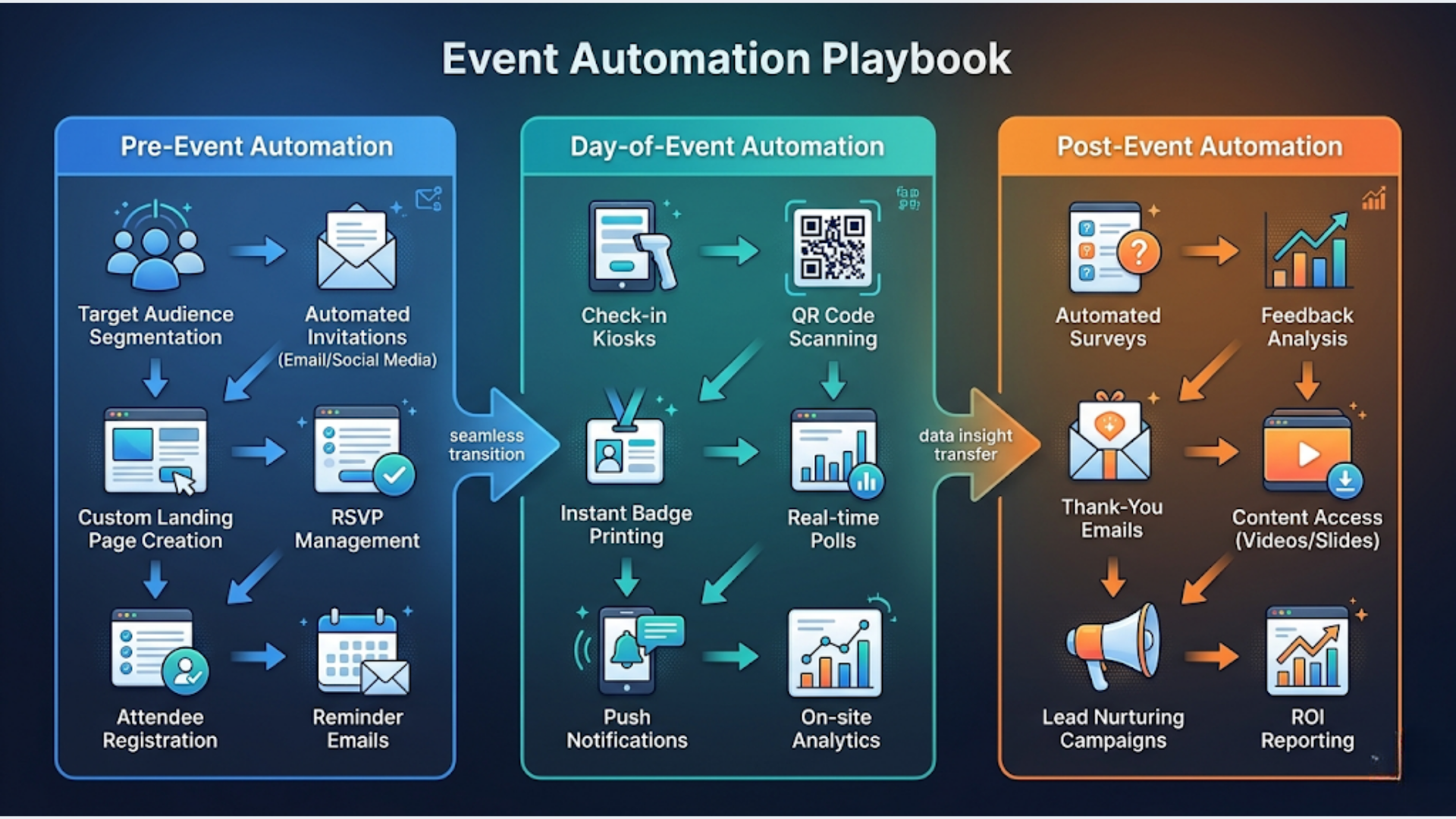
Complete Event Automation Playbook: RSVP to Post-Event Nurture
A complete event automation system covers three phases (pre-event, day-of, post-event) using 4-5 connected tools orchestrated through n8n. Total implementation takes 2-4 weeks with a one-time setup cost of $2,000-8,000 depending on event complexity and team size. Once built, it runs every event with minimal manual intervention.
These systems work for corporate conferences, MICE operations, and wedding planning. The ROI pattern is consistent: 60-80% reduction in manual coordination time, 3x faster post-event follow-up, and 30-40% higher engagement on nurture sequences compared to manual outreach.
This playbook covers every workflow from the moment someone RSVPs to the 30-day nurture drip after your event ends.
Phase 1: Pre-Event Automation
Pre-event is where most event teams burn hours on repetitive work. Registration confirmations, payment follow-ups, reminder emails, attendee list management. All of it is automatable.
RSVP Capture and Instant Confirmation
Your registration form (Zoho Backstage, Eventbrite, Google Forms, or a custom landing page) is the entry point. When someone submits, the automation chain fires immediately.
Within 60 seconds of RSVP:
- Contact record created or updated in your CRM
- WhatsApp confirmation sent via WATI with event name, date, venue, and map link
- Calendar invite (.ics file) generated and delivered via email
- Attendee added to the event-specific segment in your CRM
- If it’s a paid event, payment link generated via Razorpay or Stripe and sent in the same WhatsApp message
This replaces the manual loop where someone downloads a CSV, checks for duplicates, sends individual confirmations, and manually adds people to a mailing list. That process takes 2-5 minutes per registrant. At 500 registrations, you’ve just saved 16-40 hours of manual work.
Payment Collection and Tracking
For paid events, the payment workflow runs parallel to confirmation.
Registration form submission triggers a Razorpay/Stripe payment link. When payment completes, a webhook fires to n8n, which updates the CRM deal stage from “Registered” to “Payment Confirmed.” If payment doesn’t arrive within 24 hours, an automated WhatsApp reminder goes out. After 72 hours with no payment, the record gets flagged for your sales team to follow up manually.
This catches the 20-30% of registrants who intend to pay but forget. Without the automated nudge, those are lost attendees.
Automated Reminder Sequence
Once someone is confirmed, they enter a time-based reminder sequence.
| Timing | Channel | Content |
|---|---|---|
| 7 days before | Full event details, agenda, speaker lineup, parking/logistics | |
| 3 days before | Quick reminder with “Add to Calendar” link | |
| 1 day before | WhatsApp + SMS | ”See you tomorrow” with venue map and check-in instructions |
| 2 hours before | QR code for check-in, WiFi password, last-minute updates |
Each message is templated and personalized with the attendee’s name, ticket type, and any session selections they made during registration.
The reminder sequence reduces no-shows by 15-25%. For a 500-person conference, that’s 75-125 additional attendees who show up because you sent the right message at the right time. Zero manual effort after initial setup.
Attendee List Sync
Your CRM is the single source of truth, but multiple teams need access to attendee data.
n8n syncs the confirmed attendee list to:
- A Google Sheet for your operations team (real-time, auto-updating)
- Your check-in system (QR codes pre-generated per attendee)
- Your catering vendor (headcount updates at T-7 and T-1 days, automated)
- Your badge printing system (name, company, ticket type)
No more “can someone send me the updated attendee list?” emails. Everyone pulls from the same source, updated in real time.
Phase 2: Day-Of Automation
Event day is chaos by nature. Automation won’t eliminate the chaos, but it removes the administrative overhead so your team focuses on the experience.
QR Code Check-In System
Every confirmed attendee receives a unique QR code 2 hours before the event. On arrival, they scan it at a tablet or phone station. The check-in system logs their arrival time and triggers several downstream actions.
On successful check-in:
- CRM record updated: status changes from “Confirmed” to “Attended”
- Real-time attendee count dashboard updates (Google Sheet or simple web dashboard)
- Welcome WhatsApp message sent with WiFi password, agenda, and floor map
- If VIP, alert sent to the host or account manager via Slack/WhatsApp
No-Show Detection and Alerts
30 minutes after event start, n8n compares the confirmed list against the checked-in list. Anyone who hasn’t checked in gets flagged.
For high-value attendees (sponsors, key clients, speakers), an automated alert goes to your sales team via Slack or WhatsApp: “Attendee X has not checked in. Confirmed 3 days ago. Last communication: yesterday.” Your team can follow up in real time instead of discovering no-shows during post-event analysis.
For general attendees, a gentle WhatsApp message: “We noticed you haven’t checked in yet. The event is underway. Need help finding us?” This recovers 5-10% of no-shows who are running late, stuck in traffic, or simply forgot.
On-Site Data Capture
Events are lead generation opportunities beyond the pre-registered attendees.
WiFi landing page capture. Your event WiFi requires name and email to connect. Those contacts flow into your CRM tagged as “on-site capture” for post-event follow-up. This catches walk-ins, vendor staff, and attendees who registered through someone else’s name.
Session-level tracking. If your event has multiple tracks or breakout sessions, scan-in at each room tracks which sessions each attendee chose. This data feeds into personalization for post-event follow-up. Someone who attended the “AI in Marketing” session gets different nurture content than someone who attended “Operations Automation.”
Live social media feed. A monitoring tool tracks your event hashtag and mentions across LinkedIn, X, and Instagram. n8n aggregates these into a live feed displayed on screens at the venue and saves each post for the recap content.
Phase 3: Post-Event Automation
Most event teams treat post-event as “send a thank-you email next week.” That’s leaving money on the table. The first 48 hours after an event are when engagement peaks.
NPS Survey (Within 2 Hours)
Timing is everything with feedback. Two hours after the event ends, every attendee receives a short NPS survey via both email and WhatsApp. Why both? Email has a higher completion rate for detailed feedback. WhatsApp has a higher open rate for the initial prompt.
The survey is short. Three questions max:
- How likely are you to recommend this event? (1-10)
- What was the best part?
- What would you improve?
Based on the NPS score, attendees get automatically tagged in your CRM:
- Promoters (9-10): Enter a testimonial request sequence + referral program
- Passives (7-8): Enter a standard nurture sequence
- Detractors (1-6): Alert to event manager for personal follow-up within 24 hours
Automated NPS collection consistently delivers 35-45% response rates. Manual follow-up the next week gets 10-15%.
Photo and Video Delivery
Event photos and highlight reels are valuable content, and also a re-engagement trigger.
24 hours after the event, attendees receive a WhatsApp message with a link to the event photo gallery. 48 hours later, the video highlight reel arrives via email. These messages drive attendees back to your content while the experience is fresh.
The automation handles delivery. Your team handles curation (selecting and uploading the photos/videos to a shared folder). Once the folder is ready, n8n distributes the links to every attendee automatically.
30-Day Nurture Drip
This is where events convert into recurring revenue. The nurture sequence turns one-time attendees into repeat customers.
| Day | Channel | Content | Goal |
|---|---|---|---|
| Day 1 | Thank you + NPS survey | Immediate feedback | |
| Day 2 | Event photos + highlight reel link | Re-engagement | |
| Day 5 | Key takeaways recap, speaker slides | Value delivery | |
| Day 10 | ”Save the date” for next event | Early awareness | |
| Day 15 | Early bird pricing announcement | Conversion | |
| Day 20 | Speaker announcement or agenda preview | Build excitement | |
| Day 25 | Social proof (testimonials, attendee count, NPS score) | Trust building | |
| Day 30 | Email + WhatsApp | Final early bird reminder + registration link | Close |
Each message is personalized based on the sessions they attended, their NPS score, and their engagement with previous messages (opened, clicked, replied). Someone who attended three of your events gets a different message than a first-timer.
This nurture sequence drives 20-35% of registrations for recurring events. Without it, you’re starting from scratch every time.
Lead Scoring Based on Engagement
Not all attendees are equal. Your CRM should score contacts based on their full event engagement.
| Action | Score |
|---|---|
| Registered | +5 |
| Paid | +10 |
| Checked in | +15 |
| Attended 2+ sessions | +10 |
| Gave NPS of 9-10 | +15 |
| Opened 3+ nurture emails | +5 |
| Clicked early bird link | +20 |
| Previous event attendee | +10 |
Contacts scoring above 60 are your warmest leads for the next event and the best prospects for upselling sponsorship packages or premium tickets. Your sales team should be calling these people, not blasting the entire list with the same generic email.
Recommended Tool Stack
Here’s the exact stack I recommend and implement for event companies.
| Function | Tool | Monthly Cost |
|---|---|---|
| Registration | Zoho Backstage or Eventbrite | Free-$99/event |
| Orchestration | n8n (self-hosted or cloud) | $0-50 |
| Messaging | WATI (WhatsApp Business API) | $49-98 |
| Payments | Razorpay (India) / Stripe (global) | Transaction fees only |
| CRM | Zoho CRM Professional | $14-23/user |
| Quick Dashboards | Google Sheets | Free |
| Zoho Campaigns or Mailchimp | $0-30 |
Total monthly cost for a 5-person team: $150-350/month. Compare that to enterprise event platforms like Cvent ($2,000+/month) or Bizzabo ($1,000+/month) that offer similar automation but at 5-10x the price.
n8n is the critical piece. It’s the glue that connects everything. Without it, you’re manually moving data between systems or paying for rigid, pre-built integrations that don’t match your workflow.
India Case Study: Automating a 500+ Guest MICE Event
Here’s what a typical implementation looks like for a corporate conference in a major city.
The event: Annual industry conference. 500 target registrations. Two-day event with 4 parallel tracks, 30 speakers, 15 sponsors, and a networking dinner.
Before automation: A team of 4 spent 3 weeks on manual coordination. Registration via Google Forms, confirmations via individual emails, attendee tracking in Excel, post-event follow-up sporadic and late. No-show rate: 30%. NPS response rate: 12%. Time from event end to first follow-up: 5-7 days.
After automation: Same team of 4, same event scale. Setup time for automation: 2 weeks one-time. Every subsequent event: 2 days of configuration tweaks.
Results:
- 500 registrations processed automatically. Zero manual confirmation emails.
- Check-in rate: 80% (up from 70%). Reminder sequence recovered 50+ attendees.
- NPS survey sent 2 hours after Day 1. Response rate: 42% (up from 12%).
- Post-event nurture launched Day 1. First follow-up email hit inboxes before attendees reached home.
- 30-day nurture drove 35% of next event registrations.
- Detractor alerts caught 8 unhappy attendees. Personal outreach converted 5 into repeat attendees.
Total setup cost: Rs 2,50,000 (approximately $3,000). Includes CRM configuration, all n8n workflows, WhatsApp templates, check-in system, and nurture sequences. One-time.
Monthly operating cost: Rs 12,000 (approximately $145) for WATI, n8n Cloud, and Zoho CRM for 3 users.
The automation paid for itself in the first event through reduced no-shows (50 additional attendees at Rs 3,000/ticket = Rs 1,50,000 in recovered revenue) and faster sponsor renewal conversations (nurture sequences triggered sponsor follow-up 3 weeks earlier than the previous year).
Cost and Timeline to Implement
| Approach | Timeline | Cost (INR) | Cost (USD) | Best For |
|---|---|---|---|---|
| DIY with n8n | 4-6 weeks | Rs 50,000-1,00,000 | $600-1,200 | Tech-savvy event teams with n8n experience |
| Hire an agency | 2-3 weeks | Rs 2,00,000-6,00,000 | $2,400-7,200 | Teams that want it done right, fast |
| Enterprise custom | 4-8 weeks | Rs 5,00,000-15,00,000 | $6,000-18,000 | Large-scale MICE operators, 1,000+ attendee events |
The DIY route works if you have someone on your team comfortable with n8n and API integrations. The learning curve is real but manageable for technical event coordinators.
The agency route (which is what we offer at triggerAll) makes sense when you want production-grade automation without pulling your team off event operations to learn workflow tools. We build it, test it with a pilot event, train your team, and hand it over.
Enterprise custom is for organizations running 20+ events per year where the automation needs to handle complex ticketing tiers, multi-currency payments, multi-language communications, and integrations with enterprise systems like SAP or Oracle.
For most event companies running 5-20 events per year, the agency setup at Rs 2,00,000-4,00,000 delivers the best value. It pays for itself within 2-3 events through reduced manual labor, improved no-show rates, and faster post-event revenue conversion.
For CRM selection guidance to pair with this automation stack, see our detailed comparison: Best CRM for Event Management Companies. For the broader approach to choosing automation tools, our n8n automation guide covers the orchestration layer in depth.
FAQ
Q1: How much does event automation cost? A: A basic event automation setup (RSVP confirmation, reminder sequence, post-event email) costs $600-1,200 if you build it yourself using n8n and free-tier tools. A comprehensive system covering the full lifecycle (registration, payments, check-in, NPS, nurture) costs $2,400-7,200 through an agency. Enterprise implementations with custom integrations run $6,000-18,000. Monthly operating costs range from $100-350 regardless of setup approach.
Q2: Can I automate event check-in with QR codes? A: Yes, and it’s one of the simplest automations to implement. Each confirmed attendee gets a unique QR code generated automatically and delivered via WhatsApp or email. On event day, a tablet or phone scans the code, logs the check-in, and triggers downstream workflows (welcome message, CRM update, real-time dashboard). Tools like Zoho Backstage include QR check-in natively. For custom setups, n8n generates QR codes and a simple web app handles scanning.
Q3: What tools do I need to automate an event? A: At minimum: a registration form (Google Forms or Zoho Backstage), a CRM (Zoho CRM or HubSpot), a messaging tool (WATI for WhatsApp), and an orchestration layer (n8n). Add Razorpay or Stripe if you’re collecting payments. Add Google Sheets for quick dashboards your operations team can access. Five to six tools connected through n8n handle 90% of event automation needs. Avoid “all-in-one” event platforms that lock you into their ecosystem and charge premium prices.
Q4: How long does it take to set up event automation? A: First-time setup takes 2-6 weeks depending on complexity and who’s building it. That includes CRM configuration, workflow building, WhatsApp template approval (which takes 24-48 hours alone), testing, and a pilot run. Subsequent events reuse the same workflows with minor configuration changes (new event name, dates, pricing). Once your automation system is built, spinning up a new event takes 1-2 days of setup work.
Q5: Is WhatsApp good for event communication? A: In India and Southeast Asia, WhatsApp is the best channel for event communication. Open rates exceed 90% compared to 25-35% for email. Response rates are 3-5x higher. For pre-event reminders and day-of logistics, nothing beats WhatsApp. For post-event content delivery (recaps, slides, photo galleries), email is better because it handles longer content and attachments more gracefully. Use both: WhatsApp for time-sensitive, short messages. Email for content-rich follow-ups.
Q6: Can I automate post-event follow-ups? A: Absolutely. This is where event automation delivers the most measurable ROI. Automated NPS surveys sent within 2 hours of event end achieve 35-45% response rates versus 10-15% for manual follow-up sent days later. A 30-day nurture drip, personalized based on attendance data and NPS score, drives 20-35% of registrations for your next event. The key is timing and personalization, both of which automation handles better than a human team sending batch emails.
Q7: What’s the ROI of event automation? A: For a typical 500-person event, automation delivers ROI in three areas. First, no-show reduction: a reminder sequence recovers 10-15% of potential no-shows, worth Rs 1,50,000-3,00,000 in ticket revenue. Second, faster follow-up: automated post-event nurture starts day-of instead of week-later, increasing next-event conversion by 20-35%. Third, labor savings: a 4-person team saves 80-120 hours per event on registration processing, confirmation messages, and follow-up coordination. At Rs 500/hour effective labor cost, that’s Rs 40,000-60,000 per event. Most implementations pay for themselves within 2-3 events.
Need help implementing this?
Book a free 30-minute discovery call. We'll map your current setup, identify quick wins, and outline what automation can do for your business.
Book a Free Discovery Call