Stripe + Razorpay Double-Charge Bug: How to Prevent It
Prevent double-charge bugs in Stripe and Razorpay: webhook race conditions, idempotency failures, retry storms, and prevention architecture explained.
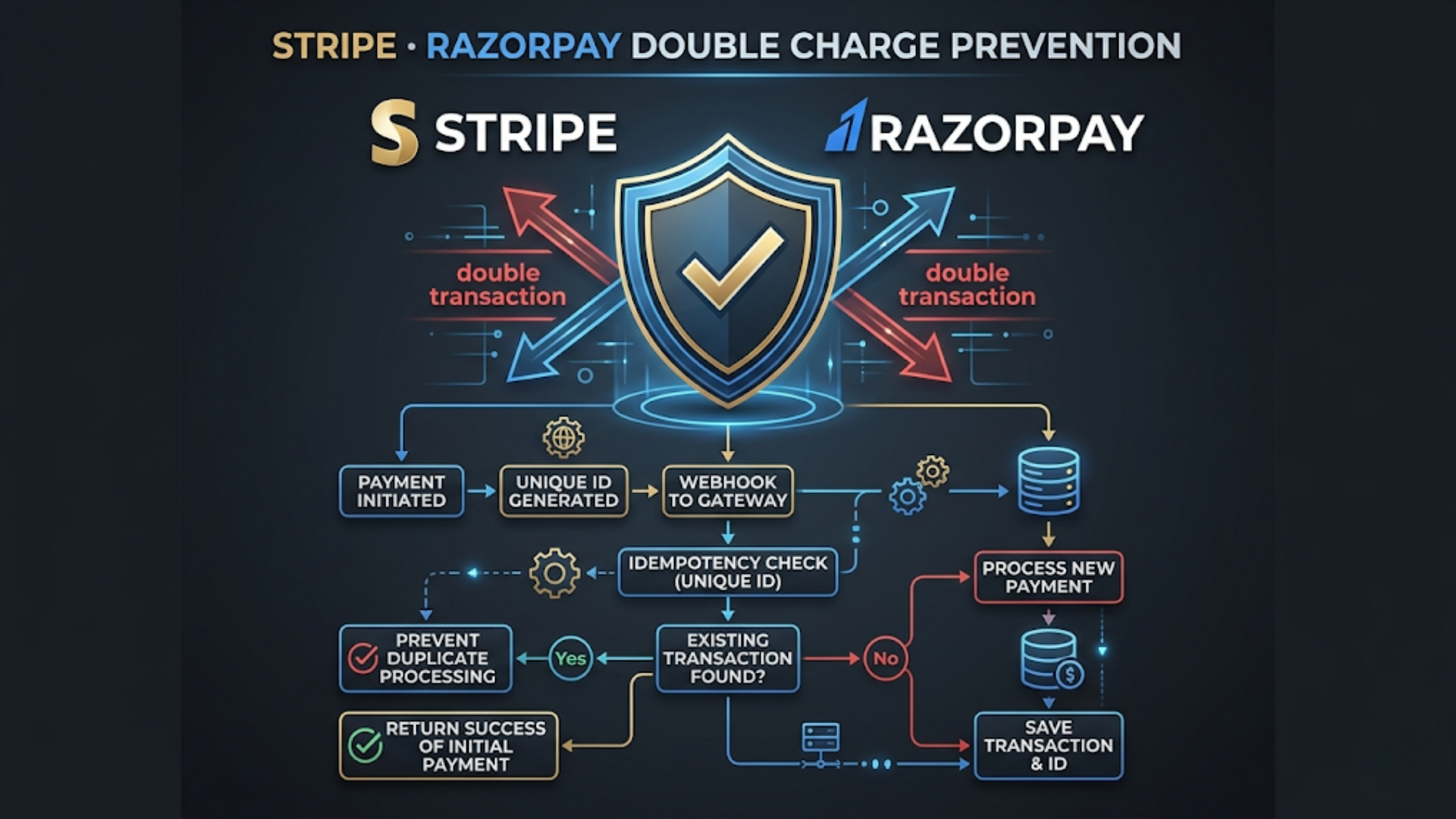
Stripe + Razorpay Double-Charge Bug: How to Prevent It
Double charges happen when your system processes the same payment event more than once. The fix is idempotent webhook processing: store the payment ID before processing, check for duplicates on every webhook, and never trust client-side payment confirmation alone. Implementation takes 2-4 hours and prevents what is otherwise a customer trust destroyer.
This is one of the most common payment integration bugs I encounter. A customer pays once, gets charged twice. Or they see two pending transactions, panic, contact support, file a chargeback. The business refunds one charge, pays the chargeback fee, and spends 30 minutes on a problem that shouldn’t exist.
The root cause is almost always the same: webhook processing that isn’t idempotent.
Why Double Charges Happen
To fix the bug, you need to understand the payment flow and where it breaks.
The normal flow:
- Customer clicks “Pay” on your site
- Customer is redirected to Stripe/Razorpay payment page (or the embedded checkout opens)
- Customer completes payment
- Payment gateway processes the charge
- Payment gateway sends a webhook to your server: “Payment successful, here’s the payment ID”
- Your server processes the webhook: updates the order, sends confirmation, adjusts inventory
- Customer is redirected back to your site with a “success” page
Where it breaks (the 5 failure modes):
Failure 1: Duplicate webhooks. Both Stripe and Razorpay guarantee “at least once” delivery. Not “exactly once.” If your server takes too long to respond (or returns a 500 error), the payment gateway retries the webhook. Your server processes the same payment event twice. Two order confirmations. Two inventory deductions. Sometimes, two charges if your processing logic triggers a new capture.
Failure 2: Client-side redirect + webhook race. After payment, the customer is redirected back to your site. Your site checks the payment status via API. Simultaneously, the webhook arrives. Both your redirect handler and your webhook handler process the same payment. If both trigger order fulfillment, you get duplicate processing.
Failure 3: User double-clicks. Customer clicks “Pay” twice in quick succession. Two payment intents are created. Both go through. Two charges. This is embarrassingly common and trivially preventable.
Failure 4: Retry storms. Your server crashes during webhook processing. It partially processed the payment (inventory updated, email not sent). Server comes back up. Stripe/Razorpay retries the webhook. Your server processes it again from the beginning because it doesn’t know what was already done.
Failure 5: Razorpay-specific - Subscription payment overlap. Razorpay’s subscription engine can occasionally fire overlapping renewal charges during network instability. The subscription creates a new invoice while the previous charge is still processing. Two charges for the same period.
The Prevention Architecture
Every payment integration needs three layers of protection. No exceptions.
Layer 1: Idempotent Webhook Processing
This is the most important fix. If you implement nothing else, implement this.
The principle: Every webhook handler must check if it has already processed the event before processing it again. If it has, it returns 200 OK without doing anything.
How to implement:
- Create a table (or collection) called
processed_webhooksorpayment_events - When a webhook arrives, extract the unique event ID:
- Stripe:
event.id(e.g.,evt_1234567890) - Razorpay:
payment_id(e.g.,pay_1234567890)
- Stripe:
- Check if this ID exists in your table
- If it exists: return 200 OK immediately. Do nothing
- If it doesn’t exist: insert it, then process the payment, then mark it as “completed”
The critical detail: Insert the ID before processing, not after. If you insert after processing and your server crashes mid-processing, the retry will process it again because the ID was never saved.
Schema:
| Column | Type | Purpose |
|---|---|---|
event_id | String (unique) | Stripe event ID or Razorpay payment ID |
event_type | String | ”payment.captured”, “order.paid”, etc. |
status | Enum | ”processing”, “completed”, “failed” |
received_at | Timestamp | When the webhook arrived |
processed_at | Timestamp | When processing completed |
payload_hash | String | Hash of the webhook body (for debugging) |
attempts | Integer | How many times this event was received |
The flow:
Webhook arrives → Extract event_id
  → SELECT WHERE event_id = X
    → Found AND status = "completed" → Return 200 OK (duplicate)
    → Found AND status = "processing" → Return 200 OK (already in progress)
    → Not found → INSERT with status "processing"
      → Process payment (update order, send email, adjust inventory)
        → Success → UPDATE status = "completed" → Return 200 OK
        → Failure → UPDATE status = "failed" → Return 500 (gateway will retry)
Layer 2: Client-Side Double-Submit Prevention
Stop the customer from creating duplicate payment intents in the first place.
Disable the pay button after click. The moment the customer clicks “Pay,” disable the button and show a loading state. This prevents double-clicks. It’s one line of JavaScript that prevents hours of customer support.
Use Stripe’s PaymentIntent or Razorpay’s Order ID. Both gateways support creating a payment intent/order on your server before the customer sees the payment page.
For Stripe: Create a PaymentIntent on your server. Pass the client_secret to the frontend. Even if the frontend code runs twice, the same PaymentIntent is used. One charge.
For Razorpay: Create an Order on your server. Pass the order_id to Razorpay’s checkout. The order can only be paid once. Duplicate checkout attempts for the same order ID are rejected by Razorpay.
Never create payment sessions on the client side. If your frontend JavaScript creates a new checkout session every time the customer clicks “Pay,” you’re inviting double charges. Always create the payment session server-side and reuse it.
Layer 3: Reconciliation and Monitoring
Layers 1 and 2 prevent most double charges. Layer 3 catches the rest.
Daily reconciliation:
- Pull all payments from Stripe/Razorpay via API for the past 24 hours
- Compare against your orders database
- Flag: orders with no matching payment (missed webhook), payments with no matching order (orphaned payment), orders with multiple matching payments (double charge)
- Run this as an automated job every morning. Send results to Slack or email
Real-time monitoring alerts:
- Alert when the same customer is charged twice within 5 minutes
- Alert when a webhook event_id is received more than 3 times (indicates your processing is failing)
- Alert when webhook processing takes longer than 30 seconds (increases duplicate risk)
- Alert when your idempotency table grows faster than expected (possible webhook storm)
Stripe-Specific Prevention
Stripe has built-in tools for idempotency that many developers don’t use.
Idempotency Keys. Every Stripe API call that creates or modifies a resource should include an Idempotency-Key header. If Stripe receives two requests with the same idempotency key, it returns the result of the first request without processing the second. Use the order ID as your idempotency key.
Webhook signature verification. Always verify the webhook signature using Stripe’s library. This prevents spoofed webhooks. If you’re not verifying signatures, anyone can hit your webhook URL with a fake payment event.
PaymentIntent lifecycle. A PaymentIntent can only be captured once. If you’re using PaymentIntents (you should be), double-capture is handled by Stripe. The second capture attempt returns an error, not a second charge.
Stripe Checkout Sessions. If you’re using Stripe Checkout (the hosted payment page), each session can only be paid once. This is the easiest way to prevent double charges with Stripe. Create a session server-side, redirect the customer, done.
| Stripe Feature | What It Prevents | Implementation Effort |
|---|---|---|
| Idempotency Keys | Duplicate API calls | Low (add header) |
| PaymentIntent | Double capture | Low (use instead of Charges) |
| Checkout Sessions | Multiple payments for same order | Low (create server-side) |
| Webhook Signatures | Spoofed payment events | Low (verify in handler) |
| Subscription Idempotency | Duplicate subscription charges | Medium (use subscription schedules) |
Razorpay-Specific Prevention
Razorpay’s architecture is slightly different from Stripe’s, and India-specific payment methods add complexity.
Order-based payments. Always create a Razorpay Order before opening the checkout. The order_id ensures only one successful payment per order. If the customer opens checkout twice for the same order, the second payment attempt references the already-paid order and fails gracefully.
Webhook vs. callback verification. Razorpay sends both a callback (redirect to your success URL with payment details) and a webhook. Process the payment in the webhook handler, not the callback handler. The callback is for updating the UI. The webhook is for business logic. If you process in both, you get double processing.
Razorpay signature verification. Razorpay signs every webhook with your webhook secret. Verify this signature before processing. The verification is straightforward: HMAC-SHA256 of the webhook body with your secret.
UPI-specific issues. UPI payments in India can sometimes show “pending” for extended periods (30-60 seconds is common during peak hours). If your system creates a new payment intent because the first one appears “stuck,” you risk two UPI debits when both eventually complete. Never create a new payment intent while one is pending. Poll the existing intent’s status instead.
Netbanking timeout handling. Indian netbanking payments can timeout after the bank’s OTP step. The customer sees an error, assumes payment failed, tries again. But the first payment actually went through (the bank processed it after the timeout). Razorpay’s Order-based flow handles this: the second attempt sees the order is already paid and doesn’t create a new charge.
| Razorpay Feature | What It Prevents | Implementation Effort |
|---|---|---|
| Order ID | Multiple payments for same order | Low (create before checkout) |
| Webhook signatures | Spoofed events | Low (HMAC verification) |
| Payment capture flow | Auto-capture duplicates | Medium (manual vs. auto capture) |
| Subscription billing anchor | Overlapping subscription charges | Medium (configure anchor dates) |
What to Do When a Double Charge Happens
Prevention fails sometimes. When a customer is double-charged, speed and transparency matter.
Immediate response (within 1 hour):
- Identify the duplicate payment in your gateway dashboard
- Issue a full refund for the duplicate charge (not a partial refund)
- Notify the customer proactively via WhatsApp or email: “We detected a duplicate charge on your account. A full refund of [amount] has been initiated. It will reflect in your account within [timeframe].”
- Do not wait for the customer to contact you. Proactive communication prevents chargebacks
Refund timelines (India):
- Razorpay refund to UPI: 5-7 business days
- Razorpay refund to credit card: 5-10 business days
- Razorpay refund to netbanking: 5-7 business days
- Stripe refund: 5-10 business days (international cards may take longer)
Root cause analysis:
- Check your
processed_webhookstable. Was the duplicate event logged? - Check webhook delivery logs in Stripe/Razorpay dashboard. How many times was the webhook sent?
- Check your server logs for the timestamp of the duplicate processing. Was it a retry or a race condition?
- Fix the root cause before the next business day
FAQ
How common are double charges? Without idempotent processing, double charges occur in 0.1-0.5% of transactions. That sounds small until you process 10,000 transactions/month. 10-50 double charges per month means 10-50 angry customers, potential chargebacks, and manual refund work.
Does Razorpay handle double-charge prevention automatically? Partially. Razorpay’s Order-based flow prevents multiple successful payments for the same order. But if your integration creates multiple orders for the same cart (a common bug), Razorpay can’t prevent it. Your system must ensure one order per checkout intent.
Can double charges cause chargebacks? Yes. If a customer sees two charges and you don’t proactively refund the duplicate, they may file a chargeback with their bank. Chargebacks cost ₹1,500-2,500 ($18-30) in fees on top of the refund amount, and high chargeback rates can get your payment account flagged.
Is webhook processing different for UPI vs. cards? The webhook structure is the same. But UPI payments have longer “pending” states (30-60 seconds vs. near-instant for cards). Your system must handle the pending state gracefully without creating duplicate payment intents.
Should I use auto-capture or manual capture in Razorpay? Auto-capture is simpler and appropriate for most e-commerce flows. Manual capture gives you a window to verify the order before capturing payment, which can prevent some edge cases. For double-charge prevention specifically, it doesn’t matter as long as your webhook processing is idempotent.
How do I test my double-charge prevention? Send the same webhook event to your endpoint twice in rapid succession (under 1 second apart). Your system should process it exactly once. Stripe and Razorpay both provide test mode webhooks. Use them. Also test: webhook arrives while redirect handler is still processing, server restart mid-processing (kill the process), and webhook with an invalid signature.
Need help implementing this?
Book a free 30-minute discovery call. We'll map your current setup, identify quick wins, and outline what automation can do for your business.
Book a Free Discovery Call