How to Route Customer Support Tickets with AI Classification
Build an AI-powered ticket classification and routing system using n8n and OpenAI/Claude. Covers category detection, priority scoring, auto-routing, and accuracy benchmarks for support teams.
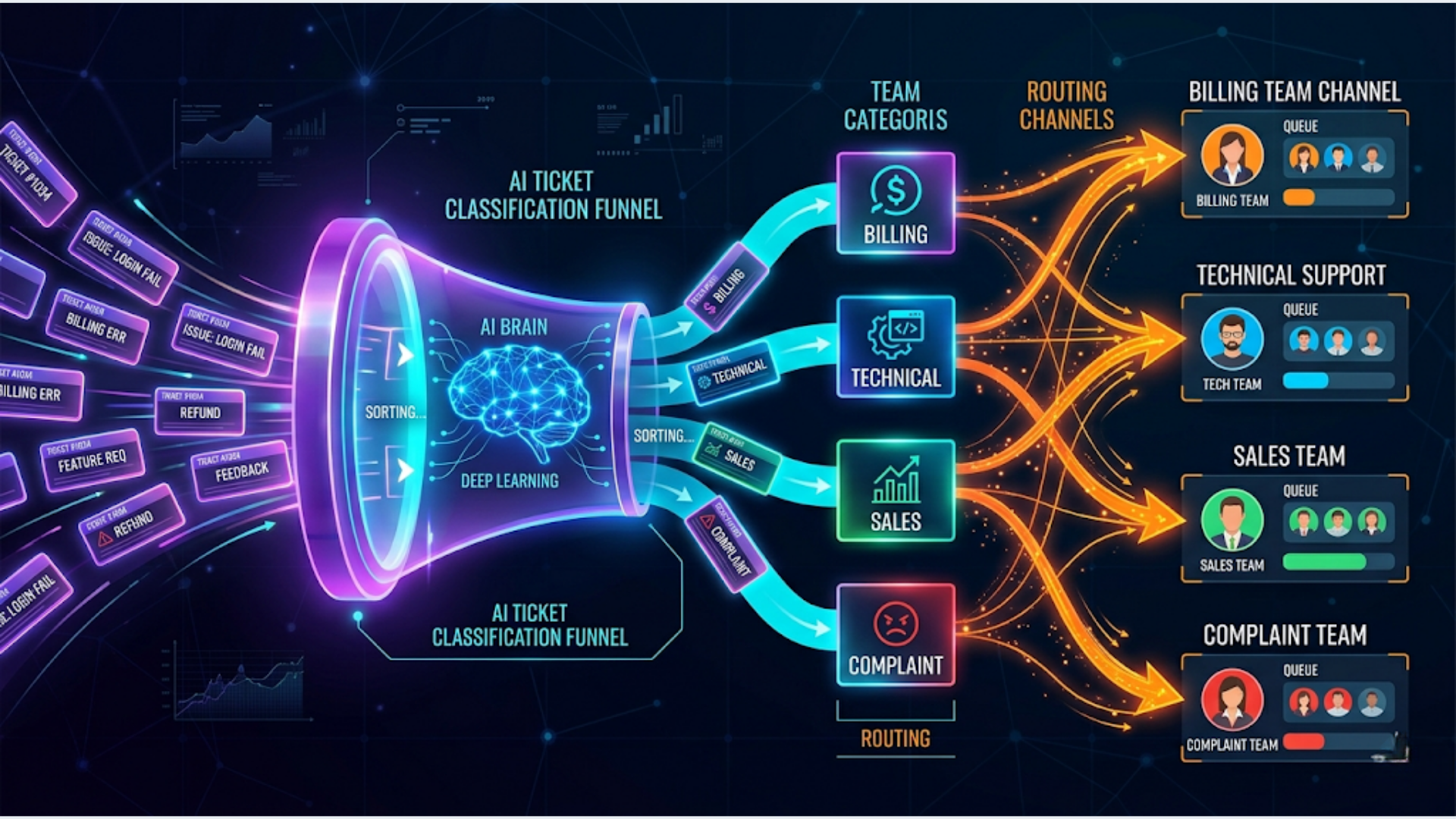
How to Route Customer Support Tickets with AI Classification
AI-based ticket classification routes support tickets to the right team in under 3 seconds with 85-93% accuracy, compared to manual triage that takes 2-5 minutes per ticket and drops to 70-80% accuracy during high-volume periods. The system reads the ticket, classifies it by category and priority, and routes it to the correct queue.
I build these systems. The core pattern is straightforward: ticket comes in, AI reads the text, assigns a category (billing, technical, sales, complaint, general), scores the priority (P1 through P4), and pushes the ticket to the right team’s queue with the classification metadata attached. The whole pipeline runs on n8n with OpenAI or Claude doing the classification.
Here’s how to build it from scratch.
Why Manual Ticket Triage Breaks at Scale
Manual triage works fine at 20 tickets a day. One person reads each ticket, decides where it goes, assigns a priority, and moves on. The moment you cross 50-100 tickets daily, things fall apart.
The problems are predictable:
Inconsistent classification. Agent A thinks a password reset is “technical.” Agent B calls it “account access.” Agent C files it under “general.” When your routing depends on classification and your classification depends on whoever happens to read the ticket first, routing quality is random.
Priority inflation. Under pressure, triaging agents mark everything as high priority to avoid blame if something slips. When everything’s high priority, nothing is. Your P1 queue becomes a dumping ground.
Slow routing during spikes. Product outage. Billing cycle. Feature release. Ticket volume spikes 3-5x. Your triage person (or team) becomes the bottleneck. Tickets sit in an unassigned queue for 30-60 minutes while someone reads and routes each one.
The math is brutal. If triage takes 3 minutes per ticket and you receive 200 tickets per day, that’s 10 hours of someone’s day just reading and categorizing tickets. A full-time person doing nothing but triage. AI does the same job in 600 seconds total. For the entire day.
| Metric | Manual Triage | AI Classification |
|---|---|---|
| Time per ticket | 2-5 minutes | 1-3 seconds |
| Accuracy (consistent) | 70-80% | 85-93% |
| Handles volume spikes | Poorly | Identically |
| Works at 3 AM | No | Yes |
| Cost for 200 tickets/day | 1 FTE ($3-5K/mo) | $15-30/mo API costs |
The economics aren’t even close.
The Architecture: Classification Pipeline
The pipeline has four stages. Each one is a node (or small group of nodes) in n8n.
Stage 1: Ticket Intake. Tickets arrive from your helpdesk (Zendesk, Freshdesk, Intercom, HubSpot Service Hub, or email). A webhook or polling trigger captures the ticket data: subject, body, sender info, and any metadata.
Stage 2: AI Classification. The ticket text goes to GPT-4 or Claude with a structured prompt. The AI returns a JSON object with category, subcategory, priority score, confidence level, and a one-line reasoning.
Stage 3: Routing Logic. An n8n Switch node reads the classification output and routes to the appropriate action. High-priority billing issues go to the billing team’s Slack channel. Technical issues go to the engineering queue. Sales inquiries route to the CRM.
Stage 4: Ticket Update. The original ticket in your helpdesk is updated with the AI classification as tags or custom fields. The ticket is assigned to the correct agent or team. If the AI confidence is below a threshold (say 70%), it routes to a human triage queue instead.
Step 1: Connect Your Helpdesk
The trigger depends on your helpdesk platform.
Zendesk: Use n8n’s Zendesk Trigger node. Set it to fire on “Ticket Created.” The node returns the ticket ID, subject, description, requester email, and any custom fields. Zendesk’s API is well-documented and n8n has native support.
Freshdesk: Use the Freshdesk Trigger node or a webhook. Freshdesk can send webhooks on ticket creation through its Automation Rules (Admin > Workflows > Automations > Ticket Creation). Point the webhook to your n8n webhook URL.
Intercom: Use the Intercom Trigger node with the “Conversation Created” event. Intercom calls them “conversations” not “tickets,” but the concept is the same. The payload includes the conversation body and user information.
Email (no helpdesk): If tickets come via email directly, use n8n’s Email Trigger (IMAP) node. Monitor a support@yourdomain.com inbox. The node captures subject, body, sender, and attachments. This works surprisingly well for small teams that haven’t outgrown email yet.
Normalize the data:
Different helpdesks send data in different formats. Add a Set node after the trigger that extracts the fields you need into a consistent structure:
{
  "ticket_id": "12345",
  "subject": "Can't access my account after password change",
  "body": "I changed my password yesterday and now I can't log in...",
  "sender_email": "customer@example.com",
  "sender_name": "John Smith",
  "created_at": "2026-04-26T10:30:00Z",
  "source": "zendesk"
}
This normalization means the rest of your pipeline works identically regardless of which helpdesk feeds it.
Step 2: Build the Classification Prompt
The classification prompt is the brain of the system. Get this right and everything downstream works. Get it wrong and you’re routing tickets to the wrong teams with high confidence (the worst outcome).
The prompt template:
You are a customer support ticket classifier for {company_name}, a {company_description}.

Classify this support ticket into exactly one category and assign a priority.

Categories:
- billing: Payment issues, invoicing, refunds, subscription changes, pricing questions
- technical: Bugs, errors, feature not working, integration issues, performance problems
- account: Login issues, password resets, account settings, profile changes, access permissions
- sales: Pricing inquiries, upgrade requests, feature comparisons, demo requests
- complaint: Service dissatisfaction, escalation requests, negative feedback about experience
- general: Questions about features, how-to inquiries, documentation requests, general feedback

Priority levels:
- P1_critical: Service completely down, data loss, security breach, payment processing broken
- P2_high: Major feature broken, blocking user's workflow, billing error affecting charges
- P3_medium: Feature partially working, non-blocking issue, general billing question
- P4_low: How-to question, feature request, general feedback, cosmetic issue

Ticket Subject: {subject}
Ticket Body: {body}

Respond with JSON only:
{
  "category": "",
  "subcategory": "",
  "priority": "",
  "confidence": 0.0-1.0,
  "reasoning": "one line explanation",
  "sentiment": "positive/neutral/negative/angry",
  "suggested_team": ""
}
Why include sentiment? Because a P3 ticket from an angry customer should be handled differently than a P3 ticket from a curious one. The sentiment field lets your routing logic escalate negative-sentiment tickets even if the technical priority is medium.
Why include confidence? Tickets that don’t fit cleanly into one category (e.g., a billing complaint that’s also a technical bug) get lower confidence scores. Route low-confidence tickets to a human triage queue. This keeps your automation trustworthy.
Model selection matters:
| Model | Speed | Accuracy | Cost per 1K tickets |
|---|---|---|---|
| GPT-4 Turbo | 1-3 sec | 90-93% | $3-5 |
| GPT-3.5 Turbo | 0.5-1 sec | 82-87% | $0.20-0.40 |
| Claude 3 Haiku | 0.3-0.8 sec | 83-88% | $0.15-0.30 |
| Claude 3.5 Sonnet | 1-2 sec | 89-92% | $2-4 |
For most teams, GPT-3.5 Turbo or Claude Haiku provides the best cost-to-accuracy ratio. Use GPT-4 or Sonnet only if your categories are complex or your tickets are highly ambiguous.
Step 3: Configure Routing Rules
The classification output feeds into routing logic. In n8n, a Switch node handles this cleanly.
Basic routing by category:
Category: billing → Assign to: Billing Team → Slack: #billing-support
Category: technical → Assign to: Engineering → Slack: #tech-support
Category: account → Assign to: Account Team → Slack: #account-issues
Category: sales → Assign to: Sales → CRM: Create/update deal
Category: complaint → Assign to: Senior Agent → Slack: #escalations
Category: general → Assign to: Tier 1 → No notification
Priority-based escalation:
Add a second Switch node after the category router that checks priority.
P1_critical tickets, regardless of category, should trigger immediate alerts: Slack notification with @channel mention, email to the team lead, and (if you have it) a PagerDuty or Opsgenie incident. Don’t wait for someone to check a queue. Critical tickets need active alerting.
P2_high tickets get a Slack DM to the assigned agent. P3 and P4 go to the team queue without individual notifications.
Confidence-based fallback:
If the AI’s confidence score is below 0.70, skip automated routing entirely. Instead, send the ticket to a human triage queue with the AI’s best guess attached as a suggestion. The human triager sees: “AI suggests: billing (62% confidence). Reason: Ticket mentions both a bug and a refund request.” This assists the human without making the decision for them.
Round-robin assignment:
Within each team, distribute tickets evenly. n8n doesn’t have a built-in round-robin node, but a simple code node with a counter stored in a Google Sheet or Redis handles it. Increment the counter, modulo the number of agents on the team, and assign to the next agent in the rotation.
Step 4: Update the Helpdesk and Monitor Accuracy
After classification and routing, update the original ticket with the AI’s findings.
Zendesk update: Use the Zendesk node to add tags (category, priority) and set the assignee/group. Add the AI reasoning as an internal note so the assigned agent sees the context.
Track accuracy:
This is the step most teams skip, and it’s the most important one for long-term success.
Create a Google Sheet that logs every classification:
| Ticket ID | AI Category | AI Priority | AI Confidence | Human Override | Override Category | Correct? |
|---|
When an agent reclassifies a ticket (changes the category or priority), log the override. Run a weekly accuracy report: what percentage of tickets were reclassified? Which categories have the most misclassifications? Which agents override the AI most often (and are they right)?
This feedback loop lets you tune the prompt. If billing tickets are frequently misclassified as account tickets, update the category descriptions in your prompt to make the distinction clearer. If P2 tickets keep getting downgraded to P3 by agents, your priority criteria might be too aggressive.
Target accuracy by week:
- Week 1: 75-80% (you’re still tuning the prompt)
- Week 2-3: 82-88% (after the first round of prompt adjustments)
- Week 4+: 88-93% (stable, with occasional tuning)
If you’re consistently below 85% after a month, the issue is usually in category definitions, not the AI model. Make your categories more distinct and add more examples to the prompt.
India-Specific Considerations
For Indian support teams and D2C brands, several adjustments improve classification accuracy and routing effectiveness.
Multi-language tickets: Indian customers write in English, Hindi, Hinglish (Hindi + English mixed), and regional languages. GPT-4 and Claude handle Hindi and Hinglish well for classification. You don’t need to translate first. Just pass the ticket text as-is. The AI classifies it correctly in most cases. For regional languages (Tamil, Telugu, Kannada, etc.), accuracy drops. Add a language detection step. If the ticket is in a regional language, route to a language-specific agent queue before classification.
WhatsApp as a ticket source: Many Indian businesses receive support messages via WhatsApp Business API (WATI, Twilio, or direct API). Treat WhatsApp messages as tickets. In n8n, use a webhook that receives WATI’s message notifications. The challenge: WhatsApp messages are shorter and more informal than email tickets. Adjust your prompt to handle brief, colloquial messages. “bhai mera order aaya nhi” should classify as “general/order status” not get confused by the informal language.
Festival and sale period handling: Diwali, End of Season sales, Republic Day sales. These periods spike ticket volume 5-10x for e-commerce companies. Pre-configure your routing to automatically expand team assignments during known high-volume periods. Add a date-check node that adjusts routing rules during sale dates (e.g., route all order-related tickets to a temporary extended team).
COD (Cash on Delivery) specific classifications: Indian e-commerce has a high COD percentage. Add “cod_issue” as a subcategory under both billing and general. COD tickets have specific patterns: “delivery person didn’t have change,” “want to convert to prepaid,” “COD not available for my pincode.” These route differently than standard billing issues.
Cost in Indian context: Running this pipeline for a team handling 500 tickets/day using Claude Haiku costs roughly ₹1,500-2,500/month in API calls. That’s less than two days of a triage agent’s salary. The ROI is immediate.
FAQ
How accurate is AI ticket classification compared to human triage? AI classification achieves 85-93% accuracy when properly configured, compared to 70-80% for human triage during busy periods. The key difference is consistency. AI applies the same criteria to every ticket. Humans get tired, rush, and interpret categories differently. After 2-3 weeks of prompt tuning based on override data, most teams see AI accuracy exceed their human triage baseline.
Which AI model should I use for ticket classification? For most support teams, GPT-3.5 Turbo or Claude 3 Haiku offers the best balance of speed, accuracy, and cost. These models classify tickets in under a second at $0.15-0.40 per thousand tickets. Use GPT-4 Turbo or Claude 3.5 Sonnet only if your categories are complex, tickets are highly technical, or you need nuanced priority scoring. Start with a cheaper model and upgrade only if accuracy is below 85%.
Can AI classification handle tickets in multiple languages? Yes, with caveats. GPT-4 and Claude handle English, Hindi, and Hinglish (mixed Hindi-English) well for classification. You don’t need to translate first. Accuracy drops for regional Indian languages and less common global languages. For these, add a language detection step and route non-supported languages to human triage. The AI classification prompt doesn’t need to be in the ticket’s language. Keep the prompt in English even for non-English tickets.
What happens when the AI classifies a ticket incorrectly? Build a feedback loop. When an agent reclassifies a ticket, log the original AI classification and the human correction. Review these overrides weekly. Common patterns (e.g., “billing” tickets consistently reclassified as “account”) indicate your category definitions need clarification. Update the classification prompt with more specific examples and boundary cases. Most misclassification patterns resolve within 2-3 prompt iterations.
How do I integrate AI classification with Zendesk? Use n8n’s Zendesk Trigger node to capture new tickets. Send the ticket text to OpenAI or Claude for classification. Use n8n’s Zendesk node to update the ticket with AI-assigned tags (category, priority), set the ticket group/assignee, and add an internal note with the AI’s reasoning. The entire flow is 4-5 nodes in n8n and takes about an hour to configure.
What’s the cost of running AI ticket classification? For 500 tickets per day using Claude 3 Haiku: approximately $5-10/month in API costs. Using GPT-4 Turbo: $50-80/month. Add $20/month for n8n Cloud. Total: $25-100/month depending on model choice and volume. Compare this to a full-time triage agent’s cost ($2,000-5,000/month depending on market) and the decision is straightforward.
Should I route low-confidence classifications to humans? Yes. Set a confidence threshold (0.70 works well as a starting point). Tickets below this threshold go to a human triage queue with the AI’s best guess attached as a suggestion. This keeps the system trustworthy. Over time, as you tune the prompt, the percentage of low-confidence tickets drops. Most mature systems see 5-10% of tickets falling below the threshold.
Need help implementing this?
Book a free 30-minute discovery call. We'll map your current setup, identify quick wins, and outline what automation can do for your business.
Book a Free Discovery Call