Pipedrive vs HubSpot: Which CRM Is Better for Sales Teams?
Pipedrive vs HubSpot compared on pricing, pipeline management, automation, and reporting. Real breakdown for sales teams with India-specific INR pricing.
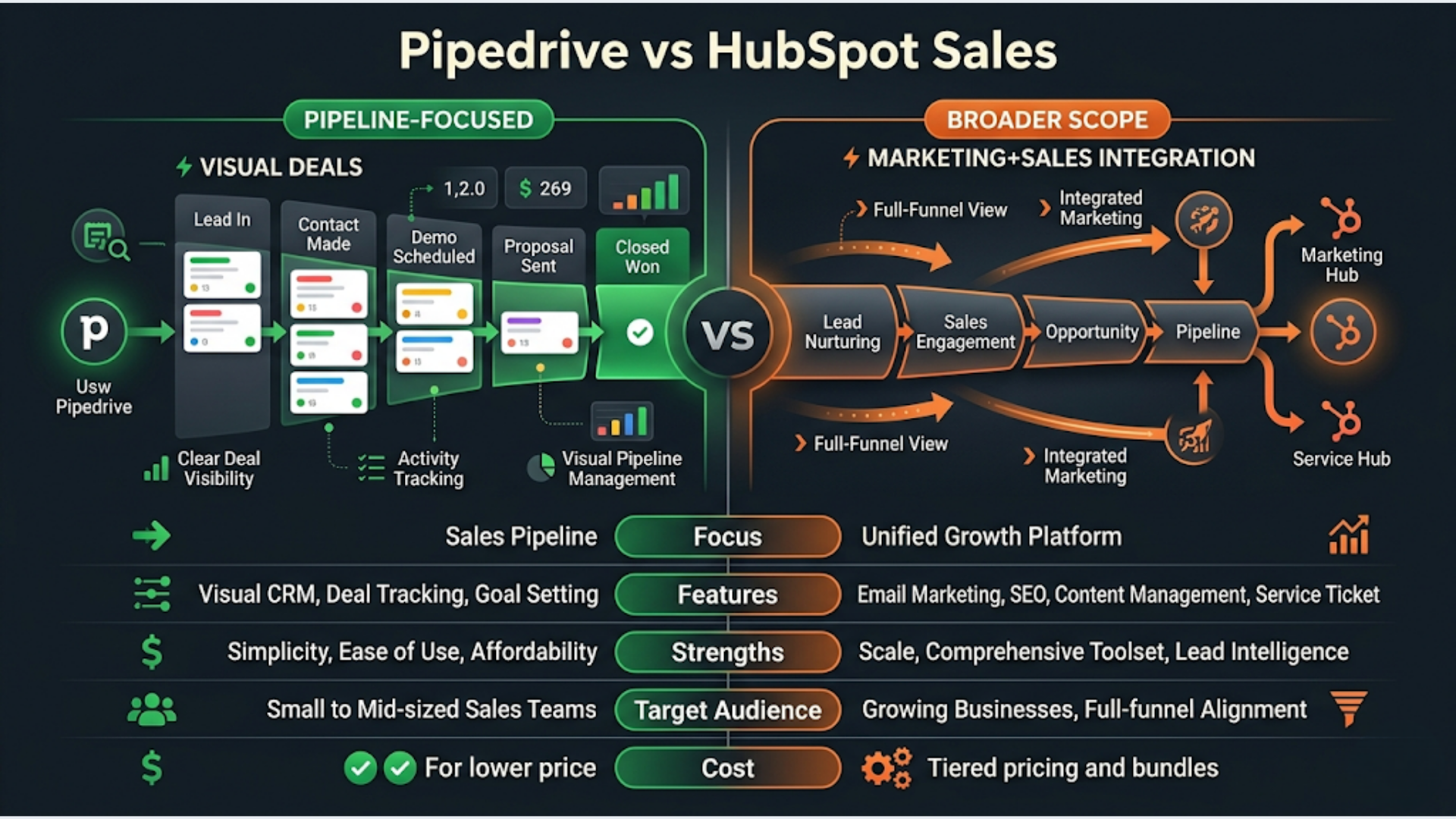
Pipedrive vs HubSpot: Which CRM Is Better for Sales Teams?
Pipedrive is better for pure sales execution. HubSpot is better when you need marketing, sales, and service in one platform. That’s the honest answer, and it hasn’t changed much in 2026.
Pipedrive starts at $14/user/month. HubSpot’s free tier gets you in the door, but anything useful for a real sales team costs $45-90/user/month. The gap is even wider than the sticker prices suggest once you factor in the features each tier actually unlocks.
I build CRM automations for clients. The most common mistake I see is teams choosing HubSpot because it’s “the safe pick” when their actual workflow is pure outbound sales with no marketing automation needs. That’s paying 3x for features you’ll never open.
Here’s a detailed breakdown so you can make the right call.
Pricing Tiers: What You Actually Pay
Pricing is where these two diverge hard. Pipedrive keeps it simple. HubSpot’s pricing requires a spreadsheet to decode.
| Plan | Pipedrive | HubSpot Sales Hub |
|---|---|---|
| Free | No free tier | Free CRM (limited) |
| Starter | $14/user/mo | $45/user/mo (was $20, raised 2025) |
| Mid-Tier | $34/user/mo (Advanced) | $90/user/mo (Professional) |
| Top Tier | $99/user/mo (Enterprise) | $150/user/mo (Enterprise) |
| Minimum Seats (Enterprise) | No minimum | 10 seats |
HubSpot’s free CRM is genuinely useful for solopreneurs or teams under 3. You get contact management, deal tracking, and basic reporting. But the moment you need sequences, custom reporting, or workflow automation, you’re jumping to $45-90/user/month.
Pipedrive doesn’t play the freemium game. Every paid tier includes pipeline management, email tracking, and deal automation. The $14/user starter plan covers what most 5-10 person sales teams actually need.
Hidden costs to watch. HubSpot charges extra for API access on lower tiers, limits custom properties, and gates many automation features behind Professional ($90/user/mo). Pipedrive includes API access on all plans and has far fewer feature gates between tiers.
For a 10-person sales team, the annual difference is significant: Pipedrive Advanced runs about $4,080/year. HubSpot Professional runs about $10,800/year. That’s $6,700 you could spend on actual sales tools or, you know, hiring.
Pipeline Management
This is Pipedrive’s home turf. The product was literally built around the visual pipeline.
Pipedrive’s pipeline view is drag-and-drop, clean, and fast. You see every deal, every stage, every expected close date in one screen. Custom pipelines take about 90 seconds to create. Multiple pipelines per team are supported on all plans.
HubSpot’s pipeline works fine. It’s functional. But it feels like it was added to a marketing platform, not built from scratch for sales reps who live in the pipeline view 8 hours a day. The deal cards are less customizable, pipeline editing requires more clicks, and the UI is busier because it’s trying to serve marketing, sales, and service teams simultaneously.
Where HubSpot pulls ahead is deal-to-ticket handoff. If your sales process involves handing qualified deals to an onboarding or service team, HubSpot’s native connection between Sales Hub and Service Hub is seamless. Pipedrive requires a third-party integration or custom automation to replicate that.
My take. If your reps spend most of their day in the pipeline view moving deals forward, Pipedrive’s UX is noticeably better. If your sales process is tightly coupled with marketing campaigns and post-sale service, HubSpot’s cross-hub connectivity matters more.
Email Tracking and Sequences
Both platforms track email opens and clicks. The real comparison is in sequences (automated follow-up chains).
Pipedrive offers email sequences on the Advanced plan ($34/user/mo) and above. You can create multi-step sequences with delays, conditions, and automatic removal when a prospect replies. The sequence builder is straightforward. No frills, no confusion.
HubSpot gates sequences behind the Professional plan ($90/user/mo). This is the single biggest pricing complaint I hear from sales teams evaluating HubSpot. Basic email sequences, a feature most sales teams consider essential, costs nearly $1,100/user/year.
The sequence functionality itself is comparable. Both support:
- Multi-step email chains with custom delays
- Automatic unenroll on reply
- Task creation within sequences (call reminders, LinkedIn touches)
- A/B testing on subject lines (HubSpot has a slight edge here with built-in split testing)
HubSpot does offer more sophisticated email analytics, including revenue attribution per sequence and engagement scoring. But most sales teams I work with care about reply rates and meeting bookings, not marketing-grade attribution models.
The verdict. Pipedrive gives you sequences at $34/user/mo. HubSpot charges $90/user/mo for essentially the same capability. Unless you need HubSpot’s advanced attribution reporting, the cost difference is hard to justify.
Automation and Workflows
This is where the platforms serve different philosophies.
Pipedrive’s automation is sales-focused. You can trigger actions based on deal stage changes, new contacts, activity completions, and field updates. The automation builder uses a simple if-this-then-that format. Move a deal to “Proposal Sent”? Automatically create a follow-up task for 3 days later and send a Slack notification to the sales manager.
Pipedrive’s automations cover about 80% of what sales teams need. The remaining 20% (multi-branch logic, cross-object automations, complex conditional routing) requires connecting Pipedrive to n8n, Zapier, or Make.
HubSpot’s workflow engine is significantly more powerful. Multi-branch if/then logic, enrollment triggers across any object (contacts, companies, deals, tickets), delays, internal notifications, property calculations. It’s a genuine automation platform.
But here’s the catch: most of HubSpot’s powerful workflow features are locked behind the Professional plan. The Starter plan gives you basic task automation. That’s it.
I build CRM automations for both platforms. Pipedrive with n8n handles complex workflows at a fraction of HubSpot’s cost. The trade-off is setup time and maintenance. HubSpot’s native workflows are easier to hand off to a non-technical sales ops person. Pipedrive + n8n requires someone who understands automation logic.
For pure sales automation: Pipedrive covers the basics natively and pairs well with external automation tools for advanced needs. For cross-department automation (marketing to sales to service): HubSpot’s native workflow engine is genuinely superior, if you’re willing to pay Professional pricing.
Reporting and Analytics
HubSpot wins on reporting. Not close.
HubSpot’s reporting engine is built for teams that need dashboards, custom reports, revenue forecasting, and attribution analysis. You can build reports across contacts, companies, deals, and tickets in one view. Custom report builder lets you create almost anything without code.
Pipedrive’s reporting is adequate for sales management. You get pipeline conversion reports, activity reports, deal duration analysis, and revenue forecasting. The Insights dashboard is clean and useful. But custom reporting is limited compared to HubSpot, and cross-object reporting requires workarounds.
If your sales leadership needs detailed analytics with custom dashboards, HubSpot is the better choice. If your team needs “How many deals did we close this month and what’s our average cycle time?”, Pipedrive covers it.
One nuance. HubSpot’s best reporting features are on Professional and Enterprise plans. Starter reporting is basic. So the reporting advantage only materializes if you’re paying $90+/user/month. At the Starter tier, Pipedrive and HubSpot reporting are roughly equivalent.
Mobile App
Both apps are solid. Pipedrive’s mobile app is slightly faster and more focused on deal management. HubSpot’s mobile app tries to do everything (contacts, tasks, email, calling, service tickets) which makes navigation busier.
Pipedrive’s mobile app includes offline access, activity logging, and a built-in caller with automatic call logging. Field sales reps who need to log visits and update deals on the go consistently prefer Pipedrive’s mobile experience in my observation.
HubSpot’s mobile app includes a business card scanner, meeting scheduler, and email tracking. It’s more feature-rich overall but slower to navigate for pure sales tasks.
For field sales teams: Pipedrive mobile is better. For inside sales teams who also need marketing context: HubSpot mobile is more complete.
India-Specific Considerations
For Indian sales teams, the cost math changes significantly.
INR Pricing. Pipedrive bills in INR for Indian accounts. The Essential plan starts at approximately Rs 1,200/user/month. HubSpot also offers INR billing, with the Starter plan at approximately Rs 3,700/user/month. The relative pricing gap mirrors the USD comparison.
Local payment gateway support. HubSpot integrates natively with Razorpay and Cashfree through its App Marketplace. Pipedrive requires Zapier or n8n to connect with Indian payment gateways. If payment tracking is part of your sales workflow, this matters.
WhatsApp integration. Both platforms support WhatsApp Business. HubSpot has a native WhatsApp integration on Professional plans. Pipedrive requires a third-party connector (LeadSquared, WATI, or a custom n8n workflow). For Indian B2B sales teams where WhatsApp is the primary communication channel, HubSpot’s native integration is a real advantage.
Local support. HubSpot has an India office, local customer success managers, and IST business hours support. Pipedrive’s support is primarily European-timezone based, which means slower response times for IST business hours.
GST and compliance. Both platforms generate GST-compliant invoices for Indian businesses. HubSpot’s invoicing tools are more mature. Pipedrive relies on third-party integrations (Zoho Invoice, Tally) for Indian accounting compliance.
Vernacular support. Neither platform offers a Hindi or regional language interface. If your sales team operates in local languages, this is a limitation of both platforms. Zoho CRM has an edge here for Indian teams.
Which One Should You Pick?
| Your Situation | Choose |
|---|---|
| Pure outbound sales, budget-conscious | Pipedrive |
| Need marketing + sales + service in one tool | HubSpot |
| Team of 5-15 reps, pipeline-focused | Pipedrive |
| Team of 20+ with sales ops/analytics needs | HubSpot |
| Indian SMB, WhatsApp-heavy sales | HubSpot (native WhatsApp) |
| Indian startup, tight budget | Pipedrive (INR pricing, lower cost) |
| Already using HubSpot Marketing Hub | HubSpot (obviously) |
| Need advanced automation without high CRM cost | Pipedrive + n8n or Make |
The wrong CRM costs you more than the subscription. It costs you in adoption. If reps don’t use the CRM, you have no pipeline visibility, no forecasting accuracy, and no data to improve your sales process.
Pick the one your team will actually use every day.
If you need help automating either CRM with custom workflows, lead routing, or multi-tool integrations, that’s what I build at triggerAll.
Frequently Asked Questions
Is Pipedrive better than HubSpot for small sales teams? Yes, for teams under 15 reps focused on outbound sales. Pipedrive costs 50-70% less, has a cleaner pipeline UX, and includes sequences at a lower price tier. HubSpot makes more sense when you need marketing automation bundled with sales.
Can I migrate from HubSpot to Pipedrive? Yes. Both platforms support CSV import/export. Deals, contacts, companies, and activities can be migrated. Custom properties need manual mapping. The main challenge is recreating workflow automations, which don’t transfer between platforms.
Does Pipedrive have a free plan? No. Pipedrive offers a 14-day free trial but no permanent free tier. HubSpot’s free CRM is genuinely useful for solopreneurs but limited for real sales teams.
Which CRM has better API access? Pipedrive includes full API access on all paid plans. HubSpot gates some API endpoints behind higher tiers. For teams building custom integrations, Pipedrive’s API policy is more generous.
Is HubSpot worth the higher price? It depends on whether you’ll use the marketing and service features. If you’re only using Sales Hub, you’re paying a premium for a marketing platform’s overhead. If you need the full suite (marketing, sales, service, CMS), HubSpot’s bundled pricing can actually be more cost-effective than buying separate tools.
Which CRM works better with WhatsApp in India? HubSpot has a native WhatsApp integration on Professional plans. Pipedrive requires third-party connectors like WATI or custom n8n workflows. For WhatsApp-first sales teams in India, HubSpot’s native support is a meaningful advantage.
Can I connect either CRM to n8n for advanced automation? Both have well-documented APIs and n8n nodes. I build n8n workflows for both platforms regularly. Pipedrive + n8n is a popular combination because it gives you enterprise-grade automation at a fraction of HubSpot’s Professional plan pricing.
Need help implementing this?
Book a free 30-minute discovery call. We'll map your current setup, identify quick wins, and outline what automation can do for your business.
Book a Free Discovery Call