Make vs Power Automate: Which Is Better for Your Business?
Make vs Power Automate compared on pricing, ease of use, enterprise features, integrations, and Microsoft ecosystem lock-in. Includes India-specific pricing and local integration analysis.
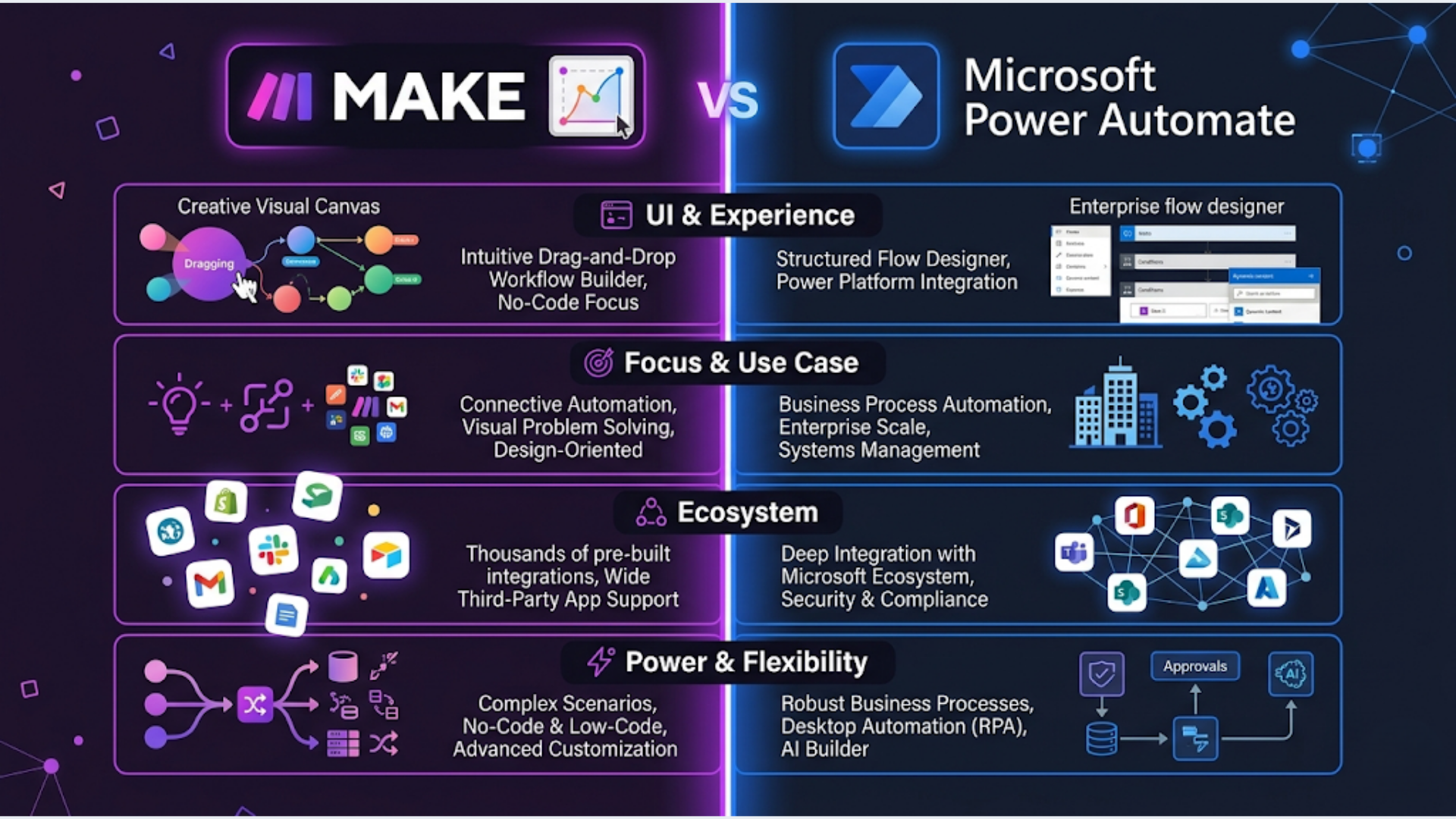
Make vs Power Automate: Which Is Better for Your Business?
Make wins for visual workflow design, third-party app variety, and price-to-operations ratio. Power Automate wins if your business already runs on Microsoft 365, Dynamics, or SharePoint and you want native, enterprise-grade integration without leaving the Microsoft ecosystem.
That is the short answer. Here is the long one.
I build these systems for businesses across different industries. The right choice depends on your existing stack, your team’s technical ability, your budget, and whether you care about Microsoft ecosystem lock-in. Both platforms can automate the same basic workflows. The difference is in how they do it, what they cost at scale, and where they each fall apart.
Pricing: The Real Math
This is where most comparisons get lazy. They list the sticker price and move on. But automation pricing is about operations, not plans.
Make pricing (2026):
| Plan | Monthly Cost | Operations/Month | Scenarios |
|---|---|---|---|
| Free | $0 | 1,000 | 2 active |
| Core | $10.59 | 10,000 | Unlimited |
| Pro | $18.82 | 10,000 | Unlimited (+ advanced features) |
| Teams | $34.12 | 10,000 | Unlimited (+ team collaboration) |
| Enterprise | Custom | Custom | Custom |
Extra operations: $1 to $3 per additional 10,000 operations depending on plan.
Power Automate pricing (2026):
| Plan | Monthly Cost | Runs | Type |
|---|---|---|---|
| Power Automate Premium | $15/user/month | Unlimited standard connectors | Per user |
| Power Automate Process | $150/month | Unlimited (attended/unattended RPA) | Per bot |
| Pay-as-you-go | ~$0.60 per flow run | No commitment | Per run |
The critical difference: Make charges per operation (each step in a workflow counts). Power Automate charges per user or per bot. For a 10-step workflow that runs 100 times per day, Make counts 1,000 operations. Power Automate counts 100 runs.
What this means in practice:
- Small team (1-5 users), moderate automation: Make is cheaper. $10.59/month vs $15/user/month for Power Automate. At 5 users, that is $10.59 vs $75/month.
- Enterprise (50+ users), heavy automation: Power Automate can be cheaper because the per-user cost is fixed regardless of how complex your workflows are. Make’s operation counts balloon with complex scenarios.
- High-volume, simple workflows: Make’s per-operation model gets expensive. Power Automate’s flat per-user rate wins.
- Low-volume, complex workflows: Make wins because 10,000 operations covers a lot of ground when you are not running at high frequency.
India-specific pricing: Power Automate often comes bundled with Microsoft 365 Business Premium ($22/user/month in India), which many Indian businesses already pay for. If you have M365, Power Automate Premium is effectively included or discounted. Make does not offer India-specific pricing. You pay global USD rates.
Ease of Use: Visual Builder vs Microsoft Logic
This is where Make pulls ahead for most teams.
Make’s builder is a visual canvas where you drag modules, connect them with lines, and see your data flow in real time. It looks and feels intuitive. Non-technical users can build basic scenarios within an hour. The data mapping interface shows you exactly what data is available at each step.
Power Automate’s builder uses a vertical flow layout. It works, but it feels more like filling out forms than building a visual workflow. The expression language for data transformation is clunky. Date formatting, string manipulation, and conditional logic require writing expressions that look like this: formatDateTime(triggerBody()?['Created'],'yyyy-MM-dd').
Not hard for developers. Painful for business users who just want to connect two apps.
Error handling comparison:
Make has a dedicated error handling system. You can add error routes, retry logic, and fallback paths visually. Every module shows green (success) or red (failure) with detailed error messages.
Power Automate’s error handling exists but requires configuring “run after” settings on each action. Less intuitive. You often discover errors by checking the run history rather than seeing them in the builder.
My assessment: If your team includes non-developers who will build and maintain workflows, Make wins clearly. If your team is IT-led and comfortable with Microsoft’s expression syntax, Power Automate is fine.
App Integrations: Breadth vs Depth
Make has 1,800+ app integrations. Strong coverage across marketing tools (HubSpot, Mailchimp, ActiveCampaign), project management (Asana, Monday, Notion, ClickUp), CRMs (Salesforce, Zoho, Pipedrive), e-commerce (Shopify, WooCommerce, Razorpay), and messaging (Slack, WhatsApp, Telegram).
Power Automate has 1,000+ connectors. Exceptionally deep Microsoft integration (SharePoint, Teams, Dynamics 365, Excel, Outlook, OneDrive, Azure). Good coverage for enterprise tools (SAP, Oracle, ServiceNow). Weaker on modern SaaS tools, especially marketing and e-commerce platforms.
The honest breakdown:
| Category | Make | Power Automate |
|---|---|---|
| Microsoft ecosystem | Basic connectors | Native, deep integration |
| Marketing tools | Excellent | Adequate |
| E-commerce | Excellent (Shopify, WooCommerce, Razorpay) | Limited |
| CRMs | Excellent | Good (Dynamics native, others via connectors) |
| Messaging (WhatsApp, Telegram) | Native modules | Requires custom connectors or workarounds |
| Payment gateways | Stripe, Razorpay, PayPal | Stripe (limited), others need custom connectors |
| Google Workspace | Full native support | Good but not as polished |
| Custom APIs / Webhooks | Excellent HTTP module | Good (HTTP connector available) |
India-specific integrations: This matters. Make has native modules for Razorpay, WATI (WhatsApp Business), Zoho suite, Freshworks, and Tally (via API). Power Automate has none of these natively. You need premium connectors or custom HTTP requests to connect Indian business tools.
For Indian businesses not running on Microsoft, Make is the obvious winner on integrations.
Microsoft Ecosystem Lock-In: The Hidden Cost
This is the part nobody talks about honestly.
Power Automate is phenomenal if you are a Microsoft shop. SharePoint document libraries, Teams notifications, Dynamics CRM records, Excel Online, Outlook email. The integration is seamless. Data flows between Microsoft products like they are one system. Because they are.
The problem starts when you want to leave.
Power Automate flows are not portable. You cannot export a flow and import it into Make, n8n, or Zapier. Your logic, connections, and configurations live inside the Microsoft ecosystem. If you ever switch to Google Workspace, or move your CRM to HubSpot, or adopt Slack instead of Teams, you are rebuilding every workflow from scratch.
Make workflows are also not directly portable. But Make connects to everything, so switching one app in the chain means updating one module. Not rebuilding the entire flow.
The risk calculation: If your organization is committed to Microsoft for the next 5+ years, the lock-in is not a risk. It is an advantage. You get deeper integration than any third-party tool can offer.
If you are a startup, small business, or growing company whose stack might evolve, the lock-in is a real cost. You are betting your operational automation on staying in the Microsoft ecosystem.
Enterprise Features: Governance, Security, and Compliance
Power Automate dominates here. No contest.
Power Automate enterprise features:
- Data Loss Prevention (DLP) policies across your entire organization
- Environment management (separate dev, test, production)
- Azure Active Directory integration for user management
- Compliance certifications (SOC 1, SOC 2, ISO 27001, HIPAA, GDPR)
- Admin center with usage analytics across all users
- RPA (Robotic Process Automation) for desktop automation
- AI Builder for document processing, form recognition, prediction models
Make enterprise features:
- Team roles and permissions
- Scenario monitoring and logging
- SOC 2 compliance
- SSO (Enterprise plan only)
- No RPA capability
- No built-in AI/ML features (you connect to external APIs)
If you are a regulated industry (finance, healthcare, insurance) or a company with 200+ employees that needs IT governance over automation, Power Automate is the right choice. The enterprise controls are years ahead of Make.
For small to mid-sized businesses, Make’s simpler governance is adequate. You do not need DLP policies when you have a 10-person team.
Performance and Reliability at Scale
Make runs scenarios on their cloud infrastructure. Execution is fast for typical workflows. High-volume scenarios (100,000+ operations/month) sometimes hit rate limits or queue delays during peak hours. You can mitigate this with sequential processing and error retry routes.
Power Automate runs on Azure. Extremely reliable infrastructure. Flow runs rarely fail due to platform issues. However, complex flows with many conditional branches and loops can hit the 30-day run limit or the nested action limit (8 levels of nesting).
Both platforms have occasional outages. Check their status pages. Neither is immune.
Real-world reliability from what I see building these:
Make fails visibly. Errors show up clearly in the scenario execution log. Easy to debug.
Power Automate fails silently sometimes. A flow might skip a run or fail on a specific branch without obvious notification unless you configure detailed error handling. The run history can be hard to parse for complex flows.
When to Choose Make
- You are NOT a Microsoft-first organization
- Your team includes non-developers who build workflows
- You need strong marketing, e-commerce, or messaging integrations
- You run an Indian business using Razorpay, Zoho, WhatsApp Business, or Freshworks
- Budget matters and you have fewer than 10 users
- You value visual workflow design and easy debugging
- You want to connect 5+ different SaaS tools in complex chains
When to Choose Power Automate
- Your organization runs on Microsoft 365, Dynamics, or SharePoint
- You need RPA (desktop automation) alongside cloud automation
- Enterprise governance, DLP, and compliance controls are requirements
- You have 50+ users and need centralized admin controls
- You need AI Builder for document processing or form recognition
- Your IT team manages the automation (not business users)
- Long-term Microsoft commitment is confirmed
FAQ
Can Make and Power Automate work together?
Yes. You can trigger a Make scenario from Power Automate via webhook, and vice versa. Some organizations use Power Automate for internal Microsoft workflows and Make for everything else. It works, but adds complexity. Only do this if you have a clear reason for both.
Is Power Automate free with Microsoft 365?
Partially. Microsoft 365 includes “standard” Power Automate capabilities (limited connectors, limited features). Premium connectors (most useful ones) require the $15/user/month Power Automate Premium license. The free tier is a taste, not the meal.
Which is faster to learn?
Make. By a significant margin. Most non-technical users are building functional scenarios within 2 to 3 hours. Power Automate’s learning curve is steeper, especially for expression syntax and connector configuration. Plan 1 to 2 days for a non-technical user to build their first useful flow.
How do they compare to Zapier and n8n?
Zapier is simpler but more expensive per task. n8n is open-source and self-hosted, offering the most flexibility at the lowest cost but requiring technical setup. Make sits between Zapier (ease) and n8n (power). Power Automate is its own category because of the Microsoft integration depth. I covered n8n vs Make vs Zapier in a separate comparison.
Which has better support?
Power Automate has Microsoft’s enterprise support tiers (if you pay). Community forums are massive. Make has responsive email support on paid plans and a very active community forum. For urgent production issues, Power Automate’s enterprise support is stronger. For learning and troubleshooting, Make’s community and documentation are better organized.
Can I migrate from one to the other?
Not directly. No export/import path exists between the platforms. Migration means rebuilding each workflow in the new tool. For 10 to 20 workflows, plan 2 to 4 weeks of part-time work. For 50+, it is a significant project.
Which is better for Indian businesses specifically?
Make. Unless you are already deep in the Microsoft ecosystem. Make’s native Razorpay, Zoho, WATI, and Freshworks integrations cover the Indian business stack. Power Automate requires custom connectors for most India-specific tools. The cost advantage also favors Make for small Indian businesses not already paying for Microsoft 365.
Choosing between automation platforms is one of the first decisions that shapes your entire operations stack. If you are evaluating Make, Power Automate, or any other platform and want an honest assessment for your specific situation, that is what triggerAll does.
Need help implementing this?
Book a free 30-minute discovery call. We'll map your current setup, identify quick wins, and outline what automation can do for your business.
Book a Free Discovery Call