Policy Renewal Automation: KYC, Reminders, and Document Collection
Automate insurance policy renewals to cut processing time by 60%. Complete playbook for KYC verification, reminder sequences, and document collection workflows.
Policy Renewal Automation: KYC, Reminders, and Document Collection
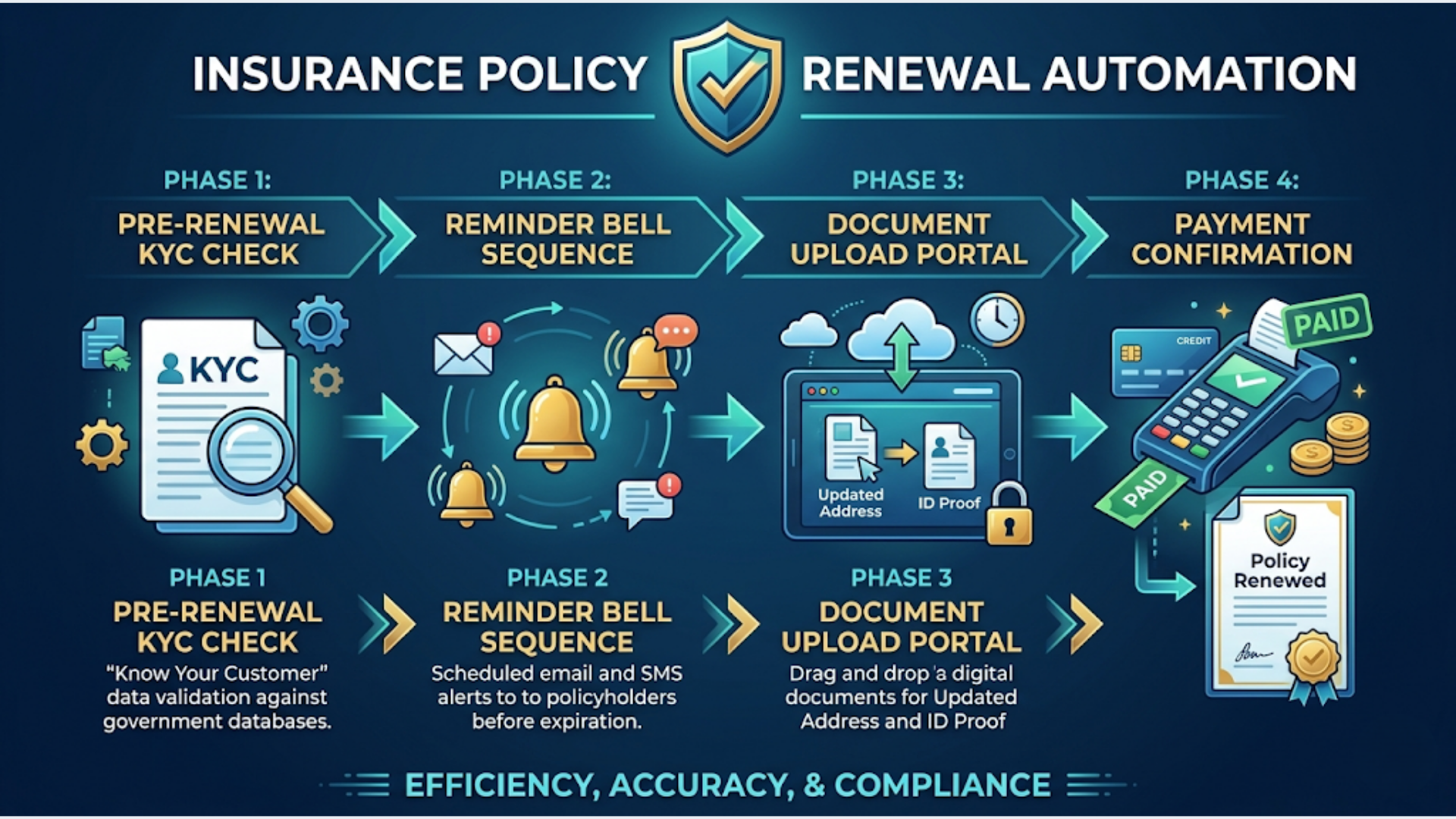
A fully automated renewal system covers four phases: pre-renewal KYC verification, multi-channel reminder sequences, document collection, and payment processing. It cuts renewal processing from 45 minutes to 15 minutes per policy and increases renewal rates by 15-25%.
Insurance brokers handling 500 to 5,000 policies per month are drowning in renewal admin. The manual process is brutal. An agent pulls a renewal report, cross-checks KYC status, sends reminder emails (maybe), chases documents over phone calls, and manually generates payment links. Multiply that by 200 renewals in a week and you’ve got a team drowning in administrative work instead of selling.
The automation stack I deploy handles all four phases without human intervention until something needs a judgment call.
Phase 1: Pre-Renewal KYC Automation
KYC verification is the bottleneck most insurance teams don’t address until it’s too late. When a policy is 7 days from expiry and the customer’s KYC has lapsed, you’re scrambling. The fix: start KYC checks 60 days before expiry.
How the automation works:
A daily scheduled workflow scans your CRM for policies expiring in the next 60 days. For each policy, it checks:
- Identity document validity: Is the ID proof (passport, driver’s license, Aadhaar) still valid? Expired documents trigger an immediate notification to the customer.
- Address proof status: Has the customer moved since the last renewal? Address verification flags prevent claim disputes later.
- KYC completion status: Is the KYC marked as complete in your system? Incomplete KYC gets flagged and routed to the appropriate workflow.
The trigger logic:
- 60 days before expiry: System checks KYC status in CRM. If complete and valid, no action needed. If incomplete or expired, trigger the document request workflow.
- 45 days before expiry: Second check. If KYC still incomplete, escalate to the assigned agent with a priority flag.
- 30 days before expiry: Final automated check. If still incomplete, block renewal processing and alert the team lead.
CRM integration details:
The workflow reads policy data from your CRM (Zoho, Salesforce, or HubSpot), checks document expiry dates stored as custom fields, and updates KYC status automatically. Each status change logs a timeline entry so you have a complete audit trail.
For the technical implementation, I use n8n as the orchestration layer. A cron trigger runs daily at 6 AM, queries the CRM API for upcoming renewals, and processes each policy through the verification logic. The entire check for 500 policies takes under 3 minutes.
What this eliminates:
- Manual spreadsheet pulls to identify upcoming renewals
- Phone calls to check document status
- Last-minute KYC scrambles that delay renewal processing
- Policies lapsing because nobody noticed the KYC gap
Phase 2: Multi-Channel Reminder Sequences
Most insurance teams send one renewal reminder email and hope for the best. That’s not a system. That’s wishful thinking.
An effective reminder sequence uses multiple channels at escalating urgency levels:
| Days Before Expiry | Channel | Message Type | Tone |
|---|---|---|---|
| 60 days | Informational | ”Your policy renews on [date]. No action needed yet.” | |
| 30 days | Email + WhatsApp | Soft reminder | ”Your [policy type] policy expires in 30 days. Here’s your renewal quote.” |
| 15 days | WhatsApp + SMS | Action prompt | ”15 days until your [policy type] expires. Renew now: [payment link]“ |
| 7 days | WhatsApp + Phone (auto-scheduled) | Urgent | ”Your policy expires in 7 days. Renew today to avoid a coverage gap.” |
| 3 days | WhatsApp + SMS + Email | Critical | ”⚠ 3 days. Your [policy type] coverage ends [date]. Renew: [link]“ |
| 1 day | WhatsApp + Agent call | Final | Agent makes a personal call. WhatsApp backup with payment link. |
Escalation logic: If a customer opens the email at 30 days but doesn’t act, the 15-day WhatsApp message includes the quote details directly in the chat (no clicking through to a portal). If they click the payment link but don’t complete payment, a follow-up message goes out 4 hours later.
For non-responsive customers: If there’s zero engagement after the 15-day message (no opens, no clicks, no replies), the system escalates to the assigned agent with a task: “Call [customer name]. No response to 2 automated reminders. Policy expires in 15 days.” This is where human judgment takes over. Automation handles the 70-80% who respond. Agents focus on the 20-30% who need a conversation.
Channel preference learning: The system tracks which channel each customer responds to. If a customer always responds to WhatsApp and ignores email, future renewal sequences prioritize WhatsApp from the first touchpoint. This small optimization improves engagement rates by 10-15% over time.
Typical results:
- Renewal reminder response rate: 65-75% (vs 20-30% with email-only)
- On-time renewal rate: 82-90% (vs 60-70% without automation)
- Agent time per renewal: reduced from 25 minutes to 8 minutes
Phase 3: Document Collection Workflows
Document collection is where most renewal processes fall apart. Customers don’t know what to submit, can’t find the upload portal, or send incomplete documents that require 3 rounds of back-and-forth.
The automated document collection flow:
Step 1: Smart document request. Based on the policy type and KYC status, the system generates a personalized document checklist. A motor insurance renewal might need: updated RC book, driving license, previous policy copy, and a no-claim bonus certificate. A health insurance renewal might need: updated health declaration and recent medical reports (if age-related).
The customer receives a WhatsApp message with the exact list: “For your motor policy renewal, we need: 1) RC book photo, 2) Driving license (front and back), 3) Previous policy copy. Upload here: [secure upload link]”
Step 2: Upload portal. A simple, mobile-friendly upload page where customers drag and drop (or photograph) their documents. No app download, no login required. Just a secure link that’s valid for 14 days.
Step 3: Automated document classification. When a document is uploaded, the system classifies it (is this an RC book or a driving license?) using basic AI document classification. Misclassified documents get flagged for manual review. Correctly classified documents are auto-filed into the customer’s policy folder.
Step 4: Completeness validation. The system checks whether all required documents have been submitted. If 3 out of 4 are in, the customer gets an automatic message: “Thanks! We still need your no-claim bonus certificate. Upload here: [link]”
Step 5: Follow-up for missing documents. If documents are still missing after 5 days, automated WhatsApp reminder. After 10 days, agent notification. After 15 days, alert to team lead.
The technical stack for document processing:
I build document collection workflows using n8n connected to a cloud storage system (Google Drive or AWS S3 for storage, with a simple upload frontend). Document classification uses OpenAI’s vision API for basic categorization. It’s not perfect (about 85-90% accuracy), but it handles the obvious cases and flags the rest.
For clients who need higher accuracy or deal with complex document types, I integrate specialized OCR services that can extract data from insurance documents and auto-populate CRM fields.
Phase 4: Payment and Confirmation
The final phase closes the renewal loop. Once KYC is verified and documents are collected, the payment flow should be frictionless.
Payment link generation: The system auto-generates a personalized payment link based on the renewal premium. The link includes policy details, premium amount, and applicable taxes. No manual calculation needed. The premium is pulled from the insurer’s system or your CRM where the quote was stored.
Multi-payment support: The payment page supports credit/debit cards, net banking, UPI, and wallet payments. For higher premiums (above ₹50,000), EMI options are displayed automatically.
Post-payment automation:
- Payment receipt: Auto-generated and sent via email + WhatsApp within 60 seconds of payment confirmation.
- Policy document delivery: Once the insurer processes the renewal (usually 24-48 hours for standard renewals), the policy document is automatically sent to the customer via email with a WhatsApp notification.
- CRM status update: Policy status changes from “Pending Renewal” to “Active.” Next renewal date is auto-calculated and the cycle begins again.
- Agent notification: The assigned agent gets a summary: “[Customer] renewed [Policy Type] for ₹[amount]. Next renewal: [date].”
Failed payment handling: If a payment fails or is abandoned, the system retries the sequence: immediate WhatsApp with a new payment link, then a 4-hour follow-up, then a 24-hour escalation to the agent. Payment failure is the #1 reason renewals drop off at the final step, and most teams don’t have a systematic retry process.
India-Specific: IRDAI Compliance and Local Integrations
Insurance automation in India has specific regulatory and technical considerations that don’t apply globally.
IRDAI compliance: The Insurance Regulatory and Development Authority of India requires specific disclosures in renewal communications. Automated messages must include: policy number, insurer name, premium amount (including GST breakdown), and the IRDAI registration number of the broker/agent. Your message templates need legal review before deployment.
Aadhaar-based eKYC: India’s Aadhaar system enables digital KYC verification. Through APIs provided by UIDAI and licensed KYC providers (like DigiLocker, CERSAI, or Karza), you can verify customer identity in real-time. The automation flow: customer provides Aadhaar number, system sends OTP, customer verifies, eKYC data is pulled and auto-populated into the CRM. Total time: under 2 minutes. Manual KYC processing: 2-3 days.
DigiLocker integration: Customers can share verified documents (driving license, RC book, PAN card) directly from DigiLocker. This eliminates the need for physical document uploads for most standard renewals. The integration works via DigiLocker’s API, and the documents come pre-verified by the issuing authority.
UPI and Razorpay for premium collection: UPI handles 70%+ of digital payments in India. Razorpay (or PayU, Cashfree) as the payment gateway enables one-tap UPI payments via WhatsApp payment links. For the customer, it’s: tap link, select UPI app, authorize, done. I configure Razorpay for most insurance clients because their settlement cycle is fast (T+2 business days) and their insurance-specific compliance features are built in.
GST-compliant invoicing: Renewal receipts must include proper GST breakdowns (CGST + SGST or IGST depending on state). The automation generates GST-compliant invoices using data from the CRM and the insurer’s premium structure. This feeds directly into the broker’s accounting system.
Tool Stack and Cost
Here’s what the complete renewal automation system costs to build and operate.
| Component | Tool | Monthly Cost |
|---|---|---|
| Orchestration | n8n (self-hosted) | ₹1,500-2,500 (VPS) |
| CRM | Zoho CRM | ₹1,300-2,700/user/mo |
| WhatsApp API | WATI or Interakt | ₹2,499-4,999/mo |
| SMS | MSG91 or Kaleyra | ₹0.15-0.25 per SMS |
| Zoho Campaigns or SendGrid | ₹500-2,000/mo | |
| Document Storage | Google Drive or AWS S3 | ₹500-1,500/mo |
| Payment Gateway | Razorpay | 2% per transaction |
| Document AI | OpenAI Vision API | ₹1,000-3,000/mo |
| Total (excluding CRM seats) | ₹8,000-17,000/mo |
Implementation cost:
- DIY (with technical skills): ₹0 + 4-6 weeks of setup time
- Automation specialist: ₹1,50,000-3,00,000 one-time setup
- Ongoing maintenance: 4-6 hours/month
For insurance brokers handling 500+ renewals/month, this system pays for itself within the first month through improved renewal rates and reduced processing time. At 1,000 renewals/month with a 15% improvement in on-time renewals, that’s 150 additional retained policies. At an average commission of ₹2,000-5,000 per policy, the revenue impact is ₹3,00,000-7,50,000/month.
I build these renewal automation systems for insurance clients at triggerAll. The implementation includes all four phases, CRM integration, and WhatsApp setup.
FAQ
Q1: How much does policy renewal automation cost to set up? A: For a mid-size insurance broker (500-2,000 renewals/month), expect ₹1,50,000-3,00,000 for initial setup including CRM configuration, WhatsApp template approval, workflow building, and testing. Monthly operating cost runs ₹8,000-17,000 depending on message volume and tool choices. The system typically pays for itself within 30-45 days through improved renewal rates and reduced manual processing time.
Q2: Can renewal automation work with any insurance CRM? A: Yes. The orchestration layer (n8n) connects to any CRM with an API. Zoho CRM, Salesforce, HubSpot, and most insurance-specific CRMs (like Vymo, AgencyBloc, or Applied Epic) have REST APIs that support the required data operations. The integration complexity varies by CRM. Zoho and Salesforce are straightforward. Legacy insurance systems may need custom API wrappers.
Q3: Is Aadhaar eKYC legal for insurance renewal verification? A: Yes. IRDAI permits eKYC through Aadhaar for insurance policy servicing, including renewals. The customer must provide explicit consent via OTP verification. You need to use a licensed KYC provider (CERSAI-registered), not direct UIDAI access. The eKYC data is valid for the duration of the policy period and needs re-verification at the next renewal.
Q4: What renewal rate improvement should I expect? A: Insurance brokers typically see 15-25% improvement in on-time renewal rates. The biggest gains come from multi-channel reminders (WhatsApp + SMS vs email-only) and automated follow-ups for non-responsive customers. The exact improvement depends on your current process. If you’re already sending systematic reminders, expect 10-15%. If you’re relying on agents remembering to follow up, expect 20-25%.
Q5: How do I handle renewals for policies from different insurance companies? A: The automation system connects to your CRM, not to individual insurer systems. Your CRM is the single source of truth for policy data, renewal dates, and premium amounts. When you receive renewal quotes from different insurers (LIC, HDFC Ergo, ICICI Lombard, etc.), those quotes are stored in the CRM. The automation workflows trigger based on CRM data regardless of which insurer issued the policy.
Q6: Can this system handle bulk renewals during peak months? A: Yes, but plan for it. January and March are peak renewal months for many policy types. The system processes renewals in batches (typically 200-500 per workflow run) with rate limiting to stay within WhatsApp API limits and email sending thresholds. For brokers expecting 2,000+ renewals in a single month, I recommend starting the reminder sequence at 75 days instead of 60 to distribute the workload. The automation handles scale without breaking, but your team’s capacity for the 20-30% of cases requiring human intervention needs planning.
Need help implementing this?
Book a free 30-minute discovery call. We'll map your current setup, identify quick wins, and outline what automation can do for your business.
Book a Free Discovery Call