End-to-End Order Automation: Shopify + Razorpay + WhatsApp + CRM
Automate your entire e-commerce order flow from Shopify to delivery with Razorpay, WhatsApp, and CRM integration. Complete setup guide with real implementation costs.
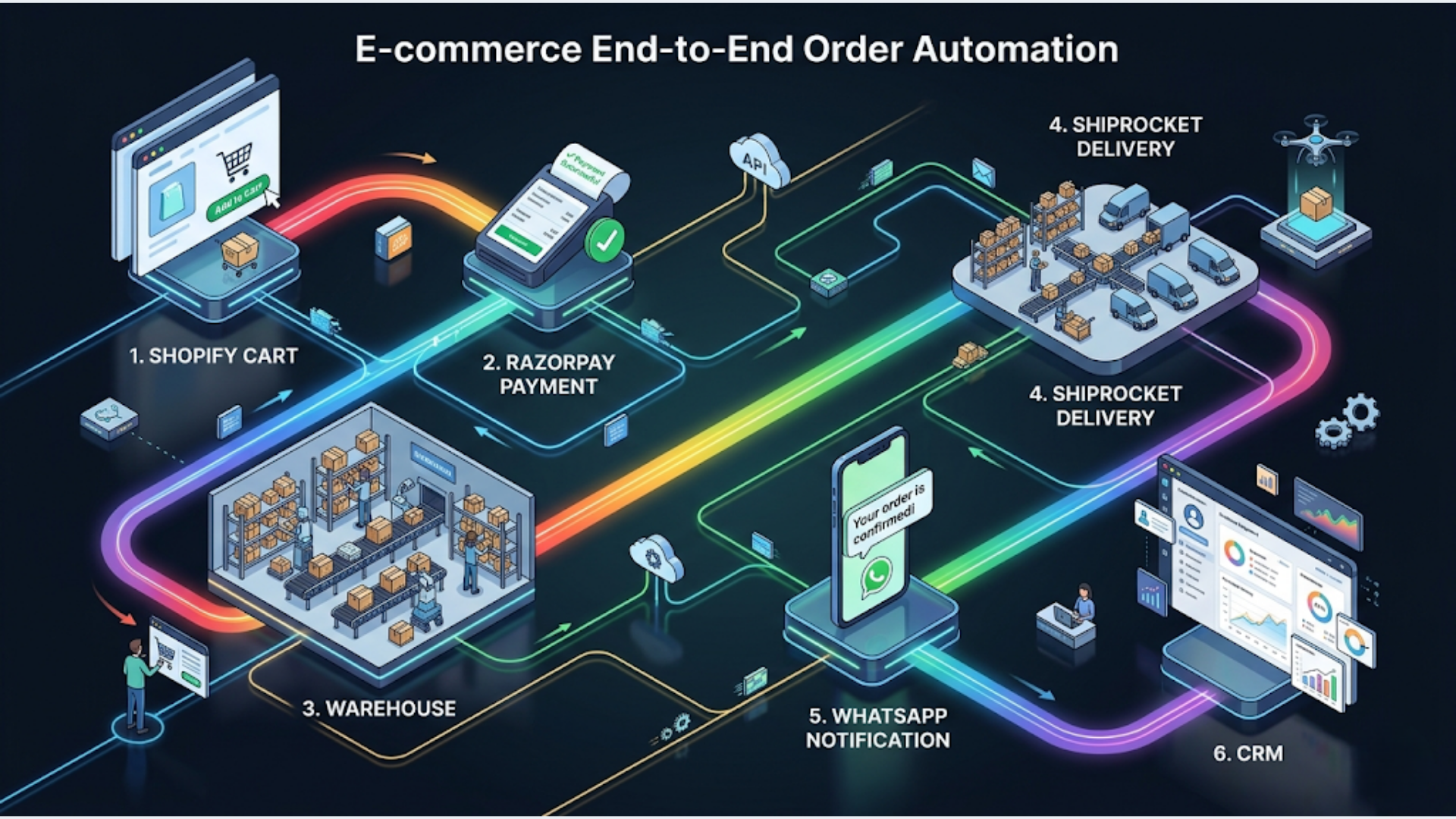
End-to-End Order Automation: Shopify + Razorpay + WhatsApp + CRM
A fully automated Shopify order system handles everything from payment confirmation to delivery notification across 6 touchpoints without manual intervention. Setup cost: ₹1,50,000-5,00,000 ($2,000-6,000). It saves 15-30 hours per week for stores doing 500+ orders/month.
End-to-end order automation for e-commerce brands processing 200 to 10,000 orders monthly follows the same architecture. The pattern is always the same: a Shopify store connected to Razorpay for payments, a logistics partner for shipping, WhatsApp for customer communication, and a CRM that nobody remembers to update. Every step between these systems is either automated or it’s a manual task someone forgets on a busy day.
Here’s the complete architecture and how to implement it.
The 6 Automation Touchpoints
Every e-commerce order passes through six critical moments. Each one is either automated or it’s a support ticket waiting to happen.
Touchpoint 1: Order Placed (Payment Verification + Inventory Update + Confirmation)
What happens automatically:
When a customer completes checkout on Shopify, three things fire simultaneously:
-
Payment verification: Razorpay webhook confirms payment status. For prepaid orders, this is instant. For COD orders, the system triggers a WhatsApp confirmation flow (more on this in the India section). Failed payment? The system sends a retry link via WhatsApp within 5 minutes.
-
Inventory sync: Shopify decrements inventory. If you sell on multiple channels (Shopify + Amazon + your website), the orchestration layer syncs stock across all platforms in real-time. No overselling. No “sorry, that item is actually out of stock” emails.
-
Customer confirmation: WhatsApp message within 60 seconds: “Hi [Name], your order #[number] for [product] is confirmed. Amount: ₹[total]. We’ll share tracking details once shipped.” Simultaneously, a confirmation email is sent as backup.
CRM update: Customer record is created or updated in your CRM (Zoho, HubSpot, or whatever you use) with order details, total spent, and order count. First-time buyer? Tagged as “new customer” for future segmentation.
Touchpoint 2: Fulfillment (Shipping Label + Tracking + WhatsApp Update)
What happens automatically:
Once the warehouse marks an order as packed (or after a configurable delay for quality check):
-
Shipping label generation: The system creates a shipping label through your logistics partner’s API (Shiprocket, Delhivery, Ecom Express, or whichever you use). Address, weight, dimensions, and COD amount are pulled from the Shopify order. No manual data entry.
-
Tracking number assignment: The logistics partner returns a tracking number and estimated delivery date. Both are written back to the Shopify order and the CRM.
-
Customer notification: WhatsApp message: “Your order #[number] has been shipped! Track your package: [tracking link]. Expected delivery: [date].”
What this eliminates: The person who spends 2 hours/day copy-pasting order addresses into the logistics dashboard. The customer who emails “has my order shipped?” because they didn’t get an update. The support agent who checks the logistics portal to answer that email.
Touchpoint 3: In-Transit Updates
What happens automatically:
The system polls the logistics partner’s tracking API every 4-6 hours (or receives webhook updates from partners that support them):
-
Out for delivery: WhatsApp message: “Your order #[number] is out for delivery today. Our delivery partner will reach you by [estimated time].”
-
Delivery attempt failed: WhatsApp message: “We tried delivering your order today but couldn’t reach you. We’ll attempt delivery again tomorrow. Please ensure someone is available.” This reduces second-attempt failures by 30-40%.
-
Held at hub: If a shipment is stuck (address issue, customs, weather), the system detects the status and alerts both the customer and your operations team.
Most stores stop at “order shipped” and don’t communicate again until delivery. That gap generates 60-70% of all customer support queries. Proactive in-transit updates cut support volume dramatically.
Touchpoint 4: Delivery Confirmation + Review Request
What happens automatically:
Once the logistics partner confirms delivery:
-
Delivery confirmation: WhatsApp message: “Your order #[number] has been delivered! If everything looks good, we’d love a quick review: [review link].” (Sent 2-4 hours after delivery to give the customer time to open the package.)
-
CRM update: Order status marked as “Delivered.” Customer lifetime value updated. If this is their 3rd+ order, they’re tagged as a “repeat customer” for loyalty program inclusion.
-
Review request follow-up: If no review is submitted within 3 days, one follow-up message with a small incentive (₹50-100 store credit or discount code).
Touchpoint 5: Exception Handling (Failed Payment, Returns, Refunds)
This is where most automation setups fail. They handle the happy path and ignore exceptions. Exceptions are where you lose money and customers.
Failed payment retry:
- Razorpay webhook triggers on payment failure
- WhatsApp message sent within 5 minutes with a new payment link
- If not completed in 4 hours, second reminder with “need help?” option
- If not completed in 24 hours, abandoned order. Cart recovery sequence begins
Return processing:
- Customer initiates return through your store or via WhatsApp (“I want to return order #1234”)
- System validates return eligibility (within return window, product category eligible)
- Generates return pickup request with logistics partner
- Sends customer the return label and pickup schedule
- Tracks return shipment and triggers refund upon warehouse receipt
Refund automation:
- Return received and inspected (manual quality check step)
- Agent marks return as “approved” in CRM
- Razorpay refund initiated automatically
- WhatsApp confirmation: “Your refund of ₹[amount] has been processed. It’ll reflect in your account within 5-7 business days.”
Touchpoint 6: Post-Purchase (Re-engagement + Loyalty)
What happens automatically (7-30 days after delivery):
-
Cross-sell recommendation: Based on what they bought, suggest complementary products. “You bought [Product A]. Customers who bought this also loved [Product B]. Shop here: [link]”
-
Re-purchase nudge: For consumable products, timed to the expected consumption cycle. Supplements at day 25 of a 30-day supply. Skincare at day 45 of a 60-day jar.
-
Loyalty program update: If you run a points or tier system, automated WhatsApp with their current status: “You’ve earned 500 points! You’re 200 points away from Silver status and 15% off your next order.”
Tool Stack Architecture
Here’s how the pieces fit together. The key principle: each tool does what it’s best at, and n8n orchestrates the connections.
| Layer | Tool | Role |
|---|---|---|
| Storefront | Shopify | Product catalog, checkout, order management |
| Payments | Razorpay (or Stripe for international) | Payment processing, refunds, payment links |
| Logistics | Shiprocket or Delhivery | Shipping label generation, tracking, delivery |
| Communication | WATI or Interakt (WhatsApp API) | Customer messaging across all touchpoints |
| Shopify Email or SendGrid | Confirmation emails, receipts, marketing | |
| CRM | Zoho CRM or HubSpot | Customer data, segmentation, lifetime value |
| Orchestration | n8n (self-hosted) | Connects everything, handles logic, manages exceptions |
| Analytics | Google Analytics + Zoho Analytics | Order funnel, communication performance, revenue tracking |
Why n8n as the orchestration layer?
Shopify’s native automation (Shopify Flow) handles basic triggers but can’t manage complex logic across external systems. Zapier works but gets expensive fast at 500+ orders/month (each order triggers 10-15 actions across the touchpoints above). n8n, self-hosted, has zero per-execution costs. A Shopify store doing 3,000 orders/month with 15 automated actions per order runs 45,000 workflow executions/month. On Zapier, that’s $200+/month just for the automation layer. On n8n self-hosted, it’s $15/month for the server.
Step-by-Step Implementation
Week 1: Foundation
Day 1-2: Webhook setup
- Configure Shopify webhooks for: order created, order paid, order fulfilled, order cancelled, refund created
- Configure Razorpay webhooks for: payment captured, payment failed, refund processed
- Set up n8n webhook receiver endpoints for each event
Day 3-4: Payment verification flow
- Build the Razorpay payment verification workflow in n8n
- Handle prepaid confirmation, COD flagging, and failed payment retry logic
- Test with ₹1 test transactions (Razorpay’s test mode)
Day 5: Inventory sync
- Connect Shopify inventory API to your other sales channels (if multi-channel)
- Build stock level monitoring alerts (low stock, out of stock)
Week 2: Communication Layer
Day 6-7: WhatsApp setup
- Get WhatsApp Business API approved through your BSP (WATI or Interakt)
- Submit message templates for all 6 touchpoints (expect 2-3 days for Meta approval)
- Configure template variables (customer name, order number, tracking link, amount)
Day 8-9: Build messaging workflows
- Order confirmation WhatsApp + email
- Shipping notification with tracking link
- Delivery confirmation + review request
- Failed payment retry sequence
Day 10: CRM integration
- Map Shopify customer data to CRM fields
- Build customer creation/update workflow (new customers, repeat customers, order history)
- Set up customer segmentation tags
Week 3: Logistics and Exception Handling
Day 11-12: Logistics integration
- Connect Shiprocket or Delhivery API to n8n
- Build shipping label generation workflow
- Set up tracking status polling (or webhook if available)
Day 13-14: Exception handling
- Build failed payment retry flow
- Build return initiation and processing flow
- Build refund automation flow
- Set up escalation rules (when to alert a human)
Day 15: Testing
- End-to-end test with real orders (place 5-10 test orders covering all scenarios)
- Test edge cases: failed payment, COD order, return request, refund
- Verify all WhatsApp messages, emails, and CRM updates
Week 4: Polish and Launch
Day 16-17: Analytics and monitoring
- Set up order funnel tracking
- Build a dashboard showing: orders processed, messages sent, exceptions flagged, response rates
- Configure error alerting (workflow failures, API errors)
Day 18-19: COD-specific flows (for India)
- COD confirmation WhatsApp flow
- RTO reduction automation
- COD-to-prepaid conversion offers
Day 20: Go live
- Switch from test mode to production
- Monitor first 50 real orders end-to-end
- Adjust message timing and content based on initial results
India-Specific Deep Dive
Indian e-commerce has unique characteristics that demand specific automation flows. These aren’t optional optimizations. They’re requirements.
COD Verification via WhatsApp
Cash on delivery is 50-65% of orders for most Indian D2C brands. The problem: 15-25% of COD orders result in RTO (return to origin), meaning the customer refuses delivery. Each RTO costs ₹150-300 in shipping charges you don’t recover.
The COD confirmation flow:
- COD order placed on Shopify
- Immediate WhatsApp: “Hi [Name], your order #[number] for ₹[amount] is Cash on Delivery. Please confirm by replying YES to proceed.”
- Customer replies YES: order moves to fulfillment
- No reply in 6 hours: follow-up message
- No reply in 24 hours: order flagged as high-risk, agent review
- Customer replies NO or CANCEL: order auto-cancelled, no shipping cost incurred
Bonus: COD to prepaid conversion. After the COD confirmation, send a follow-up: “Pay online now and get ₹50 off. Pay here: [Razorpay payment link].” Conversion rate on this: 8-15%. Every converted COD order eliminates RTO risk entirely.
Razorpay Payment Links
Razorpay payment links are the backbone of payment automation for Indian e-commerce. They support UPI, cards, net banking, and wallets in a single link. The link works on WhatsApp (no broken redirects), is mobile-optimized, and auto-detects the customer’s preferred payment method.
Use cases in the order automation flow:
- Failed payment retry: generate a new Razorpay payment link, send via WhatsApp
- COD to prepaid conversion: payment link with discount applied
- Partial payment or EMI: Razorpay supports no-cost EMI links for orders above ₹3,000
Shiprocket Integration
Shiprocket aggregates 15+ courier partners (Delhivery, Bluedart, Ecom Express, DTDC, Xpressbees) and selects the cheapest or fastest option per shipment based on your rules.
What the n8n integration handles:
- Auto-creates shipments in Shiprocket from Shopify orders
- Selects courier based on: delivery pincode, weight, COD vs prepaid, priority
- Fetches tracking updates and pushes to WhatsApp
- Handles NDR (non-delivery reports) with automated customer contact
GST Invoice Automation
Every order needs a GST-compliant invoice. The automation generates invoices with proper GSTIN, HSN codes, CGST/SGST or IGST breakdown (based on intra-state vs inter-state), and sequential invoice numbers. These feed into your accounting system (Zoho Books, Tally, or ClearTax) automatically.
RTO Reduction Stack
Combining three automations specifically to reduce return-to-origin rates:
- COD confirmation (25-40% RTO reduction)
- Address verification via WhatsApp: “Please confirm your delivery address: [address from order]. Reply YES if correct or send the updated address.” (10-15% reduction in address-related RTOs)
- Delivery slot preference: “Your order is scheduled for delivery on [date]. Preferred time: Morning / Afternoon / Evening? Reply with your choice.” (15-20% reduction in “customer not available” RTOs)
Combined, these three automations can reduce RTO rates from 20-25% to 8-12%. For a brand doing 1,000 COD orders/month, that’s 100-130 fewer RTOs, saving ₹15,000-39,000/month in just shipping costs.
Cost and Timeline
Implementation Cost
| Approach | Timeline | Cost | Best For |
|---|---|---|---|
| DIY | 4-6 weeks | ₹50,000-1,50,000 (tools + your time) | Technical founders, small brands |
| Freelancer | 3-4 weeks | ₹1,00,000-2,50,000 | Brands with specific integration needs |
| Agency/Specialist | 2-3 weeks | ₹2,00,000-5,00,000 | Brands wanting turnkey setup + training |
Monthly Operating Cost
| Component | 500 orders/mo | 2,000 orders/mo | 5,000 orders/mo |
|---|---|---|---|
| Shopify plan | ₹2,500 (Basic) | ₹7,500 (Shopify) | ₹30,000 (Advanced) |
| Razorpay | 2% per transaction | 2% per transaction | 2% (negotiable at volume) |
| Shiprocket | ₹0 (pay per shipment) | ₹0 (pay per shipment) | Custom plan |
| WhatsApp (WATI) | ₹2,499 + message fees | ₹4,999 + message fees | ₹9,999 + message fees |
| n8n (self-hosted) | ₹1,500 | ₹1,500 | ₹3,000 (bigger server) |
| CRM (Zoho CRM) | ₹1,300/user | ₹1,300/user | ₹1,300/user |
| Total (ex. Razorpay %) | ₹8,000-12,000 | ₹16,000-22,000 | ₹45,000-60,000 |
ROI Calculation
For a store doing 2,000 orders/month at ₹1,500 average order value:
- Time saved: 15-25 hours/week of manual order processing, status updates, and support queries. At ₹500/hour (ops team cost), that’s ₹30,000-50,000/month.
- RTO reduction: If 40% of orders are COD (800 orders) and RTO drops from 20% to 10%, that’s 80 fewer RTOs at ₹200 each = ₹16,000/month saved.
- Abandoned cart recovery: 15-20% recovery on WhatsApp. If 300 carts are abandoned monthly and you recover 50 at ₹1,500 AOV = ₹75,000/month additional revenue.
- Total monthly impact: ₹1,21,000-1,41,000 in savings and recovered revenue.
- Monthly automation cost: ₹16,000-22,000.
- Net ROI: 5-7x return on automation investment.
The math makes this a straightforward decision for any store doing 500+ orders/month. Below that volume, the manual approach is still manageable. Above 500, you’re either automating or hiring, and the automation costs a fraction of an additional employee.
I build these end-to-end order automation systems for e-commerce brands at triggerAll. The implementation covers all 6 touchpoints, India-specific flows, and ongoing optimization.
FAQ
Q1: How long does it take to set up full order automation for a Shopify store? A: Plan for 3-4 weeks from start to go-live. Week 1 covers webhook setup and payment flows. Week 2 handles WhatsApp and CRM integration. Week 3 adds logistics and exception handling. Week 4 is testing and launch. The timeline assumes your Shopify store is already live and you have accounts with Razorpay and a logistics partner. WhatsApp Business API approval can add 1-3 days if not already set up.
Q2: Can this automation work with WooCommerce instead of Shopify? A: Yes. The architecture is identical. WooCommerce uses webhooks the same way Shopify does. The n8n orchestration layer connects to WooCommerce’s REST API for order data, inventory updates, and status changes. The only difference: WooCommerce requires more initial configuration since it doesn’t have Shopify’s built-in app ecosystem. Expect an additional week of setup time for WooCommerce compared to Shopify.
Q3: What happens when WhatsApp is down or the API has issues? A: The system falls back to SMS and email automatically. When a WhatsApp message fails to send (API error, rate limit, or customer number not on WhatsApp), n8n catches the failure and routes the message through SMS (via MSG91 or Kaleyra) and email. The customer gets the update regardless. This fallback adds about 2 hours to the implementation but prevents communication gaps.
Q4: How do I handle multi-warehouse fulfillment with this setup? A: The n8n orchestration layer supports multi-warehouse logic. When an order comes in, the system checks inventory across warehouses, selects the fulfillment center closest to the delivery pincode (or the one with stock), and routes the fulfillment request accordingly. Shiprocket supports multi-pickup locations natively. The complexity adds 1-2 days to the implementation but works reliably once configured.
Q5: Is Razorpay or Stripe better for Indian e-commerce automation? A: Razorpay for Indian customers, Stripe for international. Razorpay supports UPI (which handles 70%+ of online payments in India), offers Indian bank EMI options, and bills in INR. Stripe’s India support has improved but UPI integration isn’t as seamless. If you sell internationally, use both: Razorpay for Indian payments, Stripe for international. The automation handles dual payment gateways without additional complexity.
Q6: What’s the minimum order volume where automation makes sense? A: At 200 orders/month, basic automation (order confirmation + shipping notification via WhatsApp) is worth it. That’s ₹3,000-5,000/month in tool costs to eliminate 5-8 hours/week of manual work. Full end-to-end automation (all 6 touchpoints + exception handling) makes financial sense at 500+ orders/month, where the time savings and RTO reduction generate clear ROI. Below 200 orders/month, a simple Shopify Flow + email setup is sufficient.
Q7: Can I add AI-powered product recommendations to the post-purchase flow? A: Yes. The re-engagement touchpoint (Touchpoint 6) can use AI to generate personalized recommendations based on purchase history, browsing behavior, and similar customer profiles. I implement this using OpenAI’s API connected through n8n: the workflow sends the customer’s order history, gets back product recommendations, and formats them into a WhatsApp message. The AI recommendation layer adds ₹2,000-5,000/month in API costs but typically increases repeat purchase rates by 10-20%.
Need help implementing this?
Book a free 30-minute discovery call. We'll map your current setup, identify quick wins, and outline what automation can do for your business.
Book a Free Discovery Call