How to Build a WhatsApp Order Bot for Small Businesses
Build a WhatsApp order bot for your small business using WATI, WhatsApp Business API, and n8n. Product catalog, order flow, UPI payments, and kitchen notifications included.
How to Build a WhatsApp Order Bot for Small Businesses
2.78 billion people use WhatsApp monthly. In India alone, over 500 million. Your customers are already on it. They already message businesses on it. The only question is whether those messages turn into orders or dead conversations.
Most small businesses handle WhatsApp orders manually. Someone reads a message, writes down the order, confirms it via text, sends a payment link, then updates the kitchen or warehouse. That works for 5 orders a day. At 50, it breaks. At 200, you need 3 people doing nothing but replying to WhatsApp messages.
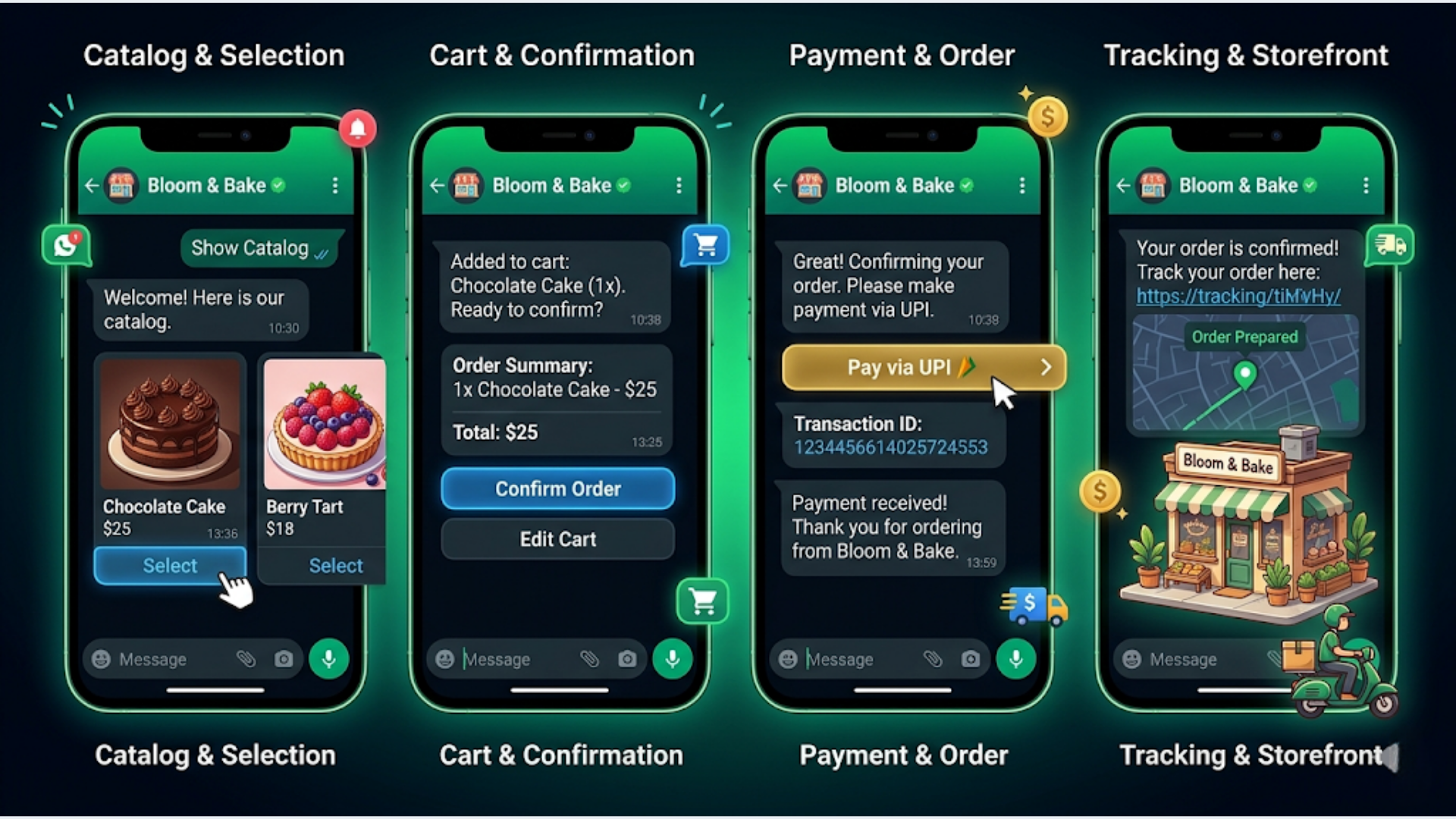
A WhatsApp order bot handles the entire flow: browse catalog, select items, confirm order, collect payment, notify fulfillment, send tracking. No human touches the routine orders. Your team only handles exceptions. I build these systems for small businesses and D2C brands. Here’s the full architecture.
The Tech Stack: What You Need
You need four components. No custom app development required.
WhatsApp Business API access. You can’t build bots on regular WhatsApp or even WhatsApp Business App. You need the API. Two routes:
- WATI (recommended for small businesses). Starts at $49/month. Handles API access, message templates, chatbot builder, and contact management in one dashboard. Indian company, UPI-friendly, good support.
- Direct Meta API via a Business Solution Provider (BSP). More control, more complexity. Makes sense above 10,000 conversations/month.
n8n for orchestration. The bot logic, payment processing, inventory checks, and notifications all run through n8n workflows. Self-hosted n8n costs $0. Cloud n8n starts at $24/month.
Payment gateway. Razorpay for India (UPI, cards, wallets, net banking). Stripe for international. Both have APIs that integrate cleanly with n8n.
Product database. Google Sheets for businesses under 500 SKUs. Airtable or a proper database for larger catalogs.
| Component | Tool | Monthly Cost |
|---|---|---|
| WhatsApp API | WATI | $49 |
| Orchestration | n8n (self-hosted) | $0 |
| Payments | Razorpay | 2% per transaction |
| Product catalog | Google Sheets | $0 |
| Hosting (n8n) | VPS (Hetzner/DigitalOcean) | $5-10 |
| Total fixed cost | $54-59/month |
That’s the entire stack. Under $60/month for a fully automated ordering system.
Setting Up the Product Catalog
Your catalog lives in Google Sheets. Every product needs specific fields for the bot to work properly.
Sheet structure:
| Column | Purpose | Example |
|---|---|---|
| Product ID | Unique identifier | SKU-001 |
| Name | Display name | Chicken Biryani (Full) |
| Category | For menu browsing | Main Course |
| Price | Current price in INR/USD | 350 |
| Description | Short description (under 50 chars) | Hyderabadi style, serves 2 |
| Image URL | Public image link | https://… |
| Available | Yes/No | Yes |
| Prep Time | Estimated time in minutes | 30 |
| Max Daily Qty | Stock limit per day | 50 |
| Current Qty Sold | Auto-updated by bot | 12 |
Why Google Sheets? Your staff can update prices and availability by editing a cell. No admin panel needed. Mark a dish unavailable, change a price, add a new item. The bot reads from this sheet in real time.
For WATI specifically, you also upload a product catalog through their dashboard. This enables the native WhatsApp catalog view where customers can browse items with images and prices directly inside WhatsApp. WATI syncs this catalog automatically if you connect it to your sheet.
Category organization matters. Customers don’t want to scroll through 80 items. Group products into 5-8 categories max. The bot presents categories first, then items within the selected category.
The Order Flow: Step by Step
Here’s the exact conversation flow the bot follows. Each step maps to an n8n workflow node.
Step 1: Greeting and menu. Customer sends “Hi” or any message. Bot responds with a welcome message and category buttons. WhatsApp supports interactive list messages with up to 10 options. Perfect for categories.
Welcome to [Business Name]!

What would you like to order today?

[Main Course] [Starters] [Drinks] [Desserts] [Combos]
Step 2: Category selection and item list. Customer taps a category. Bot fetches items from Google Sheets (filtered by category, available = Yes, current qty < max qty). Displays as a list message with item name and price.
Step 3: Item selection and quantity. Customer selects an item. Bot confirms the selection and asks for quantity. Supports “Add more items” to continue shopping.
Step 4: Cart review. After the customer says “Done” or “Checkout”, the bot displays the full cart with items, quantities, prices, and total.
Your Order:

1x Chicken Biryani (Full) - Rs 350
2x Paneer Tikka - Rs 500
1x Masala Chai - Rs 60

Subtotal: Rs 910
Delivery: Rs 40
Total: Rs 950

[Confirm] [Edit Order] [Cancel]
Step 5: Delivery details. If it’s a delivery order, bot asks for address. For repeat customers, it offers the last saved address. Calculates delivery fee based on distance (Google Maps API, or flat rate zones).
Step 6: Payment. This is where it gets India-specific.
UPI deep links are the fastest path. The bot generates a UPI payment link in this format: upi://pay?pa=merchant@upi&pn=BusinessName&am=950&cu=INR&tn=Order-1234. When the customer taps it on mobile, their UPI app opens with the amount pre-filled. One tap to pay.
For Razorpay integration, n8n creates a payment link via Razorpay API. The link works for UPI, cards, wallets, and net banking. Customer gets a standard Razorpay checkout page.
COD (Cash on Delivery). You can’t ignore this in India. For COD orders, the bot confirms the order without payment collection and marks it as COD in the system. Roughly 40-60% of orders in tier-2 and tier-3 cities will be COD. Build for it from day one.
| Payment Method | Integration | Transaction Fee | Settlement Time |
|---|---|---|---|
| UPI Deep Link | Direct | 0% (under Rs 2,000) | Instant |
| Razorpay UPI | API | 2% | T+2 days |
| Razorpay Cards | API | 2% | T+2 days |
| COD | None | 0% | On delivery |
Step 7: Order confirmation. Bot sends order confirmation with order number, estimated time, and payment status. This message is the receipt.
n8n Workflow Architecture
The entire bot runs on 3 n8n workflows.
Workflow 1: Order conversation handler. Triggered by WATI webhook on every incoming message. This is the main brain. It maintains conversation state (what step the customer is on) using a simple Google Sheets row per active session. Each incoming message triggers a lookup of the current conversation state, processes the response, and sends the next message via WATI API.
Key nodes:
- Webhook trigger (WATI sends every message here)
- HTTP Request to WATI API (to fetch conversation state)
- Switch node (routes based on conversation step: greeting, category, item, cart, address, payment)
- Google Sheets nodes (read catalog, write order, update session state)
- HTTP Request to WATI (send reply messages)
Workflow 2: Payment verification. Triggered by Razorpay webhook on payment success/failure. Matches payment to order number. If successful, triggers fulfillment notification. If failed, sends retry message to customer.
Workflow 3: Daily summary and inventory reset. Runs on schedule (end of day). Resets “Current Qty Sold” to 0. Sends daily summary to the business owner via WhatsApp: total orders, revenue, top items, COD vs prepaid split.
Session management is critical. WhatsApp conversations don’t have “sessions” like web apps. You track state manually. Each customer’s phone number maps to a row in a “Sessions” sheet with columns: phone, current_step, cart_json, last_message_time. Sessions older than 30 minutes auto-expire.
Kitchen and Fulfillment Notifications
When an order is confirmed (payment received or COD accepted), the bot sends a notification to your fulfillment team. Three channels work here.
WhatsApp group. Create a dedicated “Orders” group. The bot posts each new order with full details. Simple and everyone already knows how to use it.
Slack channel. If your team uses Slack, n8n sends a formatted Block Kit message with order details, customer info, and action buttons (Accept, Ready, Dispatched).
Printer integration. For restaurants, you can connect n8n to a cloud printer (like PrintNode or a Star Micronics cloud printer). Order comes in, ticket prints automatically in the kitchen. No screen-checking needed.
Order status updates flow back to the customer:
| Status | Trigger | Customer Message |
|---|---|---|
| Accepted | Staff marks accepted | ”Your order is being prepared. Estimated time: 25 min” |
| Ready | Staff marks ready | ”Your order is ready for pickup/dispatch” |
| Dispatched | Staff marks dispatched | ”Your order is on the way. Delivery partner: Ravi, +91-XXX” |
| Delivered | Delivery confirmation | ”Order delivered. Rate your experience: [1-5]” |
Each status change is a button tap on the staff side (via WhatsApp interactive buttons or a simple Slack workflow). The bot handles the customer notification automatically.
India-Specific Considerations
Building a WhatsApp order bot for the Indian market has nuances that generic guides miss.
UPI is non-negotiable. 12 billion UPI transactions happened in December 2025 alone. If your bot doesn’t support UPI, you’re losing 60-70% of prepaid orders. UPI deep links are free for transactions under Rs 2,000 (MDR waiver by NPCI). Above that, use Razorpay.
WhatsApp template messages need pre-approval. Meta reviews every template message before you can send it. Order confirmations, payment reminders, delivery updates all need approved templates. Submit them early. Approval takes 1-3 days. WATI’s dashboard makes template management straightforward.
Regional language support. 60% of India’s internet users prefer content in their local language. WATI supports template messages in Hindi, Tamil, Telugu, Marathi, Bengali, and more. Your greeting and menu messages should be in the language your customers speak. Build catalog entries with bilingual names if your customer base is mixed.
GST compliance. If you’re collecting payments, your order confirmation should include GST details (GSTIN, tax amount). Razorpay handles GST on the payment gateway side. Your order confirmation template should show: item total, GST (5% for food, 18% for most other goods), and grand total.
TRAI DND considerations. Promotional messages to DND-registered numbers are blocked. But transactional messages (order confirmations, delivery updates) are allowed. Keep your message templates categorized correctly as “utility” not “marketing” to avoid delivery issues.
Cost Breakdown and ROI
Let’s get specific about what this costs versus what it saves.
Setup cost (one-time):
| Item | Cost |
|---|---|
| WATI setup and catalog configuration | 4-6 hours |
| n8n workflow development (3 workflows) | 15-20 hours |
| Payment gateway integration | 3-4 hours |
| Template message creation and approval | 2-3 hours |
| Testing and refinement | 5-8 hours |
| Total development time | 29-41 hours |
If you hire someone to build this, expect $1,500-3,000 for a complete setup. In India, Rs 50,000-1,50,000 depending on complexity.
Monthly running cost:
| Item | Cost |
|---|---|
| WATI | $49/month |
| n8n hosting | $5-10/month |
| Razorpay | 2% per transaction |
| Google Sheets / Drive | Free |
| Total | $54-59 + transaction fees |
ROI calculation for a restaurant doing 100 orders/day:
Without the bot, you need 2-3 people handling WhatsApp orders at Rs 15,000-20,000/month each. That’s Rs 30,000-60,000/month in labor for order-taking alone.
With the bot, your monthly cost is approximately Rs 5,000 (WATI + hosting). The bot handles 80-90% of orders without human intervention. Your staff focuses on exceptions and customer service.
Monthly savings: Rs 25,000-55,000. The bot pays for itself in the first month.
For a D2C brand processing 500 orders/month at an average order value of Rs 1,500, the 2% Razorpay fee is Rs 15,000/month. But the labor savings on order processing, confirmation messages, and tracking updates easily exceed Rs 40,000/month.
Frequently Asked Questions
How long does it take to set up a WhatsApp order bot? With WATI and n8n, a working prototype takes 2-3 days. Full production-ready setup with payment integration and fulfillment notifications takes 2-3 weeks including template approvals from Meta.
Do I need the WhatsApp Business API or can I use WhatsApp Business App? You need the API. WhatsApp Business App doesn’t support automated bot conversations, programmatic message sending, or webhook integrations. The API is accessible through BSPs like WATI, Twilio, or Gupshup.
How much does the WhatsApp Business API cost? Meta charges per conversation (not per message). In India, utility conversations cost approximately Rs 0.35 each, marketing conversations cost Rs 0.75 each. WATI bundles 1,000 free conversations/month in their base plan. For 100 orders/day, expect Rs 3,000-5,000/month in conversation charges beyond the free tier.
Can the bot handle multiple languages? Yes. WATI supports templates in 10+ Indian languages. You can detect the customer’s phone locale or ask their language preference at the start. The catalog names can be bilingual. Bot responses use the appropriate approved template in the customer’s preferred language.
What happens when the bot can’t handle a request? Build a human handoff trigger. If the customer types “agent”, “help”, or the bot can’t parse a message after 2 attempts, it transfers the conversation to a live agent. WATI has built-in agent assignment for this. The agent sees the full conversation history and cart state.
Can I integrate this with my existing POS or billing system? If your POS has an API (most modern ones like Petpooja, POSist, or Lightspeed do), n8n can push confirmed orders directly into it. No double entry. If your POS doesn’t have an API, the kitchen notification via WhatsApp group or printer serves as the bridge.
Is this GDPR/data privacy compliant? WhatsApp Business API is end-to-end encrypted. Customer data stored in Google Sheets should be access-controlled. For Indian businesses, ensure compliance with the Digital Personal Data Protection Act (DPDPA) 2023. Collect only necessary data, provide opt-out options, and don’t share customer phone numbers with third parties.
Need help implementing this?
Book a free 30-minute discovery call. We'll map your current setup, identify quick wins, and outline what automation can do for your business.
Book a Free Discovery Call