How to Build a WhatsApp Chatbot for Restaurant Orders
Step-by-step guide to building a WhatsApp chatbot for restaurant orders. Menu browsing, ordering, payment, kitchen notifications, and delivery tracking using WATI and n8n.
How to Build a WhatsApp Chatbot for Restaurant Orders
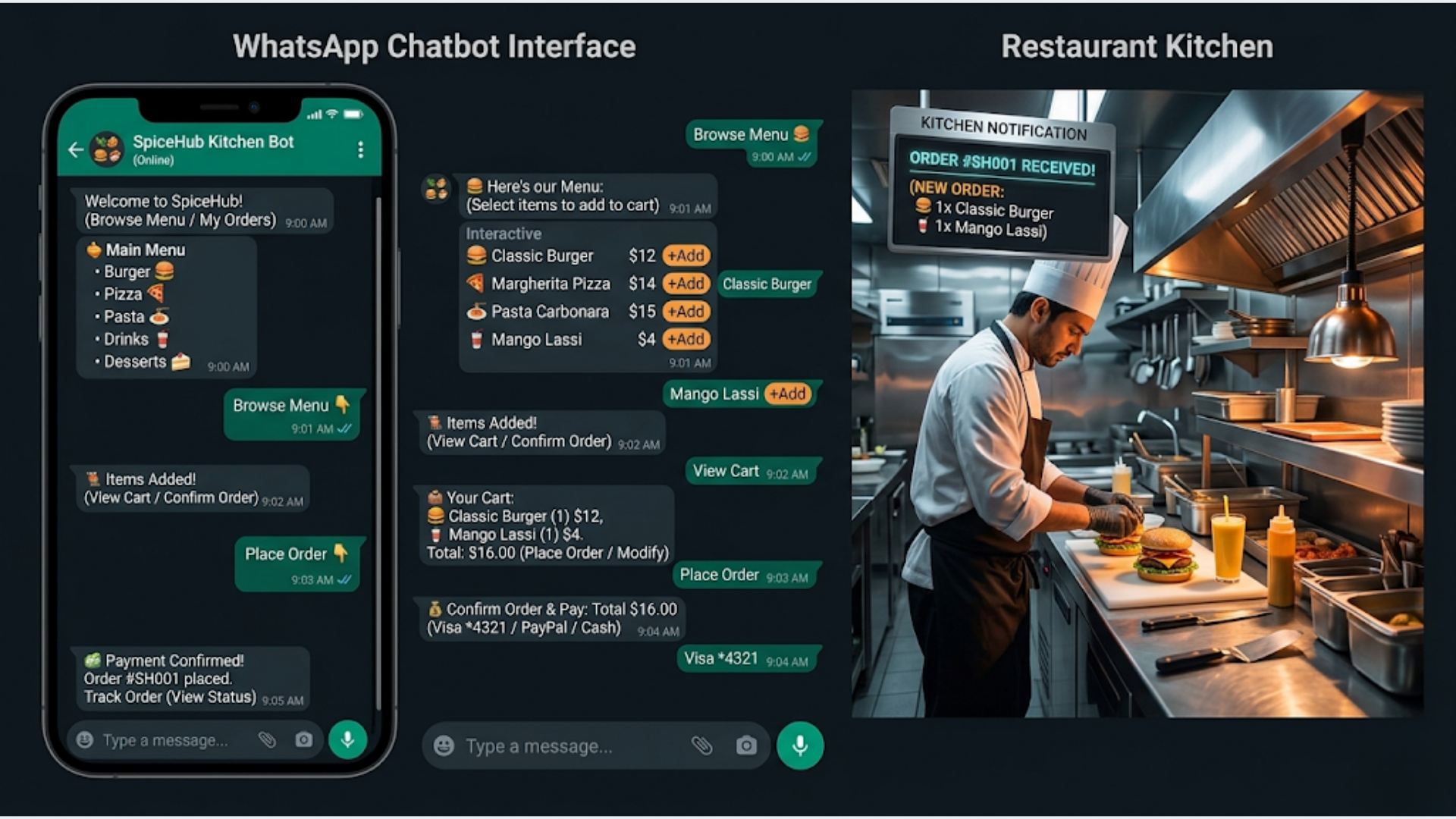
A WhatsApp ordering chatbot for restaurants handles the full cycle: menu browsing, item selection, order confirmation, payment, kitchen notification, and delivery tracking. Build time: 2-3 weeks for a production-ready system. Cost: $150-500/month to operate. The stack: WATI or WhatsApp Cloud API (messaging) + n8n (orchestration) + Razorpay (payments) + Google Sheets or Airtable (orders database). Average result: 20-35% of total orders shift to WhatsApp within 3 months, with zero commission fees compared to 25-30% on Swiggy/Zomato.
WhatsApp ordering for restaurants and cloud kitchens is a growing pattern. The pitch is simple: you’re already talking to customers on WhatsApp. They’re asking for the menu, placing orders via text messages, and your staff is manually processing all of it. The chatbot automates the conversation while keeping the personal feel that makes WhatsApp ordering attractive in the first place.
Here’s the complete build, step by step.
The Order Flow: What the Customer Experiences
Before building anything, understand the conversation flow from the customer’s perspective. This is what makes or breaks a WhatsApp ordering bot. If the flow feels clunky, customers will just call instead.
The ideal conversation:
Customer: Hi
Bot: Hey! Welcome to [Restaurant Name]. What would you like to do?
     1. See our menu
     2. Place an order
     3. Track my order
     4. Talk to a human

Customer: 1
Bot: Here's our menu:

     [Sends a catalog message with categories: Starters, Mains, Breads, Drinks, Desserts]

Customer: [Taps "Starters"]
Bot: Starters:
     1. Paneer Tikka - Rs. 280
     2. Chicken 65 - Rs. 320
     3. Veg Spring Rolls (4 pcs) - Rs. 220
     4. Fish Amritsari - Rs. 380

     Reply with item number and quantity (e.g., "1 x 2" for 2 Paneer Tikka)

Customer: 1 x 2, 3 x 1
Bot: Added to your order:
     - 2x Paneer Tikka - Rs. 560
     - 1x Veg Spring Rolls - Rs. 220

     Subtotal: Rs. 780

     1. Add more items
     2. Proceed to checkout

Customer: 2
Bot: Your order summary:
     - 2x Paneer Tikka - Rs. 560
     - 1x Veg Spring Rolls - Rs. 220
     Subtotal: Rs. 780
     GST (5%): Rs. 39
     Delivery: Rs. 40
     Total: Rs. 859

     Delivery address on file: 42 MG Road, Koramangala

     1. Confirm and pay
     2. Change address
     3. Modify order

Customer: 1
Bot: [Sends Razorpay payment link]
     Pay Rs. 859 to confirm your order.

[Customer pays]

Bot: Payment received! Your order #ORD-20260426-042 is confirmed.
     Estimated delivery: 35-45 minutes.
     We'll send you updates as your order progresses.

[20 minutes later]
Bot: Your order is being prepared by our kitchen.

[35 minutes later]
Bot: Your order is out for delivery!
     Delivery partner: Rajesh (9876543210)

[45 minutes later]
Bot: Your order has been delivered. Enjoy your meal!
     Rate your experience: 1-5
Total customer effort: 6-8 messages to complete an order. No app download. No account creation. No browsing a clunky mobile website. Just a WhatsApp conversation they’re already comfortable with.
Step 1: Set Up WhatsApp Business API
You can’t build a chatbot on regular WhatsApp or even WhatsApp Business (the free app). You need the WhatsApp Business API, which allows programmatic message sending, template messages, and webhook-based conversation handling.
Two paths to the API:
Path 1: WATI (recommended for most restaurants)
WATI is a WhatsApp Business API provider with a built-in chatbot builder, template manager, and analytics dashboard. It abstracts away the API complexity.
- Sign up at wati.io ($49/month for the Growth plan)
- Connect your business phone number (must be a number not currently on WhatsApp)
- Complete Facebook Business Verification (required by Meta, takes 1-3 business days)
- Once verified, you can send and receive messages via the WATI dashboard and API
WATI includes a no-code chatbot builder that handles simple flows. For the full ordering flow described above, you’ll need WATI’s API connected to n8n for the logic.
Path 2: WhatsApp Cloud API (direct, more control)
Meta’s direct API is free (you only pay per-conversation fees). It gives you more control but requires more technical setup.
- Create a Meta Business account and Facebook App
- Add the WhatsApp product to your app
- Register your business phone number
- Get your API access token
For restaurants without a technical team, WATI is the better choice. For cloud kitchens running multiple brands on multiple numbers, the direct API with n8n gives more flexibility at lower per-message cost.
WhatsApp conversation pricing (2026):
| Conversation Type | India Price | Initiated By |
|---|---|---|
| Marketing | ₹0.77/conversation | Business |
| Utility | ₹0.35/conversation | Business |
| Service | Free (first 1,000/mo) | Customer |
| Service (after free tier) | ₹0.35/conversation | Customer |
When a customer messages you first (which is the case for ordering), it’s a “service” conversation. The first 1,000 per month are free. For a restaurant getting 500 WhatsApp orders/month, you pay ₹0 in WhatsApp fees for customer-initiated orders. The only cost is the utility messages you send (order updates), which are ₹0.35 each.
Step 2: Build the Menu System
The menu is the core of the ordering experience. It needs to be easy to browse, up-to-date, and capable of handling unavailable items.
Menu data structure:
Store your menu in Google Sheets or Airtable. One sheet per category (Starters, Mains, Breads, Drinks, Desserts) or a single sheet with a “Category” column. Each item has: name, price, description (optional), image URL (optional), available (yes/no), and a short code for ordering.
Why Google Sheets?
Your restaurant staff can update the menu without touching any code. Item sold out? Open the sheet on their phone, change “Available” from Yes to No. New seasonal item? Add a row. Price change? Edit the cell. The chatbot reads from this sheet in real-time.
Sending the menu via WhatsApp:
WhatsApp supports three formats for menu-like content:
-
List messages: Up to 10 items with title, description, and a selection button. Best for categories. “Tap to see: Starters, Mains, Breads, Drinks, Desserts.”
-
Reply buttons: Up to 3 buttons per message. Best for yes/no/modify choices. “1. Add more items, 2. Checkout, 3. Cancel.”
-
Catalog messages: WhatsApp’s native product catalog. Customers browse items with images and prices within WhatsApp. Best for visual menus but requires setting up a WhatsApp Commerce catalog (not all business types are eligible).
For most restaurants, a combination of list messages (for category browsing) and text messages (for item details within a category) works best. The catalog approach is nicer but has more setup overhead and Meta’s approval process for commerce can take 1-2 weeks.
Handling unavailable items:
The n8n workflow checks the Google Sheet before sending menu items. If an item’s “Available” column is “No,” it’s excluded from the message. If a customer tries to order an unavailable item by code, the bot responds: “Sorry, Paneer Tikka is currently unavailable. Would you like to try Malai Tikka instead?” This suggestion is pulled from a “Substitute” column in your sheet.
Step 3: Build the Order Flow in n8n
This is the orchestration layer. n8n manages the conversation state, processes orders, and coordinates between WhatsApp, your menu, the payment system, and the kitchen.
The n8n workflow structure:
[WATI Webhook: Incoming Message]
    -> [Code: Parse Message and Determine Intent]
    -> [Switch: Route by Intent]
        -> [Menu Request] -> [Google Sheets: Fetch Menu] -> [WATI: Send Menu]
        -> [Add to Cart] -> [Code: Update Cart] -> [WATI: Send Cart Summary]
        -> [Checkout] -> [Code: Calculate Total] -> [Razorpay: Create Payment Link] -> [WATI: Send Payment Link]
        -> [Track Order] -> [Google Sheets: Lookup Order] -> [WATI: Send Status]
        -> [Human Handoff] -> [WATI: Assign to Agent]
Conversation state management:
WhatsApp conversations are stateless. Each message arrives as an independent webhook. Your workflow needs to track where each customer is in the ordering flow. Two approaches:
-
Google Sheets as state store: One row per active customer. Columns: phone number, current state (browsing/ordering/checkout/awaiting_payment), cart contents (JSON), last updated timestamp. The workflow reads and updates this row on every message.
-
Redis or a database: Faster for high-volume restaurants (100+ simultaneous orders). n8n has a Redis node. Store cart and state with an expiry (2 hours, so abandoned carts auto-clear).
For most single-location restaurants, the Google Sheets approach handles the load fine. You’re not building Uber Eats. You’re handling 20-50 concurrent conversations during peak hours.
Intent parsing:
The Code node at the start of the workflow determines what the customer wants. This doesn’t need AI (though you can add it). Simple pattern matching works:
- Message is “hi”, “hello”, “hey”, or any greeting: Send welcome message
- Message is “1”, “menu”, “see menu”: Show menu categories
- Message matches “category name” (starters, mains, etc.): Show items in that category
- Message matches “[number] x [quantity]” pattern: Add to cart
- Message is “2”, “checkout”, “pay”: Proceed to checkout
- Message is “3”, “track”, “where is my order”: Order tracking
- Message is “4”, “human”, “help”, “agent”: Hand off to human
For anything that doesn’t match a known pattern, respond with the main menu options. Don’t leave the customer in a dead end.
Step 4: Payment Integration with Razorpay
When the customer confirms their order, the bot generates a Razorpay payment link and sends it via WhatsApp.
In n8n:
- Add an HTTP Request node (Razorpay API doesn’t have a native n8n node, but the API is simple)
- Method: POST
- URL:
https://api.razorpay.com/v1/payment_links - Authentication: Basic Auth (Razorpay Key ID : Key Secret)
- Body:
{
  "amount": {{totalInPaise}},
  "currency": "INR",
  "description": "Order from [Restaurant Name]",
  "customer": {
    "contact": "{{customerPhone}}",
    "name": "{{customerName}}"
  },
  "notify": {
    "sms": false,
    "email": false,
    "whatsapp": false
  },
  "callback_url": "https://your-domain.com/payment-success",
  "callback_method": "get",
  "expire_by": {{unixTimestamp30MinFromNow}},
  "notes": {
    "order_id": "{{orderId}}",
    "items": "{{cartItemsSummary}}"
  }
}- The response contains
short_url, which is the payment link to send to the customer
Send the payment link via WhatsApp:
“Pay Rs. {{total}} to confirm your order: {{paymentLink}}\n\nThis link expires in 30 minutes.”
Payment confirmation:
Set up a Razorpay webhook (just like in the invoice tutorial) for payment_link.paid. When the customer pays, the webhook fires, n8n receives it, matches the order via the notes.order_id, and updates the order status to “Confirmed.”
The bot then sends: “Payment received! Your order #{{orderId}} is confirmed. Estimated time: 35-45 minutes.”
COD (Cash on Delivery) option:
For Indian restaurants, COD is still common. If the customer chooses COD, skip the Razorpay step and mark the order as “Confirmed (COD).” The delivery partner collects payment. Add a COD surcharge if you want to incentivize online payment: “Online payment: Rs. 859. COD: Rs. 889 (Rs. 30 COD handling fee).”
Step 5: Kitchen Notification System
The order is paid. Now the kitchen needs to know about it. Fast.
Three notification channels (use all three for redundancy):
-
Printer integration: If your kitchen has a receipt printer (like Epson TM-T20), connect it to your order system. The n8n workflow generates a formatted order ticket and sends it to the printer via the printer’s network API or a local print server. This is the most reliable method for busy kitchens.
-
Kitchen display screen: A tablet mounted in the kitchen showing a live order queue. Build a simple web page that polls your orders sheet/database every 10 seconds. New orders appear with a sound alert. Kitchen staff tap “Preparing” and “Ready” to update status.
-
WhatsApp group notification: Create a WhatsApp group with kitchen staff. When a new order comes in, the bot posts the order details to the group. Simple, works immediately, requires no hardware setup. “New Order #ORD-042: 2x Paneer Tikka, 1x Spring Rolls. Delivery to Koramangala. Est. pickup: 30 min.”
Order status updates from kitchen to customer:
Kitchen staff change order status on the tablet (or reply to the WhatsApp group message with a code: “042 prep” for preparing, “042 ready” for ready). n8n picks up the status change and sends the customer a WhatsApp update.
Status flow: Confirmed -> Preparing -> Ready for Pickup/Delivery -> Out for Delivery -> Delivered
Each status change triggers a customer WhatsApp message. The customer never has to ask “where is my order?” because they already know.
Step 6: Delivery Tracking
If you have your own delivery fleet (or use a delivery partner), the final mile needs tracking.
For own delivery:
When the order status changes to “Ready,” the bot sends a WhatsApp message to the available delivery partner: “New delivery: Order #042 to 42 MG Road, Koramangala. Customer: [Name] ([Phone]). Pick up from kitchen now.”
Delivery partner replies “picked” when they’ve collected the order. Bot updates customer: “Your order is on its way! Delivery partner: [Name] ([Phone]).”
Delivery partner replies “delivered” on completion. Bot sends customer: “Delivered! Enjoy your meal. Rate 1-5.”
For third-party delivery (Dunzo, Porter, etc.):
Integrate with Dunzo’s or Porter’s API via n8n. When the order is ready, the workflow creates a delivery task via API, receives the delivery partner’s details and tracking link, and forwards it to the customer.
Live location sharing:
WhatsApp supports live location sharing. The delivery partner can share their live location with the customer directly via WhatsApp. This requires manual action from the delivery partner (they open the customer chat and share location). For automated tracking, you’d need a custom delivery app. Most single-location restaurants don’t need this. The status update messages are sufficient.
The India Context: Swiggy/Zomato Comparison and UPI
The elephant in the room: why build a WhatsApp chatbot when Swiggy and Zomato exist?
The commission math:
Swiggy and Zomato charge 25-30% commission on every order. For a restaurant with ₹5,00,000/month in delivery revenue, that’s ₹1,25,000-1,50,000 going to the platform. Every month.
A WhatsApp ordering system costs ₹10,000-30,000/month to operate (WATI subscription, n8n, payment gateway fees). Even if only 30% of your orders shift to WhatsApp, you’re saving ₹25,000-45,000/month in commissions.
Comparison:
| Factor | Swiggy/Zomato | WhatsApp Orders |
|---|---|---|
| Commission | 25-30% per order | 0% (only payment gateway 2%) |
| New customer discovery | Yes (their marketplace) | No (your existing customers) |
| Customer data ownership | Platform owns it | You own it |
| Delivery logistics | Handled by platform | You handle (or use Dunzo/Porter) |
| Customer communication | Platform controls | You control |
| Monthly cost at ₹5L revenue | ₹1.25-1.5L | ₹10-30K |
| Setup effort | Listing (1 day) | Build (2-3 weeks) |
The right strategy isn’t either/or. Use Swiggy/Zomato for new customer acquisition. Convert those customers to WhatsApp for repeat orders. Every repeat order on WhatsApp instead of Swiggy saves you 25-30% margin.
How to convert: include a card in every Swiggy/Zomato delivery bag. “Order directly on WhatsApp and get 10% off your next order. Save this number: [your WhatsApp Business number].” Simple. Effective. Most restaurants recover the chatbot build cost within 2-3 months of commission savings.
UPI payment integration:
UPI is how India pays. Your Razorpay payment link supports UPI natively. The customer taps the link, selects their UPI app (Google Pay, PhonePe, Paytm), authenticates with their PIN, done. The payment confirms in 5-10 seconds. No card numbers, no CVV, no OTP. This frictionless payment is a major advantage of the WhatsApp ordering flow.
For even faster UPI: send a UPI deep link that opens the customer’s default UPI app directly. Format: upi://pay?pa=your-upi-id@razorpay&pn=Restaurant+Name&am={{amount}}&cu=INR&tn=Order+{{orderId}}. This saves one tap compared to going through the Razorpay payment page.
Regional language support:
For restaurants outside Tier-1 cities, the chatbot should support the local language. WATI supports multilingual templates. Build your menu and conversation flows in both English and the local language (Hindi, Tamil, Bengali, etc.). At the start of the conversation, ask: “Choose your language: 1. English 2. Hindi 3. Tamil.” Route all subsequent messages through the appropriate language template.
This isn’t a nice-to-have for a restaurant in, say, Madurai or Varanasi. It’s essential. Your delivery customers communicate in Tamil or Hindi respectively. An English-only bot feels impersonal and confusing.
Build Timeline and Cost Summary
Week 1: Foundation
- Set up WATI account and WhatsApp Business API
- Create menu in Google Sheets
- Build the welcome flow and menu browsing in n8n
- Time: 15-20 hours
Week 2: Ordering and Payment
- Build cart management (add, remove, modify items)
- Integrate Razorpay payment links
- Build order confirmation and status tracking
- Time: 20-25 hours
Week 3: Kitchen and Delivery
- Set up kitchen notification system (tablet dashboard or WhatsApp group)
- Build delivery partner notification flow
- Add customer status updates
- End-to-end testing with real orders
- Time: 15-20 hours
Total build cost:
- If you build it yourself: $0 (just your time)
- If you hire a developer: $2,000-5,000
- If you hire an automation agency: $3,000-8,000
Monthly operating cost:
- WATI: $49-99/month
- n8n Cloud: $20-50/month
- Razorpay: 2% per online transaction (0% for UPI)
- Google Sheets/Airtable: $0-20/month
- Total: $70-170/month (plus Razorpay transaction fees)
Break-even: If you do ₹2,00,000/month in delivery orders and shift 25% to WhatsApp, you save ₹12,500-15,000/month in Swiggy/Zomato commissions. Your operating cost is ₹5,000-12,000/month. Break-even happens in Month 1.
If you’re a restaurant paying Swiggy/Zomato commissions and want to build a direct ordering channel, we build these systems at triggerAll.
FAQ
How much does a WhatsApp chatbot for restaurants cost? Build cost: $2,000-8,000 if you hire someone. Monthly operating cost: $70-170 (WATI + n8n + hosting). The system pays for itself if you shift even 20-25% of delivery orders from Swiggy/Zomato (25-30% commission) to WhatsApp (0% commission, only payment gateway fees).
Can I accept orders on WhatsApp without a chatbot? Yes, but you’ll be manually processing every order. Staff reads the message, writes down the order, calculates the total, sends a payment link, confirms receipt, and updates the customer. For 10 orders/day, it’s manageable. For 50+, it’s a full-time job. The chatbot handles the conversation, cart management, payment, and notifications automatically.
What is the best WhatsApp API provider for restaurant ordering? WATI ($49-99/month) is the best balance of features and ease of use. It includes a chatbot builder, template manager, and multi-agent support. For larger operations (multiple restaurant brands), the WhatsApp Cloud API (direct from Meta) is cheaper per message but requires more technical setup. Both work with n8n for workflow orchestration.
How do I handle menu updates in a WhatsApp ordering bot? Store your menu in Google Sheets. Restaurant staff update the sheet (change prices, mark items unavailable, add new items). The chatbot reads from the sheet in real-time. When an item is marked “unavailable,” it’s automatically excluded from the menu shown to customers. No code changes needed for menu updates.
Is WhatsApp ordering better than Swiggy/Zomato for restaurants? Not for new customer acquisition. Swiggy/Zomato’s marketplace brings you customers who don’t know your restaurant exists. But for repeat orders from existing customers, WhatsApp is dramatically cheaper (0% commission vs 25-30%). The optimal strategy: use Swiggy/Zomato for discovery, convert repeat customers to WhatsApp for direct orders.
How do I integrate UPI payments in a WhatsApp food ordering bot? Use Razorpay to generate payment links that support UPI natively. When the customer clicks the link, they choose their UPI app (Google Pay, PhonePe, Paytm) and pay in seconds. Razorpay charges 0% for UPI transactions. For faster checkout, send a UPI deep link that opens the customer’s UPI app directly.
Can a WhatsApp chatbot handle multiple orders at once during peak hours? Yes. The system processes each conversation independently. n8n handles concurrent webhook events. WATI manages message queuing. The bottleneck isn’t the chatbot. It’s your kitchen capacity. For peak load (100+ simultaneous conversations), use Redis for session state instead of Google Sheets, and ensure your n8n instance has sufficient execution capacity.
Need help implementing this?
Book a free 30-minute discovery call. We'll map your current setup, identify quick wins, and outline what automation can do for your business.
Book a Free Discovery Call