How to Build a Multi-Channel Notification System with n8n
Build a multi-channel notification system with n8n. Single event triggers email, WhatsApp, Slack, Telegram, and SMS with priority routing. Complete Switch node architecture and template management guide.
How to Build a Multi-Channel Notification System with n8n
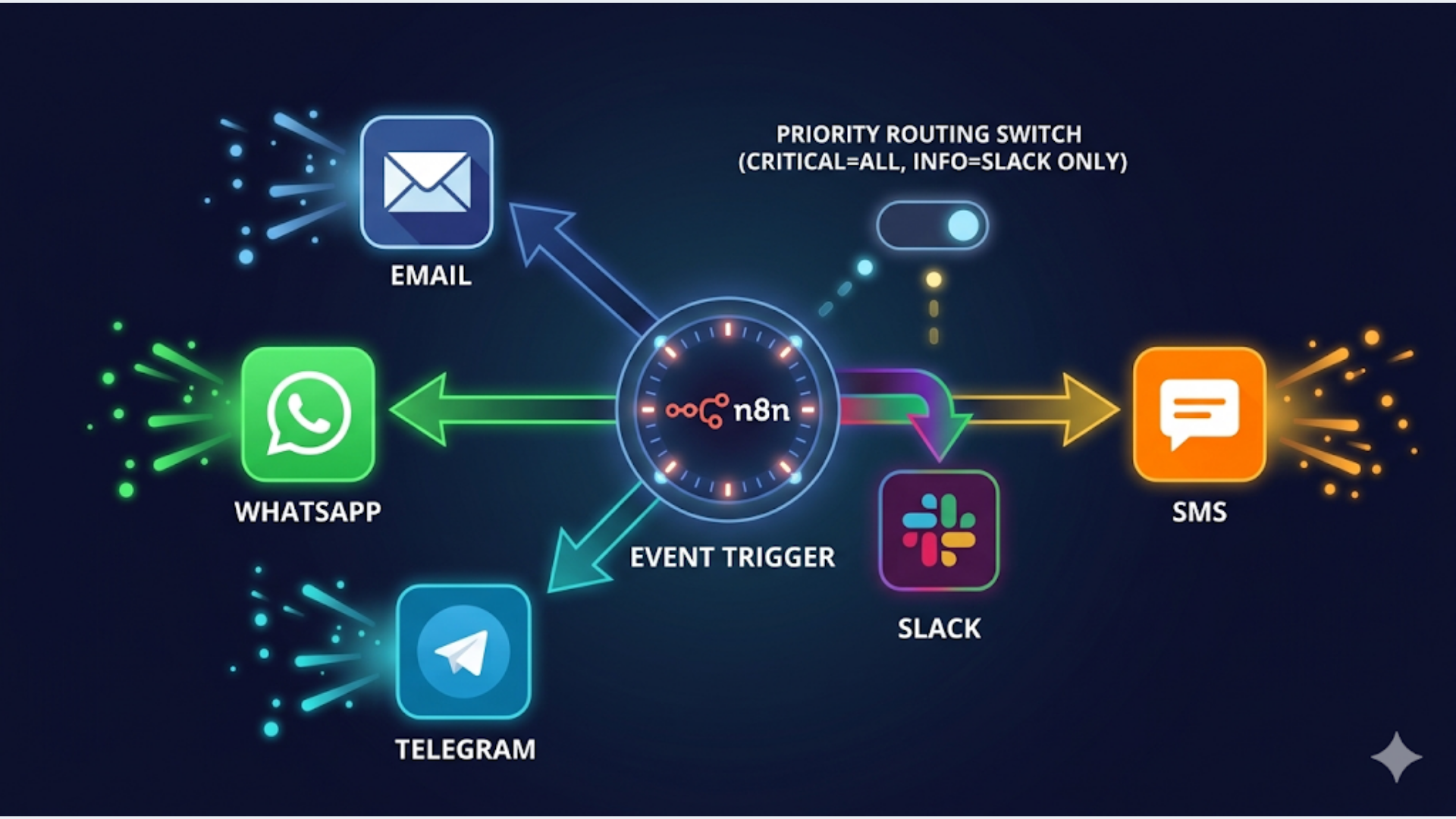
A multi-channel notification system sends the right message through the right channel at the right time. One event fires, and based on priority and recipient preferences, it routes to email, WhatsApp, Slack, Telegram, SMS, or all of them. n8n handles the orchestration, the routing logic, the template rendering, and the delivery. No custom code required.
The problem with most notification setups: they’re hardcoded. Someone writes “send Slack message” into every workflow, and when leadership wants email alerts too, you’re editing 30 workflows. Or worse, you’re sending everything through every channel, and people start ignoring all of it.
A proper notification system is centralized. Every workflow in your organization sends events to one notification hub. The hub decides who gets notified, through which channel, with what level of urgency. Change the routing rules once, every workflow benefits.
I build these systems. Here’s the complete architecture using n8n.
Architecture: The Centralized Notification Hub
Instead of each workflow managing its own notifications, every workflow sends a standardized event to a central notification workflow.
Any workflow (CRM, billing, support, monitoring)
    |
    v
Send to Notification Hub (n8n webhook)
    |
    v
Parse event: type, priority, recipient, data
    |
    v
Lookup recipient preferences (Google Sheets or DB)
    |
    v
Apply priority routing rules
    |
    +--> Critical: ALL channels (email + WhatsApp + Slack + SMS)
    |
    +--> High: WhatsApp + Slack
    |
    +--> Medium: Slack only
    |
    +--> Low: Email digest (batched, sent hourly)
    |
    v
Render message template per channel
    |
    v
Deliver through each channel
    |
    v
Log delivery status
Why centralize?
- One place to change routing rules. New team member? Add them to the preferences sheet. New channel? Add it to the hub. Zero changes to any source workflow
- Consistent formatting. Every Slack message looks the same. Every email follows your template. No per-workflow styling
- Delivery logging. One sheet tracks every notification sent, to whom, through which channel, and whether it was delivered
- Rate limiting. Prevent notification storms. If 50 alerts fire in 5 minutes, the hub batches them instead of blasting 50 separate messages
The event payload format:
Every source workflow sends this JSON to the notification hub:
{
  "event_type": "payment_failed",
  "priority": "critical",
  "recipient_id": "krishna",
  "title": "Payment Failed - Acme Corp",
  "body": "Invoice #4521 for $2,400 failed. Card ending 4242 declined.",
  "data": {
    "customer_name": "Acme Corp",
    "invoice_id": "4521",
    "amount": 2400,
    "currency": "USD"
  },
  "source_workflow": "billing-monitor",
  "timestamp": "2026-04-26T14:30:00Z"
}
Standardize this format across all your workflows. Document it. Every workflow that sends notifications follows the same schema.
The n8n Switch Node Architecture
The Switch node is the brain of priority routing. It evaluates the priority field and branches the workflow into parallel delivery paths.
Building the priority router:
- Webhook node: Receives the event payload
- Function node: Validates the payload (checks required fields exist)
- Google Sheets node: Looks up recipient preferences by recipient_id
- Switch node: Routes based on priority level
Switch node configuration:
| Output | Condition | Channels Activated |
|---|---|---|
| Output 1 | priority = “critical” | Email + WhatsApp + Slack + Telegram + SMS |
| Output 2 | priority = “high” | WhatsApp + Slack |
| Output 3 | priority = “medium” | Slack |
| Output 4 | priority = “low” | Email (batched) |
| Fallback | No match | Slack (default) |
After the Switch node, each output connects to the appropriate channel nodes in parallel. Critical events fire all five channels simultaneously. n8n handles the parallel execution natively.
Recipient preferences sheet:
Store in Google Sheets with this structure:
| recipient_id | name | slack_id | telegram_id | phone | quiet_hours_start | quiet_hours_end | timezone | ||
|---|---|---|---|---|---|---|---|---|---|
| krishna | Krishna | k@triggerall.com | +91XXXXXXXXXX | U04XXXXX | 123456789 | +91XXXXXXXXXX | 22:00 | 07:00 | Asia/Kolkata |
| sarah | Sarah | s@company.com | +1XXXXXXXXXX | U04YYYYY | - | +1XXXXXXXXXX | 23:00 | 08:00 | America/New_York |
Quiet hours logic: Add a Function node before delivery that checks the current time against the recipient’s quiet hours. During quiet hours, downgrade medium and low priority to batched. High stays immediate but goes to Slack only. Critical always goes through regardless of time.
const now = new Date();
const recipientTZ = items[0].json.timezone;
const localHour = parseInt(now.toLocaleString('en-US', {
  timeZone: recipientTZ,
  hour: 'numeric',
  hour12: false
}));

const quietStart = parseInt(items[0].json.quiet_hours_start);
const quietEnd = parseInt(items[0].json.quiet_hours_end);

let isQuietHour = false;
if (quietStart > quietEnd) {
  isQuietHour = localHour >= quietStart || localHour < quietEnd;
} else {
  isQuietHour = localHour >= quietStart && localHour < quietEnd;
}

items[0].json.is_quiet_hour = isQuietHour;
return items;
Channel Configuration: Email, WhatsApp, Slack, Telegram, SMS
Each channel has its own setup requirements and message formatting.
Email (Gmail or SendGrid):
n8n’s Gmail node or SendGrid node handles this. For notifications, use HTML email templates stored in a Google Doc or as n8n expressions.
Subject: [{{priority | uppercase}}] {{title}}
Body: Clean HTML with the event details, timestamp, and action link
Cost: Free with Gmail (500 emails/day limit). SendGrid free tier: 100 emails/day. Paid: $20/month for 50,000 emails.
WhatsApp (WATI or Interakt):
Pre-register your notification templates with your WhatsApp BSP (Business Service Provider). You’ll need separate templates for different notification types since WhatsApp requires pre-approved templates for business-initiated messages.
Example templates to register:
| Template Name | Content |
|---|---|
| critical_alert | ”[CRITICAL] {{title}}. {{body}}. Action needed immediately.” |
| high_alert | ”Alert: {{title}}. {{body}}. Please review.” |
| daily_digest | ”Daily Summary ({{date}}): {{summary}}” |
n8n’s HTTP Request node calls WATI’s or Interakt’s API to send the WhatsApp message using the appropriate template.
Cost: WATI starts at $49/month. Interakt starts at Rs 999/month. Per-message charges vary by country (India: Rs 0.50 to 0.85 per business-initiated message).
Slack:
n8n has a native Slack node. For notifications, use Slack’s Block Kit format for rich, structured messages.
Block Kit message structure:
{
  "blocks": [
    {
      "type": "header",
      "text": {"type": "plain_text", "text": "Payment Failed - Acme Corp"}
    },
    {
      "type": "section",
      "fields": [
        {"type": "mrkdwn", "text": "*Priority:* Critical"},
        {"type": "mrkdwn", "text": "*Source:* Billing Monitor"},
        {"type": "mrkdwn", "text": "*Amount:* $2,400"},
        {"type": "mrkdwn", "text": "*Time:* 2:30 PM IST"}
      ]
    },
    {
      "type": "actions",
      "elements": [
        {
          "type": "button",
          "text": {"type": "plain_text", "text": "View Invoice"},
          "url": "https://app.example.com/invoices/4521"
        }
      ]
    }
  ]
}
This looks professional. Color-coded headers, structured fields, and action buttons. Way better than a plain text message.
Cost: Slack is free for small teams. The Slack API has no per-message cost.
Telegram:
n8n’s Telegram node sends messages to individual users or groups. Telegram supports Markdown formatting and inline buttons.
Cost: Free. Telegram Bot API has no usage limits or fees.
SMS (Twilio or MSG91):
SMS is the last resort for critical notifications because it costs money per message and people actually read SMS (98% open rate).
Cost: Twilio: $0.0079 per SMS in the US, Rs 0.15 to 0.25 in India. MSG91 (India): Rs 0.16 to 0.20 per SMS depending on volume. Keep SMS for critical-only to control costs.
India-specific: MSG91 is the go-to for SMS in India. Better DLT compliance handling (mandatory for Indian SMS), lower rates than Twilio for Indian numbers, and native support for promotional vs transactional routes.
Template Management
Templates turn your notification system from a messaging pipe into a professional communication channel.
The template registry:
Store all message templates in a dedicated Google Sheet:
| template_id | channel | event_type | priority | subject/header | body_template |
|---|---|---|---|---|---|
| email_critical | * | critical | [CRITICAL] {{title}} | Full HTML template reference | |
| slack_payment_failed | slack | payment_failed | * | Payment Failed | Block Kit JSON reference |
| whatsapp_critical | * | critical | critical_alert | WATI template name | |
| sms_critical | sms | * | critical | n/a | CRITICAL: {{title}}. {{body}} |
Template selection logic in n8n:
Before rendering a message, look up the template by matching event_type and priority. If no specific template exists for that event_type, fall back to the priority-based default template.
Priority: event_type + priority match (most specific)
Fallback 1: priority match only
Fallback 2: channel default template
Variable substitution:
Templates use double-curly-brace variables: {{title}}, {{body}}, {{customer_name}}, {{amount}}. A Function node in n8n replaces these with actual values from the event payload before sending.
let template = items[0].json.template_body;
const data = items[0].json.event_data;

for (const [key, value] of Object.entries(data)) {
  template = template.replaceAll(`{{${key}}}`, value);
}

items[0].json.rendered_message = template;
return items;
Maintaining templates:
- Keep templates in one place (the Google Sheet)
- Version your templates (add a version column)
- Test new templates by sending to yourself before deploying
- Review templates quarterly for outdated language or broken variables
Handling Failures and Delivery Logging
Notifications that fail silently are worse than no notifications. Build delivery tracking into the system.
Delivery logging sheet:
Every notification attempt gets logged:
| timestamp | event_type | recipient | channel | status | error_message | retry_count |
|---|---|---|---|---|---|---|
| 2026-04-26 14:30:05 | payment_failed | krishna | slack | delivered | - | 0 |
| 2026-04-26 14:30:06 | payment_failed | krishna | delivered | - | 0 | |
| 2026-04-26 14:30:07 | payment_failed | krishna | delivered | - | 0 | |
| 2026-04-26 14:30:08 | payment_failed | krishna | sms | failed | Invalid number format | 1 |
Retry logic:
Add an IF node after each channel’s delivery node. If the HTTP response indicates failure:
- Wait 60 seconds
- Retry once
- If still failed, log the failure and try the next-priority channel as fallback
Fallback chain: If SMS fails, try WhatsApp. If WhatsApp fails, try email. Critical notifications must reach the recipient through at least one channel. The fallback chain ensures this.
Rate limiting:
Prevent notification storms by adding a deduplication check. Before sending, check if the same event_type was sent to the same recipient in the last 5 minutes. If yes, batch it with the previous notification instead of sending a separate one.
// Check for duplicate within 5-minute window
const recentNotifications = items[0].json.recent_log;
const isDuplicate = recentNotifications.some(n =>
  n.event_type === items[0].json.event_type &&
  n.recipient === items[0].json.recipient_id &&
  (Date.now() - new Date(n.timestamp).getTime()) < 300000
);

items[0].json.should_send = !isDuplicate;
items[0].json.is_batched = isDuplicate;
return items;
Monitoring the notification system itself:
Set up a daily health check. n8n runs a scheduled workflow that:
- Sends a test notification through every channel
- Verifies delivery (checks for webhook confirmation or API response)
- If any channel fails, sends an alert through the working channels
- Logs the health check result
This catches problems like expired API tokens, WhatsApp template rejections, or Slack permission changes before they affect real notifications.
Scaling: From 100 to 10,000 Notifications Per Day
The basic architecture handles low to medium volume. Here’s what changes at scale.
Volume thresholds:
| Daily Volume | Architecture |
|---|---|
| Under 500 | Single n8n workflow, Google Sheets storage |
| 500-2,000 | Add queue (Redis or n8n’s built-in queue mode) |
| 2,000-10,000 | Dedicated n8n instance, PostgreSQL for logs, batch processing |
| 10,000+ | Consider dedicated services (Amazon SNS, Firebase Cloud Messaging) |
Batch processing for low-priority notifications:
Instead of sending low-priority notifications immediately, collect them and send a digest. n8n’s Cron node triggers every hour (or every 4 hours, or once daily). It reads all pending low-priority notifications from a staging sheet, groups them by recipient, renders a digest template, and sends one email per recipient.
This dramatically reduces notification fatigue. Nobody needs 15 separate low-priority emails per day. One digest with all 15 items is better.
Performance optimization:
- Use n8n’s execution data pruning to prevent the database from growing unbounded
- Set workflow timeout to 30 seconds per notification (prevents hanging on slow API calls)
- Use n8n’s error workflow feature to catch and handle failures centrally
- If self-hosting n8n, allocate at least 2GB RAM for the notification hub workflow
India-specific scaling note: WhatsApp BSPs like WATI have rate limits. WATI’s standard plan supports 1,000 business-initiated messages per day. If you’re sending more than that, you’ll need WATI’s higher tier or a direct Meta Business API integration. MSG91 for SMS also has throughput limits that vary by your DLT registration type (promotional vs transactional).
FAQ
Can I add push notifications to this system?
Yes. Use Firebase Cloud Messaging (FCM) for mobile push notifications. n8n’s HTTP Request node calls FCM’s API. Add “push” as another channel in your routing rules. Cost: free for up to 500 million messages per month through FCM.
How do I handle notifications for teams instead of individuals?
Add a “team” recipient type. When recipient_id maps to a team, look up all team members and send to each based on their individual preferences. For Slack, send to a channel instead of a DM. For email, send to a distribution list.
What if WhatsApp templates get rejected?
WhatsApp template approval takes 24 to 48 hours and rejections are common. Keep templates generic and informational. Avoid promotional language in transactional templates. Always have a fallback channel. If your WhatsApp template is pending approval, the system should automatically route through email or Slack instead.
How do I test the notification system without spamming real users?
Create a “test” recipient_id that routes to your personal channels only. Every source workflow can send test events by setting recipient_id to “test”. The notification hub routes everything to your test channels. Remove the test flag before going live.
Can this replace PagerDuty?
For basic alerting, yes. For on-call rotation, escalation policies, and incident management, no. If you need those features, use PagerDuty for critical infrastructure alerts and this system for business notifications. They serve different purposes.
What’s the latency from event to notification delivery?
Typical end-to-end latency: 2 to 5 seconds for Slack and Telegram, 3 to 8 seconds for email, 5 to 15 seconds for WhatsApp (due to BSP processing), 3 to 10 seconds for SMS. Fast enough for all business use cases. If you need sub-second latency, you need a custom solution, not n8n.
How much does the complete system cost to run?
n8n self-hosted: $12 to 24/month. Google Sheets: free. Slack: free. Telegram: free. Email (SendGrid): free to $20/month. WhatsApp (WATI): $49/month. SMS (MSG91): pay per message. Total fixed cost: $60 to $95/month, plus per-message SMS charges. That’s significantly cheaper than any commercial notification platform like OneSignal or Courier, which start at $100+/month for similar volume.
I build notification systems and workflow automation for businesses that need reliable, multi-channel alerting without enterprise pricing. If you’re duct-taping notifications across 10 different workflows, triggerAll can centralize it.
Need help implementing this?
Book a free 30-minute discovery call. We'll map your current setup, identify quick wins, and outline what automation can do for your business.
Book a Free Discovery Call