How to Build an AI-Powered FAQ Bot for Your Website
Step-by-step guide to building an AI FAQ bot for your website using RAG, embeddings, and n8n. Covers content collection, vector DB setup, chat widget deployment. Cost: $10-50/month vs $300+ for Intercom.
How to Build an AI-Powered FAQ Bot for Your Website
A custom AI FAQ bot costs $10-50/month to run, answers questions in 1-2 seconds, and handles 70-85% of common customer questions without human intervention. Compare that to Intercom ($74-300+/month), Zendesk ($55+/seat/month), or Drift ($2,500+/month for AI features). Same job. A fraction of the cost.
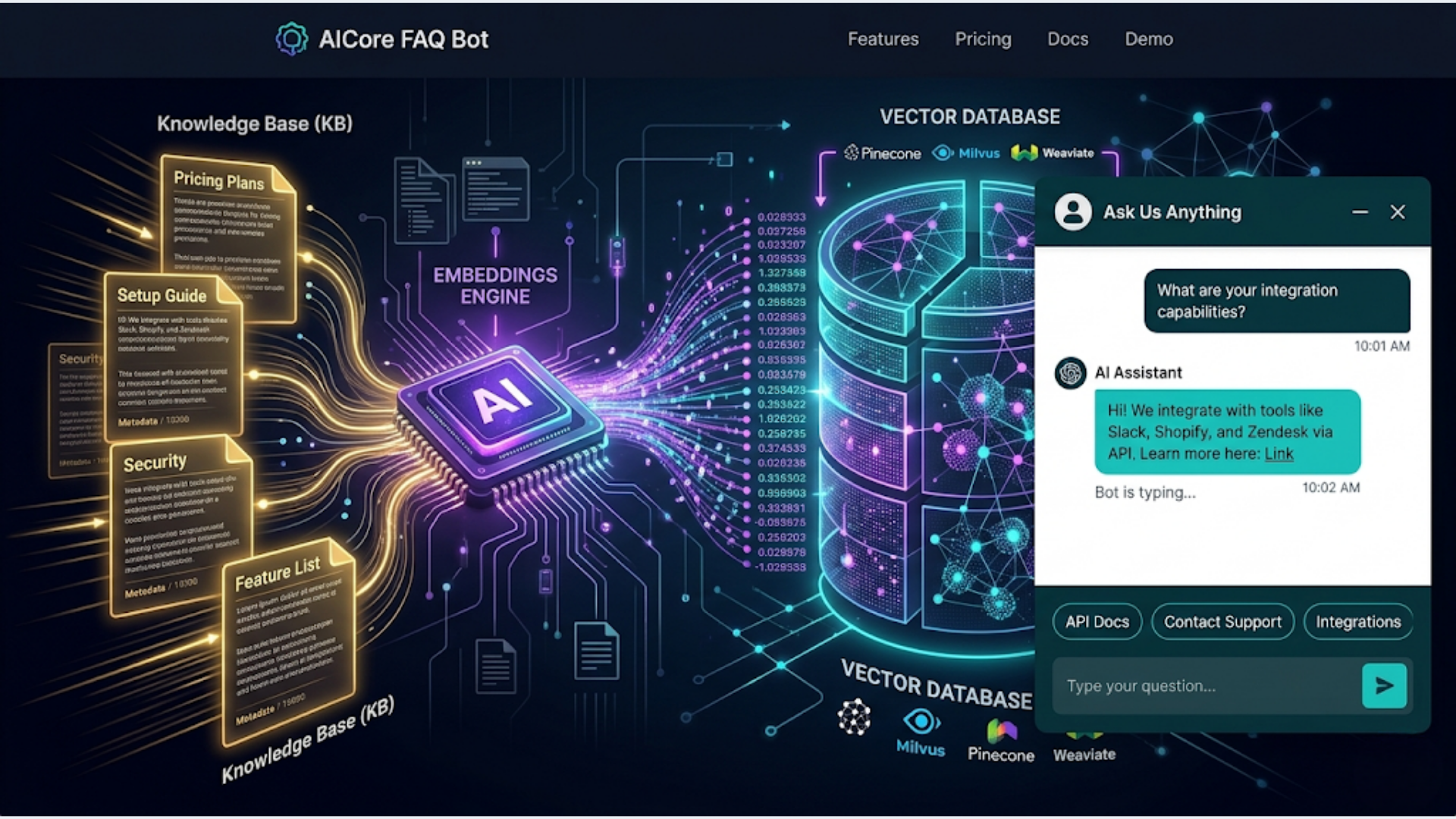
I build these systems. The approach uses RAG (Retrieval-Augmented Generation): your FAQ content is stored as embeddings in a vector database, user questions are matched against those embeddings, and an LLM generates a natural-language answer based on the matched content. The bot only answers from your content. It doesn’t hallucinate random answers because it’s grounded in your actual FAQ data.
Here’s the complete build.
How an AI FAQ Bot Actually Works (The RAG Pattern)
Before building, understanding the architecture saves you debugging time later.
Traditional chatbots use decision trees. If the user says X, respond with Y. They’re rigid, break on unexpected phrasing, and need constant manual updates. They also feel robotic.
An AI FAQ bot works differently. It understands the intent behind a question, searches your knowledge base for relevant content, and generates a conversational answer. The user asks “do you ship internationally?” and the bot finds your shipping policy content and responds naturally: “Yes, we ship to 42 countries. Standard international shipping takes 7-14 business days. Express is available for $25.”
The pipeline:
- User types a question in the chat widget on your site
- The question is sent to your n8n webhook
- n8n embeds the question using OpenAI’s embedding model (turns text into a vector)
- Vector search finds the 3-5 most relevant FAQ entries from your knowledge base
- The matched content + the question are sent to GPT-4 (or Claude) with a prompt
- The LLM generates a natural answer grounded in the matched content
- The answer is returned to the chat widget in 1-3 seconds
The critical piece is step 4. The bot doesn’t search all your content every time. It searches using semantic similarity. “What are your hours?” matches against your business hours content even if your FAQ is titled “Operating Schedule.” This is why it works better than keyword search.
What the bot can’t do (by design):
- Answer questions not covered in your FAQ content (it says “I don’t have information about that, please contact support”)
- Take actions (process refunds, change accounts, place orders)
- Access real-time data (inventory levels, order status) without additional integration
These limitations are features, not bugs. A bot that stays in its lane and admits when it doesn’t know something is infinitely better than one that confidently makes things up.
Step 1: Collect and Structure Your FAQ Content
The bot is only as good as the content you feed it. Garbage in, garbage out.
Sources to mine for FAQ content:
- Your existing FAQ page (obvious starting point)
- Support ticket history (what do customers actually ask?)
- Live chat transcripts (same questions come up repeatedly)
- Sales call notes (pre-purchase questions)
- Product documentation
- Shipping/return policies
- Terms of service (the parts customers actually care about)
How to structure it:
Create a Google Sheet or JSON file with two columns: Question and Answer. Each row is one FAQ entry.
| Question | Answer |
|---|---|
| What are your shipping options? | We offer standard shipping (5-7 days, free over $50) and express shipping (1-2 days, $15). International shipping to 42 countries, 7-14 days, $25 flat rate. |
| Can I return an item? | Returns accepted within 30 days of delivery. Item must be unused with original packaging. Refund processed within 5-7 business days after we receive the item. |
| Do you offer bulk discounts? | Orders of 50+ units receive 10% off. Orders of 200+ receive 20% off. Contact sales@example.com for custom pricing on larger orders. |
Aim for 50-150 FAQ entries. Under 50 and the bot will frequently hit “I don’t know” territory. Over 200 and you start getting false matches where similar-sounding content confuses the retrieval step.
Write answers as if a human is talking. Not legalese. Not marketing copy. Straight answers with specifics. Include numbers, timelines, prices, and URLs where relevant. The LLM will rephrase the answer naturally, but it needs good raw material.
Group related content. If you have 10 questions about shipping, that’s fine. But make sure each answer is self-contained. The vector search returns individual entries, not groups. Each answer should make sense on its own.
Step 2: Create Embeddings and Set Up the Vector Database
Embeddings are numerical representations of text. They capture meaning, not just keywords. “How do I track my package?” and “Where is my order?” produce similar embeddings even though they share zero words.
Create embeddings in n8n:
- Read your FAQ content from Google Sheets
- For each row, send the Question + Answer text to OpenAI’s
text-embedding-3-smallmodel - Store the embedding vector alongside the original text in a vector database
Vector database options:
| Option | Cost | Setup | Best For |
|---|---|---|---|
| Supabase (pgvector) | Free tier available | Medium | Teams already on Supabase |
| Pinecone | Free tier (100K vectors) | Easy | Fastest setup, managed service |
| Qdrant | Free (self-hosted) or cloud | Medium | High performance, open source |
| Weaviate | Free (self-hosted) or cloud | Medium | Complex schemas |
| Chroma | Free (self-hosted) | Easy | Prototyping, local development |
For most FAQ bots with under 500 entries, Pinecone’s free tier or Supabase’s free tier is more than enough. Don’t over-engineer this.
Supabase setup (recommended for simplicity):
- Create a Supabase project (free tier works)
- Enable the pgvector extension:
CREATE EXTENSION vector; - Create the FAQ table:
CREATE TABLE faq_embeddings (
  id SERIAL PRIMARY KEY,
  question TEXT,
  answer TEXT,
  embedding VECTOR(1536),
  category TEXT,
  created_at TIMESTAMP DEFAULT NOW()
);- In n8n, use the Supabase node to insert rows with embeddings
The embedding dimension (1536) matches OpenAI’s text-embedding-3-small model. If you use a different embedding model, adjust the dimension accordingly.
Keeping embeddings updated:
When you add or change FAQ content, re-run the embedding workflow for the updated entries. Don’t re-embed everything. Just the new or changed rows. Add a “last_updated” column to track which entries need re-embedding.
Step 3: Build the Chat Webhook in n8n
This is the workflow that receives user questions and returns answers.
Node 1: Webhook Trigger Create a webhook endpoint in n8n. Set method to POST. The chat widget will send requests here with the user’s question in the body.
Node 2: Embed the question
Send the user’s question to OpenAI’s embedding API (same model you used for the FAQ content: text-embedding-3-small). This produces a vector that represents the question’s meaning.
Node 3: Vector search Query your vector database for the 3-5 most similar FAQ entries. In Supabase, this is a SQL function:
SELECT question, answer, 1 - (embedding <=> query_embedding) AS similarity
FROM faq_embeddings
WHERE 1 - (embedding <=> query_embedding) > 0.7
ORDER BY similarity DESC
LIMIT 5;
The 0.7 threshold filters out weak matches. If nothing scores above 0.7, the bot won’t try to answer from irrelevant content.
Node 4: Generate the answer Send the user’s question and matched FAQ content to GPT-4 (or Claude):
You are a helpful customer support assistant for {company_name}.

Answer the user's question using ONLY the provided FAQ content. If the FAQ content doesn't contain the answer, say "I don't have specific information about that. Please contact our support team at {support_email} for help."

Do not make up information. Do not reference other sources. Keep answers concise (2-4 sentences).

FAQ Content:
{matched_faq_entries}

User Question: {user_question}
The “ONLY the provided FAQ content” instruction is critical. Without it, GPT-4 will happily answer questions using its general knowledge, which may be wrong for your specific business.
Node 5: Return the answer The webhook responds with the generated answer in JSON format:
{
  "answer": "Yes, we ship to 42 countries. Standard international shipping takes 7-14 business days at a flat rate of $25. Express international is not currently available.",
  "confidence": 0.89,
  "sources": ["shipping-policy", "international-orders"]
}
The confidence score (from the vector search similarity) helps the chat widget decide whether to show the answer directly or add a “Was this helpful?” prompt.
Step 4: Deploy the Chat Widget
The n8n webhook handles the logic. Now you need a frontend chat widget on your website.
Option A: Open-source chat widgets
Several open-source chat widgets work well:
- Chatbot UI (open source, React-based): Clean design, easy to customize, sends requests to any API endpoint. Deploy on Vercel or Netlify for free.
- BotUI (open source, vanilla JS): Lightweight, framework-agnostic. Embed with a script tag.
- Flowise Chat Embed (open source): Designed for AI chatbots specifically. Works with any webhook endpoint.
Option B: Simple custom widget
A basic chat widget is 50-100 lines of HTML/CSS/JS. Embed it on your site with a script tag. The widget sends POST requests to your n8n webhook and displays the response. No framework needed.
The key elements:
- A floating button (bottom-right corner, standard placement)
- A chat window with message bubbles
- An input field with send button
- Loading indicator while waiting for the response
- A “Powered by [your brand]” footer (optional)
Option C: Third-party widget with custom backend
Tools like Crisp, Tawk.to (free), or Chatwoot (open source) provide polished chat widgets with visitor tracking, agent handoff, and mobile apps. Configure their chatbot/webhook integration to point to your n8n endpoint. You get a professional widget with your custom AI backend.
Embedding on your site:
For most websites, a script tag in the footer does the job:
<script src="https://your-widget-host.com/chat-widget.js"
  data-webhook="https://your-n8n.com/webhook/faq-bot"
  data-company="Your Company Name"
  data-color="#4A90D9">
</script>
The widget loads asynchronously so it doesn’t slow down your page. The webhook URL, company name, and brand color are configurable via data attributes.
Step 5: Monitor, Improve, and Handle Edge Cases
Launching is step one. The bot improves over time with monitoring.
Log every conversation.
Store every user question, matched FAQ entries, generated answer, and user feedback (if you add a thumbs up/down button) in a Google Sheet or database. Review this weekly.
You’ll find three patterns:
- Questions with good answers: The system works. No action needed.
- Questions with weak answers: The FAQ content exists but the answer was mediocre. Improve the source content for those entries.
- Questions with no match: The user asked something not in your FAQ. If the same question appears 3+ times, add it to your FAQ content and re-embed.
Pattern 3 is where the real value is. Your customers are telling you what content is missing. Every unanswered question is a gap to fill.
Escalation to human agents:
When the bot can’t answer (no match above the similarity threshold), offer the user a handoff to a human: “I’m not sure about that. Would you like me to connect you with our support team?”
If yes, send a Slack notification or create a ticket in your helpdesk with the conversation context. The human agent sees what the user asked and what the bot couldn’t answer. No “can you repeat the issue?” friction.
Cost monitoring:
| Component | Monthly Cost (100 conversations/day) |
|---|---|
| OpenAI Embeddings | $2-5 |
| GPT-4 responses | $8-15 |
| Supabase (free tier) | $0 |
| n8n Cloud | $20 |
| Total | $30-40 |
Using GPT-3.5 Turbo instead of GPT-4 drops the response cost to $1-3/month. The quality is slightly lower but still good for straightforward FAQ answers. Use GPT-4 if your FAQ content is complex or nuanced. Use 3.5 Turbo if it’s straightforward (shipping, returns, hours, pricing).
India-Specific Considerations
For Indian businesses deploying an FAQ bot, several adjustments improve performance and user experience.
Hinglish handling: Indian users frequently type in Hinglish (mixed Hindi and English). “Mera order kab aayega” (when will my order come) should match against your order tracking FAQ. The embedding models handle Hinglish reasonably well, but add Hinglish versions of your top 20 FAQ entries to the knowledge base for better matching. Include both English and Hinglish question variants for critical topics.
WhatsApp as a channel: Many Indian users prefer asking questions via WhatsApp over website chat. Extend the same bot to WhatsApp by connecting WATI’s webhook to n8n. The backend logic (embed, search, generate) is identical. Only the input/output channel changes. One n8n workflow serves both website chat and WhatsApp.
Regional language support: If you serve customers across India, you’ll get questions in Tamil, Telugu, Kannada, Malayalam, and other languages. GPT-4 handles most Indian languages for classification, but answer quality varies. For critical answers (refund policy, shipping), provide translations in your FAQ content. The bot will respond in the language the user used if it has matching content.
UPI and COD-related FAQs: Indian e-commerce FAQ content must cover UPI payment issues (“my UPI payment failed but money was deducted”), COD policies (“why is COD not available in my area”), and RBI-related payment regulations. These are among the most common queries for Indian D2C brands. Make sure your FAQ content covers payment failure scenarios specific to Indian payment methods.
Cost in INR context: Running the bot on GPT-3.5 Turbo with Supabase free tier and n8n Cloud costs roughly INR 2,500-3,500/month for a business handling 100-200 queries/day. That’s less than one day of a support agent’s salary in most Indian cities. Even partial automation (handling 70% of queries) frees up significant human bandwidth.
FAQ
How much does it cost to build an AI FAQ bot for a website? The ongoing cost is $10-50/month depending on traffic and model choice. That covers n8n Cloud ($20), OpenAI API ($5-20 for embeddings and responses), and vector database hosting ($0 on free tiers). Initial setup takes 4-8 hours if you already have FAQ content organized. Compare to Intercom ($74-300/month), Zendesk AI ($55+/seat), or Drift ($2,500+/month).
Can an AI FAQ bot replace my customer support team? No, and it shouldn’t try to. A well-built FAQ bot handles 70-85% of repetitive questions (shipping, returns, hours, pricing, how-to). The remaining 15-30% requires human judgment (complaints, complex issues, account-specific problems). The bot’s job is to free your support team from answering the same 20 questions all day so they can focus on issues that actually need a human.
How do I prevent the bot from making up answers? Use the RAG (Retrieval-Augmented Generation) pattern. The bot only generates answers from content in your knowledge base, not from the LLM’s general knowledge. Include explicit instructions in the prompt: “Answer ONLY from the provided content. If the content doesn’t contain the answer, say you don’t know.” Set a similarity threshold (0.7+) so the bot doesn’t try to answer from weakly matched content.
What if a customer asks something not in the FAQ? The bot responds with a fallback: “I don’t have information about that. Would you like to speak with our support team?” If you add a thumbs down or “not helpful” button, log those interactions. Review unmatched questions weekly and add common ones to your FAQ content. Over time, the bot’s coverage expands based on real user needs.
How long does it take to set up an AI FAQ bot? With organized FAQ content ready, 4-8 hours for the complete setup: 1-2 hours for embedding creation and vector database setup, 1-2 hours for the n8n webhook workflow, 1-2 hours for chat widget integration and testing, and 1-2 hours for prompt tuning. If you need to write FAQ content from scratch, add 1-2 days for content creation.
Do I need technical skills to build this? You need basic comfort with n8n (visual workflow builder, no coding required for most steps) and the ability to set up a Supabase project (guided setup, about 10 minutes). The chat widget embed is a copy-paste script tag. If you can add a Google Analytics snippet to your site, you can add a chat widget. The one technical step is the SQL function for vector search, but Supabase provides templates for this.
Can I use this for an e-commerce store? Absolutely. E-commerce is one of the best use cases. Product FAQs, shipping policies, return procedures, size guides, and payment method questions are all highly repetitive and well-suited to a FAQ bot. Add your product catalog as FAQ entries and the bot can answer “Does this come in blue?” or “What’s the size guide for this jacket?” by matching against product-specific content.
Need help implementing this?
Book a free 30-minute discovery call. We'll map your current setup, identify quick wins, and outline what automation can do for your business.
Book a Free Discovery Call