Best Lead Capture + CRM Flow for B2B Services (2026)
Best lead capture to CRM flow for B2B services: 3 setups at 3 price points. Typeform+HubSpot, Tally+Zoho, and custom n8n compared with full architecture.
Best Lead Capture + CRM Flow for B2B Services (2026)
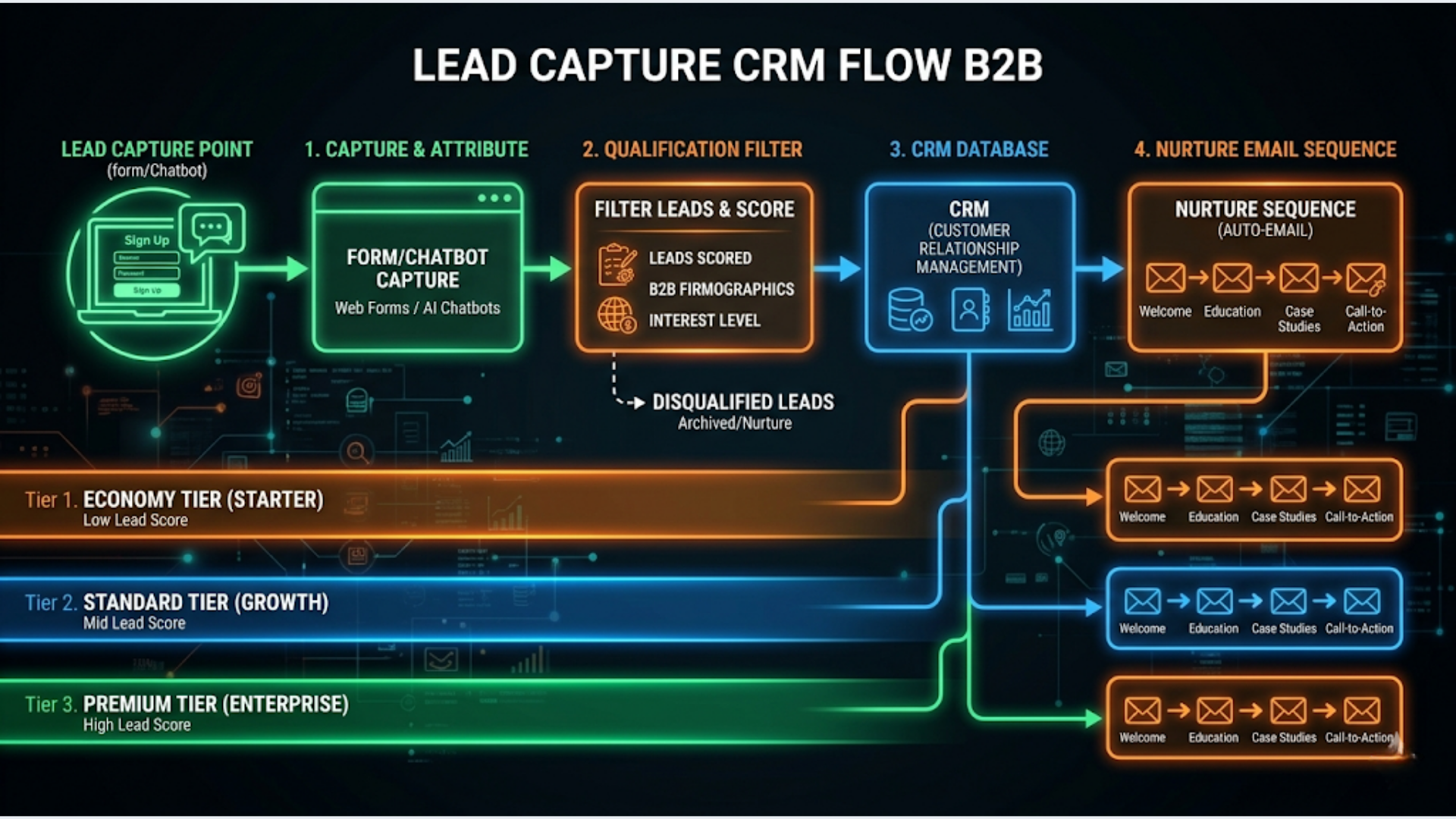
The ideal B2B lead capture flow converts a form submission into a qualified, scored, CRM-routed lead with an automated nurture sequence in under 60 seconds. Setup costs range from free (Tally + Zoho free) to $500/month (Typeform + HubSpot Professional). The right choice depends on your monthly lead volume and budget.
I build these systems for B2B service businesses. The pattern is always the same: leads come in through a form, someone manually checks if they’re qualified, someone else adds them to the CRM, a third person sends a follow-up email, and by the time all that happens, the lead has gone cold. The first business to respond usually wins. Speed matters more than perfect qualification.
Here’s the complete architecture, plus three setups at three price points.
The Ideal Lead Capture Flow (What Good Looks Like)
Before comparing tools, let’s define the flow. Every B2B service business needs these seven steps automated.
Step 1: Capture. Lead fills out a form on your website. The form collects: name, email, company, role, what they need help with, budget range (optional but valuable), and timeline.
Step 2: Qualify. Instant automated qualification based on form responses. Does this lead match your ideal customer profile? Budget above your minimum? Company size in your target range? Use case you actually serve?
Step 3: Score. Assign a lead score based on qualification signals. Budget > $5,000 gets points. “Ready to start this month” gets points. Company has 50+ employees gets points. “Just browsing” gets negative points. The score determines routing.
Step 4: Route. Hot leads (score above threshold) get routed to your calendar for immediate booking. Warm leads get a nurture sequence. Cold leads (low score) get a polite “we’ll keep in touch” email and are tagged for future outreach.
Step 5: CRM entry. The lead is automatically created in your CRM with all form data, qualification status, lead score, source (which page/campaign they came from), and assigned to the right pipeline stage.
Step 6: Notification. You (or your sales team) get an instant notification via Slack, email, or WhatsApp: “New hot lead: [Name] from [Company], wants [service], budget [range]. Calendar link sent.”
Step 7: Nurture. Automated email sequence starts based on the lead’s score and interests. Hot leads get a “looking forward to our call” email with a case study. Warm leads get a 5-email sequence over 2 weeks. Cold leads get monthly newsletter only.
All seven steps should complete within 60 seconds of form submission. The lead fills the form, gets a thank-you page, and by the time they check their email, they have a personalized response.
The Three Setups Compared
| Feature | Budget: Tally + Zoho | Mid-Range: Typeform + HubSpot | Custom: n8n + Any CRM |
|---|---|---|---|
| Monthly Cost | Free - ₹1,500 | $100-500/month | ₹2,000-5,000 (server) |
| Form Tool | Tally (free) | Typeform ($25-83/mo) | Any (Tally, Typeform, custom) |
| CRM | Zoho CRM (free-₹800/mo) | HubSpot ($0-800/mo) | Any (Zoho, HubSpot, Pipedrive) |
| Automation | Zoho Flow / Zapier | HubSpot Workflows | n8n (unlimited) |
| Lead Scoring | Manual/basic | Built-in (HubSpot Pro) | Custom logic |
| Email Sequences | Zoho Campaigns | HubSpot Sequences | Any email tool |
| Setup Time | 1-2 days | 2-5 days | 3-7 days |
| Technical Skill | Low | Low | Medium |
| Best For | <50 leads/month, budget-conscious | 50-500 leads/month, growing | 100+ leads/month, want full control |
| Scaling Limit | CRM free plan caps | HubSpot pricing tiers | None (self-hosted) |
Setup 1: Budget (Tally + Zoho CRM Free)
Total cost: Free to ₹1,500/month. Best for businesses getting started with fewer than 50 leads/month.
The form: Tally
Tally is the best free form builder for lead capture. Unlimited forms, unlimited submissions, conditional logic, hidden fields for UTM tracking, and it looks clean. Not “free tool” clean. Actually clean.
Build your lead capture form with:
- Name, email, phone (required)
- Company name and website (required)
- “What do you need help with?” (dropdown with your service categories)
- “What’s your budget range?” (dropdown: Under ₹50K, ₹50K-2L, ₹2L-5L, ₹5L+, Not sure)
- “When do you want to start?” (dropdown: This month, Next 1-2 months, Just exploring)
- Hidden fields: UTM source, UTM medium, UTM campaign (auto-captured from URL parameters)
The CRM: Zoho CRM Free
Zoho CRM’s free plan supports 3 users, 5,000 records, and basic automation. For a solo operator or small team doing under 50 leads/month, this is more than enough.
The connection: Zoho Flow or Zapier Free
When someone submits the Tally form, the integration creates a lead in Zoho CRM with:
- All form data mapped to CRM fields
- Lead source set to “Website Form”
- Lead score based on budget + timeline answers (use a formula field in Zoho)
- Pipeline stage set to “New Lead”
The notification: Zoho CRM built-in
Set up a workflow rule in Zoho CRM: when a new lead is created with score above X, send an email notification to yourself with lead details. For Slack notifications, use Zoho Flow or Zapier to push to a Slack channel.
The nurture: Zoho Campaigns (free for <2,000 contacts)
Create three email sequences:
- Hot leads: 1 email with a Calendly link and relevant case study
- Warm leads: 5 emails over 2 weeks (value content, case study, testimonial, FAQ, CTA)
- Cold leads: Added to monthly newsletter list
Limitations of this setup:
- Zoho CRM free has no workflow automation (only paid plans). You’ll need Zapier or Zoho Flow for the connection
- No built-in lead scoring. You’ll use a formula field or manual scoring
- Email sequences on Zoho Campaigns free are basic. No behavioral triggers
- Scaling beyond 5,000 contacts requires upgrading to paid Zoho
Setup 2: Mid-Range (Typeform + HubSpot)
Total cost: $100-500/month. Best for businesses processing 50-500 leads/month with budget to invest in growth.
The form: Typeform
Typeform’s conversational forms consistently show 40-60% completion rates vs. 20-30% for traditional forms. For B2B lead capture, that completion rate difference translates directly to more leads.
The conversational format (one question at a time) feels more like a chat than a form. For B2B service businesses, this creates a better first impression. Typeform also supports conditional logic, so you can ask different follow-up questions based on the service they’re interested in.
The CRM: HubSpot
HubSpot’s free CRM is legitimately powerful. Unlimited users, 1,000,000 contacts, deal tracking, email tracking, and basic automation. The paid tiers (Starter at $20/month, Pro at $800/month) add marketing automation, lead scoring, and advanced workflows.
HubSpot’s strength for B2B is the full lifecycle view. You see every page the lead visited, every email they opened, every form they filled. This context makes follow-up conversations dramatically more effective.
The connection: Native Typeform-HubSpot integration
Typeform has a native HubSpot integration. No Zapier needed. Form submissions create or update HubSpot contacts with full field mapping, UTM data, and form-specific properties.
The lead scoring: HubSpot (Pro plan)
HubSpot Pro includes predictive lead scoring. But even on the free plan, you can create manual lead scores using HubSpot’s property-based scoring:
- Budget > ₹2L: +20 points
- Timeline “This month”: +15 points
- Company size 50+: +10 points
- Visited pricing page: +10 points
- “Just browsing”: -15 points
Leads above 30 points are “hot.” 15-30 are “warm.” Below 15 are “cold.”
The routing:
Hot leads: HubSpot workflow triggers a meeting link email (using HubSpot’s meeting scheduler). The lead books a call without waiting for a human to respond. Simultaneously, you get a Slack notification with full lead details.
Warm leads: HubSpot workflow enrolls them in a nurture sequence. 5 emails over 14 days. Each email delivers value (case study, how-to guide, industry data) with a soft CTA to book a call.
Cold leads: Tagged for newsletter. No active sales outreach. They might convert in 3-6 months.
The nurture: HubSpot Sequences (Pro) or Workflows
HubSpot Pro’s sequences are specifically designed for B2B sales nurture. You can include emails, LinkedIn connection tasks, and manual follow-up tasks in a single sequence. If the lead replies or books a meeting, the sequence automatically stops (no one gets a “just following up” email after they’ve already booked a call).
Why this setup works for B2B:
- Typeform’s conversational format increases completion rates
- HubSpot’s lifecycle tracking gives context for every follow-up
- Native integration means no middleware to break
- Meeting scheduler eliminates the email ping-pong of scheduling
- Sequences adapt based on lead behavior
Limitations:
- HubSpot Pro at $800/month is expensive for businesses under $20K MRR
- Typeform at $83/month (Pro) adds to the bill
- HubSpot’s free/starter plans are limited in automation capabilities
- You’re locked into HubSpot’s ecosystem. Migration is painful later
Setup 3: Custom (n8n + Any CRM)
Total cost: ₹2,000-5,000/month (VPS hosting). Best for businesses that want full control, have 100+ leads/month, or need integrations that pre-built tools don’t support.
Why go custom:
The custom n8n approach makes sense when:
- You use a CRM that doesn’t have native integrations with your form tool
- You need complex qualification logic (API calls to verify company data, check LinkedIn profiles, etc.)
- You want to integrate WhatsApp, SMS, and email in a single flow
- You’re already running n8n for other automations and want everything in one place
- You refuse to pay $800/month for HubSpot Pro when n8n can replicate the workflows
The architecture:
- Form webhook. Any form tool (Tally, Typeform, Google Forms, custom HTML) submits to an n8n webhook URL
- Data enrichment. n8n calls enrichment APIs (Clearbit, Apollo, or free alternatives) to pull company size, industry, and revenue. Optional but powerful for scoring
- Lead scoring. n8n’s Code node runs your custom scoring logic. Any criteria you want, any weighting, any complexity. No platform limitations
- CRM creation. n8n creates the lead in your CRM (Zoho, HubSpot, Pipedrive, Salesforce, or even a Google Sheet if that’s what you use) with all data and the calculated score
- Smart routing. Based on score: hot leads get a Calendly/Cal.com link via email, warm leads enter a nurture sequence, cold leads get tagged
- Multi-channel notification. Slack message + WhatsApp message + email notification. All in the same workflow, all instant
- Nurture trigger. n8n triggers email sequences in your email tool (Brevo, Mailchimp, Zoho Campaigns, or even Gmail with scheduled sends)
What you gain:
- Zero per-contact or per-workflow fees. Your only cost is the server
- Full flexibility. Any form, any CRM, any notification channel, any logic
- Unified automation. Lead capture, nurture, follow-up reminders, and reporting in one platform
- Data ownership. Everything runs on your server. No vendor lock-in
What it costs you:
- 3-7 days of setup time (vs. 1-2 days for Tally+Zoho)
- Technical maintenance. Server updates, backup verification, error monitoring
- No visual email builder. You’ll use a separate email tool for sequences
- Debugging requires reading error logs, not clicking a “help” button
Common Mistakes in B2B Lead Capture
These errors cost businesses leads every day.
Mistake 1: Asking too many questions. Every additional form field reduces completion rate by 5-10%. For B2B, 5-7 fields is the sweet spot. Name, email, company, what they need, and budget range. That’s enough to qualify and route. Save the detailed questions for the discovery call.
Mistake 2: No instant response. If a lead submits a form at 2 PM and your first response is at 9 AM the next day, you’ve already lost to the competitor who auto-responded in 60 seconds. Automated acknowledgment with value (not just “we received your form”) is non-negotiable.
Mistake 3: Treating all leads the same. A lead with a ₹5L budget and “ready to start this month” gets the same generic email as someone “just browsing” with no budget. Scoring and routing fix this. It takes 2 hours to set up and immediately improves conversion.
Mistake 4: No nurture for warm leads. Hot leads book calls. Cold leads are ignored. But warm leads (the biggest segment, usually 50-60% of all leads) get nothing. A 5-email nurture sequence converts 10-15% of warm leads over 30 days. Without it, they forget you exist.
Mistake 5: No source tracking. If you don’t know which page, campaign, or channel generated each lead, you can’t optimize your marketing spend. Hidden UTM fields in your forms, passed through to your CRM, solve this completely.
The India Angle
Indian B2B service businesses have specific lead capture dynamics.
WhatsApp in the flow. For Indian leads, a WhatsApp follow-up gets 3-5x higher open rates than email. After form submission, sending a WhatsApp message (“Hi [Name], I saw your inquiry about [service]. Here’s a 2-min case study that’s relevant to you: [link]”) is more effective than email for Indian B2B leads. Integrate WATI or Interakt into your flow alongside email.
Regional CRM preferences. Indian SMBs disproportionately use Zoho CRM (it’s Indian-made, competitively priced, and supports GST invoicing). If your target clients are Indian SMBs, showing Zoho CRM in your stack signals you understand their ecosystem.
Price sensitivity on tools. HubSpot Professional at $800/month is a hard sell for Indian service businesses billing ₹5-15L/month. The Tally + Zoho or n8n + Zoho setup is more realistic for most Indian B2B businesses. Reserve HubSpot for businesses with $50K+ MRR.
Discovery call scheduling across time zones. If you serve both Indian and international clients, your meeting scheduler needs to handle IST and the client’s local time zone. Cal.com and Calendly both handle this well. HubSpot’s meeting scheduler does too. But make sure your availability settings account for both audiences.
Compliance. India’s upcoming DPDP Act (Digital Personal Data Protection) affects how you collect, store, and process lead data. Ensure your forms include consent checkboxes and your CRM is configured to handle data deletion requests. This isn’t optional anymore.
FAQ
What’s the best free lead capture setup? Tally (free forms, unlimited submissions) + HubSpot CRM (free, unlimited contacts) + Zapier Free (100 tasks/month). This handles up to 50 leads/month at zero cost. The limitation is Zapier’s free plan (100 tasks/month), which you’ll outgrow first.
How many form fields should a B2B lead capture form have? 5-7 fields. Name, email, company, what they need, budget range, and timeline. Every field beyond 7 reduces completion rate by 5-10%. If you need more information, collect it during the discovery call or through a progressive profiling strategy (asking one new question each time they interact with you).
Should I gate content behind forms? For B2B, gated content (download a guide in exchange for email) still works but completion rates are declining. The trend is toward “ungated + retargeting.” Publish the content openly, retarget visitors with ads, and capture leads when they’re ready to talk. If you do gate content, make the content genuinely valuable. A 3-page PDF that could be a blog post doesn’t earn an email address.
Typeform vs. Tally vs. Google Forms? Typeform has the highest completion rates (conversational format) but costs $25-83/month. Tally is free with features that match Typeform for basic lead capture. Google Forms is free and functional but looks unprofessional for B2B. For B2B service businesses, Tally is the best value. Upgrade to Typeform if you can prove the completion rate increase justifies the cost.
How fast should I respond to a lead? Under 5 minutes. Studies consistently show that responding within 5 minutes is 21x more likely to qualify a lead than responding after 30 minutes. Automated responses achieve this instantly. Follow up with a human touch (personalized email or call) within 2 hours for hot leads.
Do I need a separate CRM or can I use a spreadsheet? Under 20 leads/month, a Google Sheet with automation (via n8n or Zapier) works fine. Beyond 20 leads/month, a CRM saves time. Pipeline visualization, automated reminders, contact history, and reporting become essential. Zoho CRM Free supports 5,000 records and 3 users. There’s no reason to use a spreadsheet beyond 20 leads/month.
What’s the ROI of automating lead capture? A B2B service business converting 5% of leads into clients (industry average) at ₹2L average deal size needs to capture 20 leads to close 1 deal worth ₹2L. If automation increases your lead volume by 30% (through better form completion and faster follow-up) and your conversion rate by 20% (through scoring and nurture), you’re generating 50% more revenue from the same marketing spend. The math works at almost any scale.
Need help implementing this?
Book a free 30-minute discovery call. We'll map your current setup, identify quick wins, and outline what automation can do for your business.
Book a Free Discovery Call