Best Automation Stack for SaaS Startups (2026)
Best automation stack for SaaS startups in 2026. Comparison of user onboarding, trial-to-paid conversion, churn prediction, support routing, and billing automation tools at 3 price points.
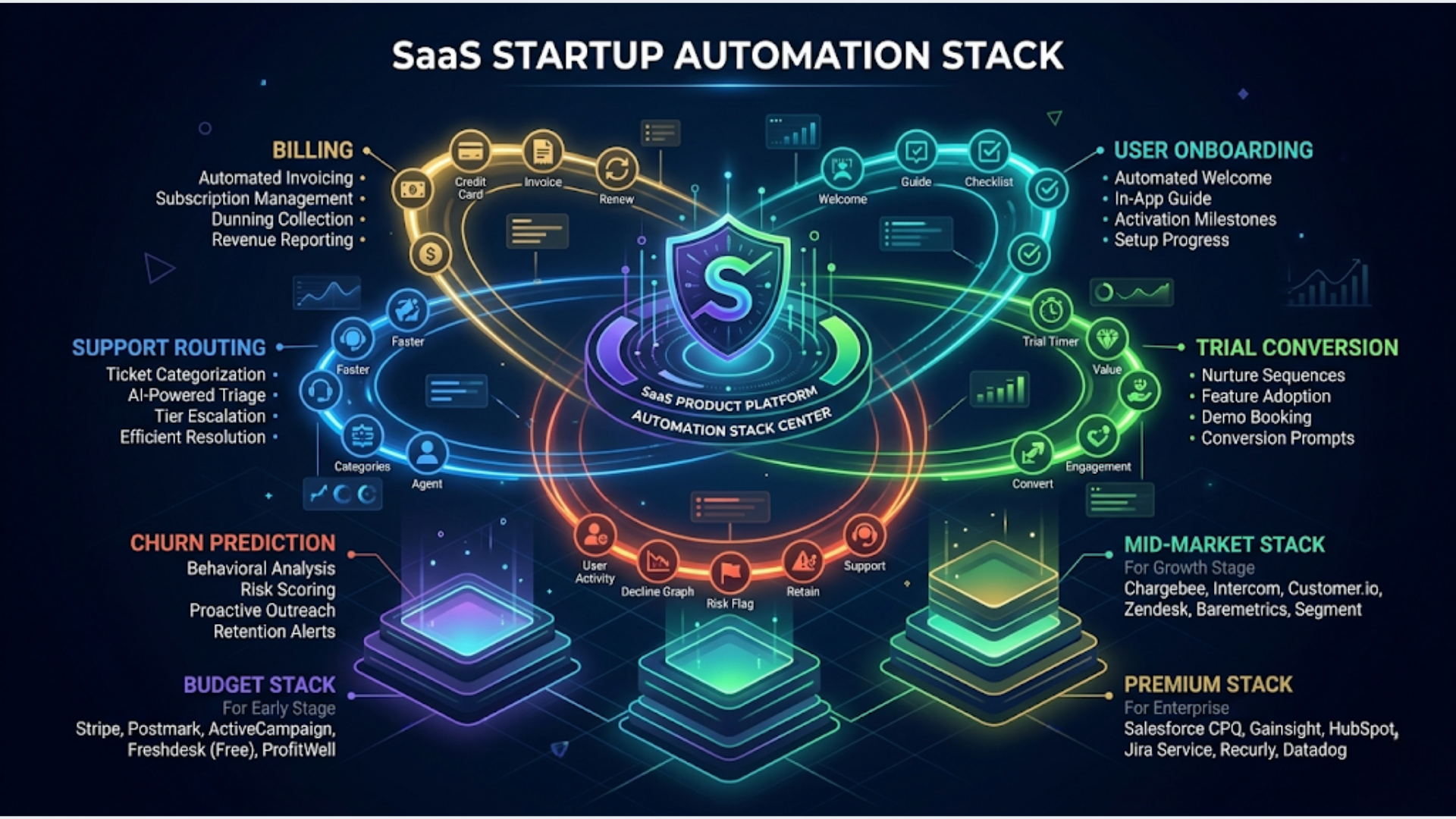
Best Automation Stack for SaaS Startups (2026)
The right automation stack for a SaaS startup in 2026 costs between $150 and $800/month and covers five critical workflows: user onboarding, trial-to-paid conversion, churn prediction, support ticket routing, and billing automation. Get these five right and you’ve automated 70% of the operational work that kills early-stage startups.
Most SaaS founders either over-engineer (buying enterprise tools at Series A stage) or under-invest (running everything through Slack messages and Google Sheets). Both paths waste money and time.
I build these systems. The pattern I see: startups that automate these five workflows early grow 2x faster than those that hire ops people to do them manually. Not because automation is magic. Because consistency beats heroics at scale.
Here’s the complete breakdown by workflow, with recommendations at three budget levels.
User Onboarding Automation
Onboarding is where most SaaS startups lose users. Industry average: 40 to 60% of free trial users never complete onboarding. Automating the onboarding flow with triggered emails, in-app nudges, and milestone tracking cuts that drop-off by 20 to 30%.
What the automation does:
User signs up
    |
    v
Welcome email (immediate)
    |
    v
Track: Did they complete Step 1? (within 24 hours)
    |
    +--> Yes: Send "great progress" email + unlock next guide
    |
    +--> No: Send nudge email with a direct link to Step 1
    |
    v
Track: Key activation event completed? (within 72 hours)
    |
    +--> Yes: Move to trial-to-paid nurture sequence
    |
    +--> No: Send personal-looking email from founder + in-app tooltip
    |
    v
Day 5 with no activation: Trigger human outreach (Slack alert to CS team)
Tool recommendations by budget:
| Budget | Email/Messaging | Event Tracking | Workflow Engine |
|---|---|---|---|
| Bootstrap ($50-100/mo) | Customer.io Essentials | Segment (free tier) or Rudderstack | n8n self-hosted |
| Growth ($200-400/mo) | Customer.io Premium | Segment Growth | n8n cloud or Make |
| Scale ($500-800/mo) | Braze or Iterable | Segment Business | n8n cloud + dedicated |
Why Customer.io over Mailchimp or Brevo: Customer.io was built for event-driven messaging. You send it user events (signed_up, completed_step_1, activated), and it handles the branching logic natively. Mailchimp is for newsletters. Brevo is getting better but still plays catch-up on event-driven flows.
India-specific: If you’re building for the Indian market, consider Engage by Freshworks. INR pricing, solid event-driven campaigns, and native Freshdesk integration if you’re already in the Freshworks ecosystem. Starting at Rs 1,399/month for 1,000 contacts.
Trial-to-Paid Conversion Automation
The gap between “active trial user” and “paying customer” is where revenue lives or dies. Average SaaS trial-to-paid conversion: 15 to 20% for opt-in trials, 40 to 60% for reverse trials (full features, then downgrade).
The conversion automation stack:
- Usage scoring: Track which trial users are power users versus casual browsers. Score based on feature usage, session frequency, and depth of engagement
- Segment-based messaging: High-usage users get pricing-focused nudges. Low-usage users get value-demonstration content
- Upgrade triggers: When a user hits a usage limit (storage, API calls, team seats), trigger an upgrade prompt immediately
- Sales handoff: Users above a deal size threshold get routed to a human. n8n sends a Slack message to sales with the user’s activity summary
Tools that handle this well:
| Tool | What It Does | Price |
|---|---|---|
| Segment | Collects and routes user events | Free to $120/month |
| n8n | Orchestrates the workflow logic, scoring, routing | $24/month cloud |
| Customer.io | Sends the right message at the right time | $100/month |
| Stripe | Handles the actual upgrade/billing | 2.9% + $0.30 per transaction |
| Slack | Internal alerts for sales handoffs | Free |
The scoring model:
Build a simple lead score in n8n. No ML needed at this stage.
Points system:
+10  Logged in 3+ days this week
+15  Used core feature (your aha moment)
+5   Invited a team member
+20  Hit a usage limit
+10  Visited pricing page
-10  No login in 5+ days
-5   Ignored last 3 emails
Users above 40 points: hot. Trigger upgrade nudge. Users at 20 to 40: warm. Send case study or demo video. Users below 20: cold. Re-engagement sequence or let them go.
Don’t overthink this. A simple points-based system outperforms gut feeling every time. Refine the weights after you have 200+ trial completions worth of data.
Churn Prediction and Prevention
Churn prediction for SaaS isn’t about building a machine learning model on day one. It’s about tracking the three to five signals that precede cancellation and acting on them automatically.
Universal churn signals:
| Signal | Warning Level | Timeframe |
|---|---|---|
| Login frequency drops 50%+ | High | Week over week |
| Support tickets increase 3x | Medium | Within 30 days |
| Key feature usage stops | High | 14 days of inactivity |
| Billing failure (card declined) | Critical | Immediate |
| Admin removes team members | High | Any occurrence |
| Downgrade from higher plan | Medium | Any occurrence |
The automated response:
Churn signal detected
    |
    v
Score severity (1-10 based on signal combination)
    |
    +--> Score 8-10 (critical): Slack alert to CS lead + auto-schedule call
    |
    +--> Score 5-7 (warning): Personalized email from CS + in-app survey
    |
    +--> Score 1-4 (early): Automated re-engagement email sequence
    |
    v
Log to churn risk dashboard (Google Sheets or Metabase)
Tool stack for churn prevention:
| Budget | Approach | Tools |
|---|---|---|
| Bootstrap | Manual scoring + n8n alerts | n8n + Google Sheets + Slack |
| Growth | Event-driven scoring + automated outreach | Segment + n8n + Customer.io + Slack |
| Scale | Predictive model + automated playbooks | Segment + custom ML model + n8n + Intercom |
The bootstrap approach works surprisingly well. A Google Sheet with a formula that scores each customer based on three signals (login frequency, feature usage, support tickets) plus n8n checking it daily and sending Slack alerts catches 80% of what a $500/month predictive tool would catch.
Billing failure recovery is the easiest churn win. 20 to 40% of SaaS churn is involuntary (failed payments). Set up automated dunning: card fails, send email immediately, retry in 3 days, send another email, retry in 7 days, final warning, cancel after 14 days. Stripe handles the retry logic. n8n handles the notification sequence. This alone recovers 30 to 50% of otherwise-lost customers.
Support Ticket Routing and Classification
Manual ticket triage wastes 3 to 5 hours per week for a small CS team. AI classification routes tickets to the right person or the right response in seconds.
The routing architecture:
New support ticket arrives (email, chat, or form)
    |
    v
AI classification (OpenAI GPT-4o-mini)
    |
    v
Categories: billing, technical-bug, feature-request, how-to, urgent
    |
    +--> Billing: Route to billing team + check account status
    |
    +--> Technical bug: Route to engineering + create GitHub issue
    |
    +--> Feature request: Log to feature board + auto-reply with timeline
    |
    +--> How-to: AI drafts response from knowledge base, human reviews
    |
    +--> Urgent: Slack alert to on-call + auto-acknowledge to customer
AI classification accuracy: With a well-tuned prompt and 50 to 100 example tickets, GPT-4o-mini classifies with 90 to 95% accuracy. At $0.15 per 1M input tokens, the cost is negligible. We’re talking fractions of a cent per ticket.
Recommended stack:
| Component | Bootstrap | Growth | Scale |
|---|---|---|---|
| Ticket system | Freshdesk Free or Gmail | Freshdesk Growth | Intercom or Zendesk |
| AI classification | OpenAI via n8n | OpenAI via n8n | OpenAI + custom model |
| Workflow engine | n8n | n8n | n8n |
| Knowledge base | Notion | Freshdesk KB | Intercom Articles |
| Alerting | Slack | Slack | PagerDuty + Slack |
India context: Freshdesk is a Freshworks product, headquartered in Chennai. Their free tier supports up to 10 agents, which covers most startups through Series A. INR pricing on paid plans. If you’re a SaaS startup in India, Freshdesk is the default choice for a reason.
The “how-to” auto-response is the biggest time saver. 40 to 50% of support tickets are questions answered in your docs. AI reads the ticket, searches your knowledge base, drafts a response, and queues it for human review. The support agent clicks approve or edits slightly. Time per ticket drops from 8 minutes to 90 seconds.
Billing Automation and Revenue Operations
SaaS billing is deceptively complex. Proration, plan changes, add-ons, usage-based components, tax compliance, failed payments, refunds. Automating this end to end prevents revenue leakage.
The billing automation stack:
| Component | Tool | Why |
|---|---|---|
| Payments | Stripe | Industry standard. Best API. Best docs |
| Subscription management | Stripe Billing | Native. Handles proration, trials, upgrades |
| Tax compliance | Stripe Tax | Automatic tax calculation for 50+ countries |
| Invoicing | Stripe Invoicing | Auto-generates, includes tax, sends to customer |
| Revenue recognition | Stripe Revenue Recognition or Baremetrics | GAAP compliance, MRR tracking |
| Failed payment recovery | Stripe Smart Retries + n8n dunning emails | Recovers 30-50% of failed payments |
| Internal reporting | n8n + Google Sheets or Metabase | Daily MRR, churn, expansion dashboards |
India-specific: If your primary market is India, Razorpay Subscriptions handles recurring billing in INR with UPI autopay, which is critical for the Indian market. Stripe works for international billing. Many Indian SaaS companies run both: Razorpay for India, Stripe for global.
Automated billing events to handle:
- New subscription: Create customer record, provision access, send welcome invoice
- Upgrade/downgrade: Prorate charges, update access level, confirm change
- Failed payment: Dunning sequence (email + in-app banner + grace period)
- Cancellation: Trigger offboarding flow, save reason, offer retention deal
- Renewal: Send invoice, update MRR dashboard, check for expansion opportunities
The n8n orchestration layer:
Stripe sends webhooks for every event. n8n catches them and orchestrates the business logic. Example: when a subscription upgrades, n8n updates your CRM, notifies your CS team, sends a thank-you email, and logs the MRR change to your dashboard. All automatic.
Revenue leakage prevention: Build a daily reconciliation job in n8n. Compare active subscriptions in Stripe against active accounts in your app. Flag mismatches. I’ve seen SaaS startups discover 5 to 10% revenue leakage from provisioning bugs (users paying but not getting access, or users with access but no active subscription). This check pays for itself immediately.
The Complete Stack at Three Budget Levels
Here’s everything consolidated.
Bootstrap ($150-250/month):
| Layer | Tool | Cost |
|---|---|---|
| Workflow engine | n8n self-hosted | $12-24/month (VPS) |
| Email automation | Customer.io Essentials | $100/month |
| Event tracking | Rudderstack Free | Free |
| Support | Freshdesk Free | Free |
| Billing | Stripe | Transaction fees only |
| AI (classification, drafts) | OpenAI API | $5-15/month |
| Dashboards | Google Sheets | Free |
| Alerts | Slack Free | Free |
Growth ($400-600/month):
| Layer | Tool | Cost |
|---|---|---|
| Workflow engine | n8n Cloud | $24-50/month |
| Email automation | Customer.io Premium | $150/month |
| Event tracking | Segment Growth | $120/month |
| Support | Freshdesk Growth | $15/agent/month |
| Billing | Stripe + Baremetrics | $50-100/month |
| AI | OpenAI API | $15-30/month |
| Dashboards | Metabase (self-hosted) | Free |
| Alerts | Slack Pro | $7.25/user/month |
Scale ($600-1,000/month):
| Layer | Tool | Cost |
|---|---|---|
| Workflow engine | n8n Cloud (dedicated) | $50-100/month |
| Messaging | Braze or Customer.io Premium | $200-400/month |
| Event tracking | Segment Business | $120+/month |
| Support | Intercom Starter | $74/month |
| Billing | Stripe + Revenue Recognition | Included in Stripe |
| AI | OpenAI + custom models | $30-50/month |
| Dashboards | Metabase Cloud | $85/month |
| Alerts | Slack + PagerDuty | $50/month |
Which level to start with: If you’re pre-revenue or under $10K MRR, start with Bootstrap. If you’re at $10K to $50K MRR, Growth is the sweet spot. Scale when you cross $50K MRR or have a CS team of 3+.
Don’t buy tools you won’t configure. A half-implemented Growth stack performs worse than a fully-implemented Bootstrap stack. Every tool needs setup, integration, and maintenance. Pick the level you can actually execute on.
FAQ
Should I build custom or use no-code tools?
At the startup stage, no-code and low-code wins every time. n8n, Segment, and Customer.io give you 90% of what a custom system would. Save engineering time for your product. Build custom only when you outgrow the tools (usually past $100K MRR).
How long does it take to set up the full stack?
Expect 2 to 3 weeks to get all five workflows running. Onboarding and billing automation in week 1. Trial conversion and support routing in week 2. Churn prediction in week 3. Budget 40 to 60 hours of someone’s focused time.
Can I use Zapier instead of n8n?
You can. But Zapier gets expensive fast for SaaS workloads. A startup processing 5,000 events/day will burn through Zapier’s task limits quickly. n8n self-hosted has no task limits. n8n Cloud is capped but still cheaper than equivalent Zapier plans. Zapier makes sense only if you need speed of setup over cost efficiency and your volume is low.
What about HubSpot for everything?
HubSpot’s Starter CRM is fine for sales. But using HubSpot for onboarding emails, support, and billing creates vendor lock-in and gets expensive ($800+/month for Marketing Hub Professional). Best-of-breed tools connected through n8n give you more flexibility at lower cost.
How do I handle GDPR and data privacy with this stack?
Segment handles consent management. Customer.io respects unsubscribe flags. Stripe is PCI compliant. For GDPR, ensure you have data processing agreements with each vendor (most provide them by default). n8n self-hosted keeps your workflow data on your infrastructure. If privacy is critical, self-host Rudderstack too.
Is this stack relevant for Indian SaaS startups?
Absolutely. Replace Stripe with Razorpay for INR billing, use Freshdesk instead of Intercom (INR pricing, local support), and consider MSG91 for transactional SMS in India. Everything else applies directly. The event-driven architecture works regardless of market.
What’s the first automation I should build?
Failed payment recovery. It takes 2 hours to set up, requires only Stripe webhooks and n8n, and immediately recovers revenue. I’ve seen it add 5 to 8% to MRR within the first month. Start there, then build onboarding flows.
I build automation stacks for SaaS startups from onboarding to billing recovery. If you’re spending engineering hours on ops work that should be automated, triggerAll can architect and build your stack.
Need help implementing this?
Book a free 30-minute discovery call. We'll map your current setup, identify quick wins, and outline what automation can do for your business.
Book a Free Discovery Call