Best Automation for Accounting Firms (2026)
Best automation tools and workflows for accounting firms in 2026. Invoice collection, receipt processing, bank reconciliation, tax reminders, and client communication using Zoho Books, n8n, and WhatsApp.
Best Automation for Accounting Firms (2026)
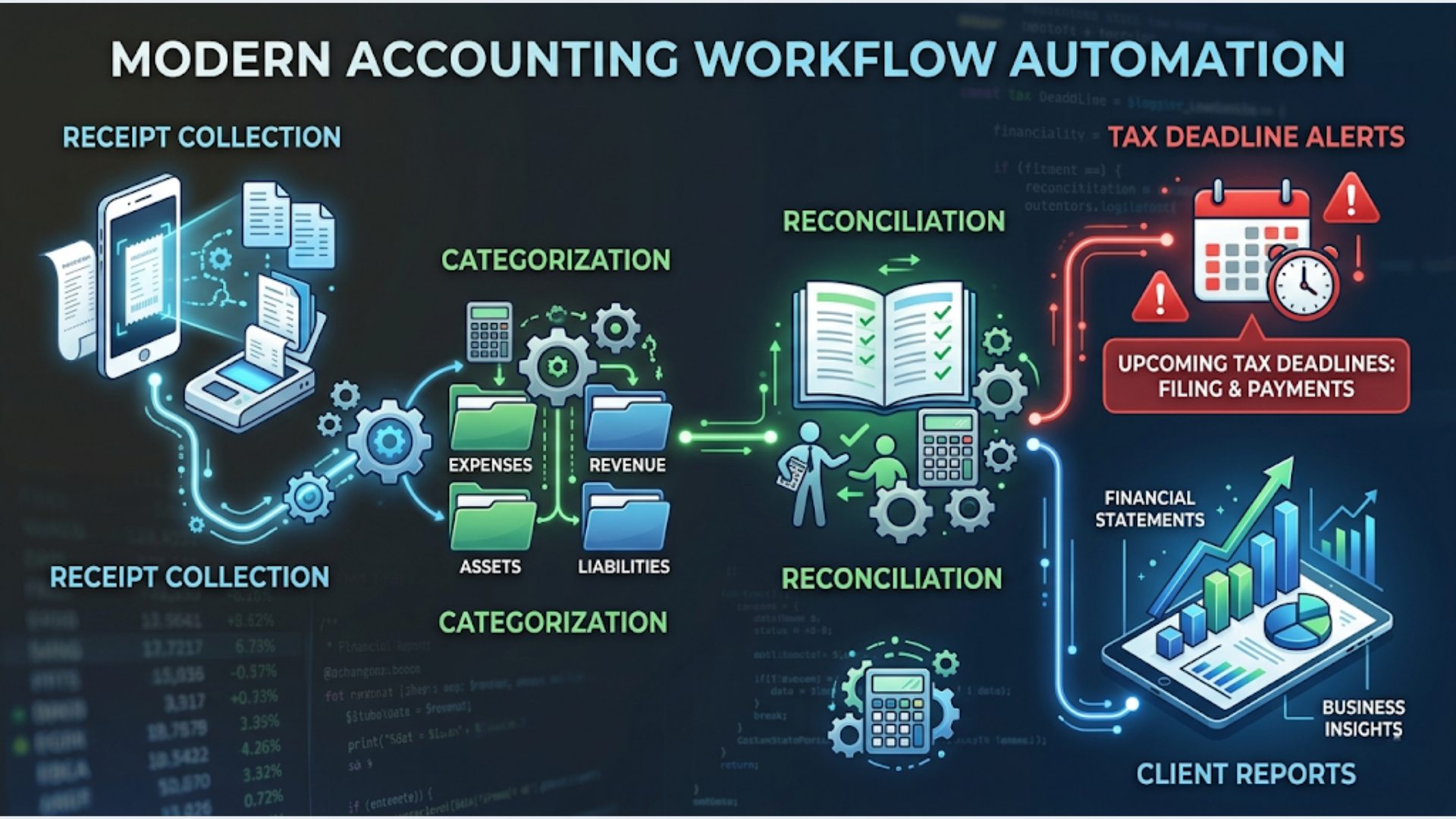
The five workflows every accounting firm should automate in 2026: invoice and receipt collection ($0 manual effort), bank reconciliation (90% auto-matched), tax deadline reminders (zero missed deadlines), client document requests (auto-chase), and recurring report generation (one click, not one day).
The tools: Zoho Books or QuickBooks as your accounting backbone, n8n for workflow automation, WhatsApp for client communication, Google Sheets for tracking, and AI for document processing. Total cost: $30 to $100 per month depending on scale.
I build these systems. Accounting firms are some of the most automation-hungry businesses I see because the work is high-volume, deadline-driven, and painfully repetitive. Yet most firms still run on email, WhatsApp groups, and Excel files stitched together with willpower.
Here is what actually works.
Invoice Collection and Receipt Processing
This is the biggest time sink in any accounting practice. Clients send invoices and receipts via email, WhatsApp, Google Drive links, paper photos, and sometimes as screenshots. Your team manually downloads, categorizes, enters data, and files them.
A mid-size accounting firm handling 50 clients processes 500 to 2,000 receipts per month. At 2 minutes per receipt for manual entry, that is 16 to 66 hours of data entry. Every month.
The automated workflow:
Step 1: Single collection point.
Set up a dedicated email address (receipts@yourfirm.com) and a WhatsApp Business number. Clients send all invoices and receipts to one of these two channels. No more hunting through personal WhatsApp chats and email threads.
Step 2: Auto-extract with AI.
An n8n workflow monitors the email inbox and WhatsApp channel. When a new document arrives:
- n8n extracts the attachment (PDF, image, or photo).
- Sends it to an OCR + AI extraction service (Google Cloud Vision, or a specialized tool like Dext, AutoEntry, or Veryfi).
- The AI extracts: vendor name, date, amount, tax amount (GST/IGST split for India), invoice number, and category.
- Returns structured data to n8n.
Step 3: Auto-categorize and enter.
n8n takes the extracted data and:
- Matches the vendor to existing contacts in Zoho Books or QuickBooks.
- Creates an expense entry or bill with the extracted details.
- Attaches the original document to the entry.
- Categorizes it based on vendor history (the AI learns your categorization patterns).
- Flags uncertain entries for human review instead of guessing.
Accuracy: Modern OCR + AI hits 85 to 95% accuracy on clean invoices. Handwritten receipts and blurry photos drop to 70 to 80%. Your team reviews flagged entries instead of entering everything manually.
India-specific: GST compliance requires extracting GSTIN, HSN/SAC codes, CGST/SGST/IGST split, and invoice type (tax invoice vs bill of supply). Tools like ClearTax, Zoho Books, and Dext have India-specific extraction models that handle this. Generic OCR tools often miss the GST components.
Cost: Dext starts at $24/month. AutoEntry at $12/month. Veryfi API at $0.10 per document. For 500 receipts per month, budget $12 to $50/month for extraction. Compare to 30+ hours of manual data entry.
Bank Reconciliation Automation
Bank reconciliation is the weekly ritual that eats 4 to 8 hours for a typical accounting firm managing 20+ client accounts.
How automation transforms this:
Direct bank feeds. Zoho Books and QuickBooks both support direct bank feeds for most Indian banks (HDFC, ICICI, SBI, Axis, Kotak) and international banks. Transactions import automatically daily. No manual CSV uploads.
Auto-matching rules. Set up matching rules in your accounting software:
- Transactions from “SWIGGY” or “ZOMATO” always categorize as “Business Meals.”
- Recurring amounts from specific payees match to standing invoices.
- Salary transfers on specific dates match to payroll entries.
- UPI transactions from known vendors match to purchase orders.
Zoho Books’ auto-matching typically handles 70 to 90% of transactions correctly. The remaining 10 to 30% need human review.
n8n enhancement layer:
For the transactions that don’t auto-match, n8n can:
- Pull unmatched transactions from Zoho Books via API.
- Send them to Claude or GPT with the client’s chart of accounts and recent categorization history.
- AI suggests the most likely category and matching invoice.
- Post suggestions back to the accounting software for one-click approval.
This reduces the human review pile from 30% to 5 to 10%.
India-specific: UPI transactions are the reconciliation nightmare. The same vendor might appear as “PhonePe Merchant,” “GPay - VENDOR NAME,” or a random UPI ID. Build a lookup table in Google Sheets mapping common UPI variants to vendor names. n8n checks this table before attempting auto-match.
Tax Deadline Reminders and Compliance Tracking
Missed tax deadlines mean penalties. For Indian accounting firms managing 50+ clients, tracking GST return dates (GSTR-1, GSTR-3B, GSTR-9), TDS deposit dates (7th of every month), advance tax deadlines, ITR filing dates, and compliance certificates is a full-time job.
The automated system:
Step 1: Build the compliance calendar.
Create a Google Sheet or Airtable base with:
- Client Name
- PAN / GSTIN
- Compliance Type (GSTR-1, GSTR-3B, TDS, ITR, etc.)
- Frequency (Monthly, Quarterly, Annual)
- Due Date (calculated based on frequency and client type)
- Status (Pending, Data Collected, Filed, Overdue)
- Assigned To (which team member handles this)
Step 2: Automated reminder sequences.
n8n workflows trigger based on dates:
- 14 days before deadline: Email + WhatsApp to the team member: “GSTR-1 due for [Client] on [Date]. Current status: Pending.”
- 7 days before deadline: If status is still “Pending,” escalation WhatsApp to the manager: “[Client] GSTR-1 still pending. 7 days remaining.”
- 7 days before deadline (client-facing): WhatsApp to the client: “Your GSTR-1 filing is due on [Date]. Please share pending purchase invoices by [Date - 3 days].”
- 2 days before deadline: Final reminder to team + client if status is not “Filed.”
- Day of deadline: If not filed, red flag alert to the firm owner.
Step 3: Auto-chase for missing documents.
The biggest delay in tax filing is waiting for clients to send documents. An n8n workflow:
- Checks which documents are missing for upcoming filings.
- Sends the client a WhatsApp message listing exactly what is needed.
- Repeats every 3 days until all documents are received.
- Sends the documents to the assigned team member via Slack when they arrive.
India-specific deadlines this handles:
| Compliance | Due Date | Frequency |
|---|---|---|
| GSTR-1 | 11th of following month | Monthly |
| GSTR-3B | 20th of following month | Monthly |
| TDS Payment | 7th of following month | Monthly |
| TDS Return (24Q/26Q) | 31st of following quarter | Quarterly |
| Advance Tax | 15th Jun/Sep/Dec/Mar | Quarterly |
| ITR (non-audit) | 31st July | Annual |
| ITR (audit) | 31st October | Annual |
| GSTR-9 (Annual) | 31st December | Annual |
One n8n workflow handles all of this for all clients. Zero missed deadlines.
Client Communication Automation
Accounting firms send the same types of messages hundreds of times per year. Monthly statements, fee reminders, document requests, filing confirmations, year-end checklists.
What to automate:
Monthly statement delivery:
After monthly bookkeeping is complete, n8n:
- Generates a PDF statement from Zoho Books (via API export).
- Emails it to the client with a standard cover note.
- Sends a WhatsApp message: “Your [Month] financial statement is ready. Check your email for details.”
- Updates the tracking sheet.
Fee collection automation:
- n8n generates invoices on the 1st of every month based on client retainer amounts.
- Sends the invoice via email + WhatsApp with a payment link (Razorpay, UPI, or bank transfer details).
- If not paid in 7 days: gentle reminder via WhatsApp.
- If not paid in 15 days: follow-up email + WhatsApp.
- If not paid in 30 days: flag to the firm owner for a personal call.
- When payment is received (detected via Razorpay webhook or bank feed), auto-sends a thank you + receipt.
Year-end document checklist:
Before financial year-end, n8n sends each client a customized checklist of documents needed for annual filing. Personalized based on their entity type (individual, partnership, company, LLP) and services subscribed.
The WhatsApp advantage in India:
Email open rates for Indian businesses: 15 to 25%. WhatsApp message read rates: 90%+.
For Indian accounting firms, WhatsApp is not optional. It is the primary communication channel. WATI or the WhatsApp Business API with n8n handles template messages, personalization, and delivery tracking.
Recurring Reports and Dashboards
Partners and managers in accounting firms need reports: revenue by client, work-in-progress, team utilization, overdue invoices, upcoming deadlines.
Building these manually in Excel every week is a 2 to 4 hour exercise.
The automated approach:
Google Sheets as the dashboard backend. n8n pulls data from Zoho Books (revenue, invoices, expenses), the compliance tracker (filing status), and team task logs (work-in-progress). Populates a master Google Sheet every Monday at 8 AM.
Google Looker Studio as the visual dashboard. Connect Looker Studio (free) to the Google Sheet. Build visual dashboards showing:
- Revenue by client (bar chart)
- Overdue invoices (table with aging buckets)
- Filing compliance status (pie chart: filed vs pending vs overdue)
- Team workload (tasks assigned vs completed)
- Monthly revenue trend (line chart)
The dashboard updates automatically because the underlying Sheet updates automatically. Zero manual effort after initial setup.
Weekly email report:
n8n compiles a text summary of key metrics and emails it to partners every Monday morning. No login required. The numbers arrive in their inbox.
The Complete Accounting Automation Stack
| Tool | Purpose | Cost/Month |
|---|---|---|
| Zoho Books | Accounting software | $15-40 (Standard to Pro) |
| n8n (self-hosted) | Workflow automation | $0 + $5-12 VPS |
| WATI or WhatsApp API | Client communication | $40 (WATI) or $0 (first 1,000 conversations) |
| Dext or AutoEntry | Receipt/invoice OCR | $12-24 |
| Google Sheets | Tracking and dashboards | $0 |
| Google Looker Studio | Visual dashboards | $0 |
| Cal.com | Meeting scheduling | $0 |
| Claude/GPT API | AI categorization | $5-15 |
Total: $37 to $130 per month depending on choices.
Compare to dedicated accounting practice management software like Karbon ($59/user/month), Canopy ($50/user/month), or TaxDome ($50/month). A 5-person firm would pay $250 to $295/month for those tools. This stack does 80% of what they do at a fraction of the cost.
FAQ
Is this secure enough for client financial data?
Zoho Books is SOC 2 Type II and ISO 27001 certified. Google Workspace (paid) offers data encryption at rest and in transit. n8n self-hosted means your data stays on your server. The weakest link is WhatsApp, where messages are end-to-end encrypted but business API messages are stored on Meta’s servers. For highly sensitive communications, use encrypted email. For routine updates and reminders, WhatsApp is acceptable.
How long does it take to set up the full stack?
Plan 2 to 3 weekends for the complete setup. Week 1: receipt processing + bank feed setup. Week 2: compliance calendar + reminder workflows. Week 3: client communication automation + dashboards. You can go live incrementally. Start with the workflow that saves the most time for your firm.
Can this handle multi-entity clients?
Yes. In the compliance tracker, add a “Entity” field alongside the client name. One client might have 3 entities (a company, an LLP, and an individual return). Each entity gets its own row with its own deadlines and document requirements. The n8n workflows send consolidated messages to the client grouping all their entities.
What about e-invoicing and e-way bill automation?
Zoho Books supports IRN generation for e-invoicing (mandatory for businesses with turnover above 5 crore in India). E-way bill generation integrates natively. For firms using Tally, the NIC e-invoice portal API can be connected via n8n to auto-generate IRN numbers. This is a specialized workflow worth setting up if your clients do B2B invoicing at scale.
Does AI categorization actually work for Indian accounting?
For standard expense categories (rent, utilities, travel, materials, professional fees), yes. Accuracy is 85 to 90% after training on 2 to 3 months of your client’s data. For specialized categories (like distinguishing CGST input credit eligible vs non-eligible expenses), you need custom prompt engineering. It works, but requires setup.
What if our clients are not tech-savvy?
Most clients don’t need to learn anything new. They already use WhatsApp. They already use email. The automation meets them where they are. The only “new” thing is a Google Form link for document uploads. Even that is optional. Clients can keep sending receipts via WhatsApp. The OCR workflow picks them up from there.
Can I start small and expand?
Absolutely. Start with one workflow: tax deadline reminders. It takes 2 hours to set up and immediately prevents missed deadlines. Then add receipt processing. Then client communication. Each workflow is independent. You don’t need the full stack to get value.
Accounting firm automation is one of the most rewarding systems to build because the time savings compound every month. If your firm is drowning in data entry and deadline tracking, there is a clear path out. See what triggerAll builds for professional services firms.
Need help implementing this?
Book a free 30-minute discovery call. We'll map your current setup, identify quick wins, and outline what automation can do for your business.
Book a Free Discovery Call