Stop Manually Moving Data Between Tools: The Automation Migration Playbook
Step-by-step playbook for migrating manual processes to automation. Audit, prioritize by ROI, build a roadmap, and execute without business disruption.
Stop Manually Moving Data Between Tools: The Automation Migration Playbook
The average small business loses 15-25 hours per week to manual data movement between tools. Automating the top 5 processes typically costs ₹1,50,000-5,00,000 ($2,000-6,000) and pays for itself in 2-4 months through saved labor and reduced errors.
I build these systems for businesses. The pattern is consistent: someone fills a form, someone else copies that data into a CRM, a third person creates a task in the project management tool, and a fourth person sends a confirmation email. Four humans doing what one webhook could handle in 3 seconds.
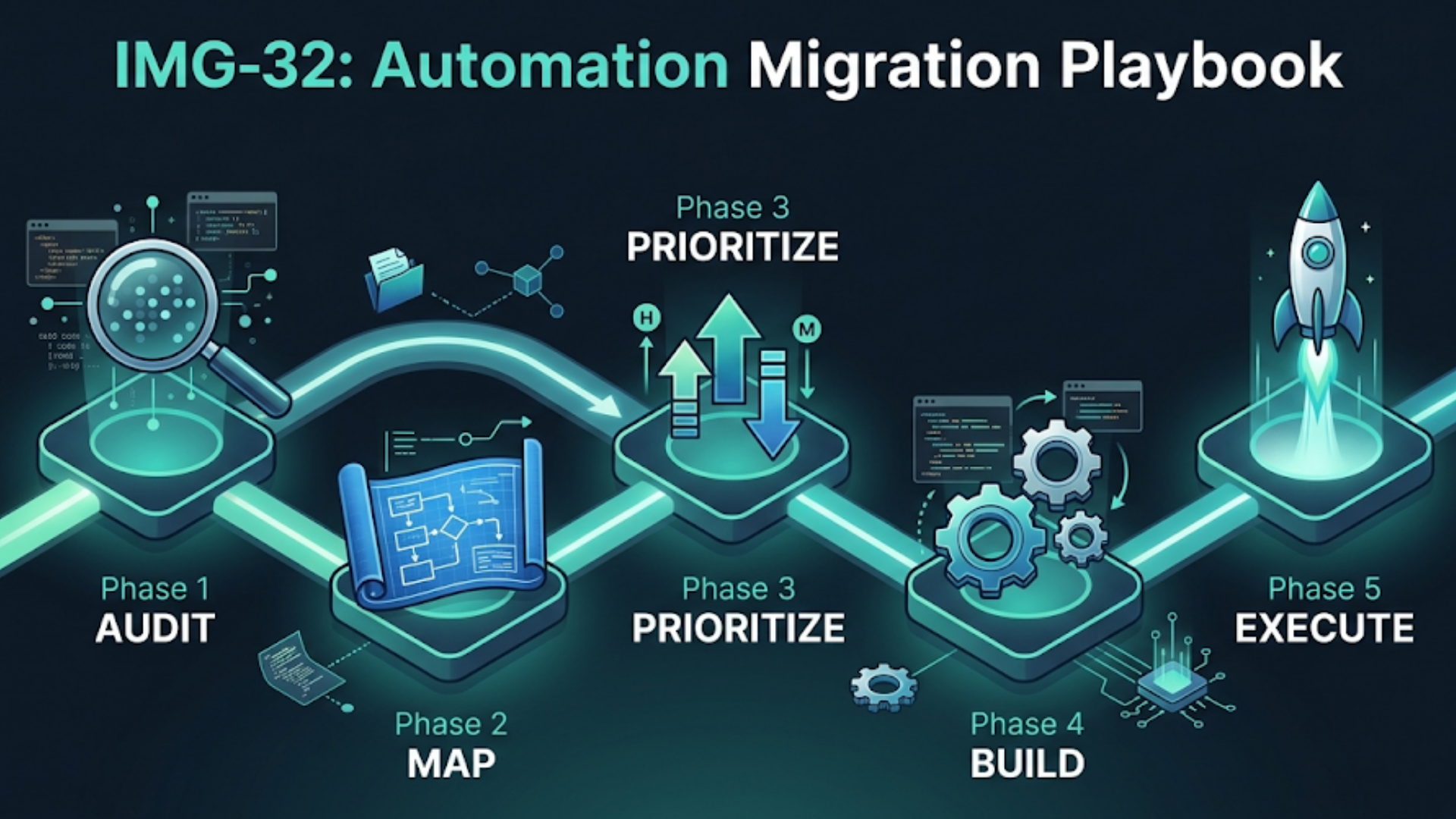
This playbook is the process I follow. Audit first. Prioritize by ROI. Build incrementally. Never disrupt what’s already working until the replacement is tested.
Step 1: The Process Audit
You can’t automate what you haven’t mapped. Before touching any automation tool, you need a clear picture of every manual process that moves data between systems.
How to run the audit:
Spend one week documenting every time someone in your business does any of these:
- Copies data from one tool to another (CRM to spreadsheet, form to CRM, email to task)
- Manually sends a templated message (order confirmation, follow-up email, invoice reminder)
- Checks a dashboard or system to trigger an action (“if this number is above X, then do Y”)
- Exports a report and reformats it for someone else
- Updates multiple systems with the same information
The audit spreadsheet:
| Process | Frequency | Time/Instance | Who Does It | Systems Involved | Error Rate | Business Impact of Error |
|---|---|---|---|---|---|---|
| Lead from website form → CRM | 15/day | 3 min | Sales intern | Typeform → HubSpot | 5-10% missed | Lost leads |
| Order confirmation email | 50/day | 2 min | Support team | Shopify → Gmail | 2-3% delayed | Customer complaints |
| Invoice generation | 20/week | 10 min | Accountant | CRM → Zoho Books | 1-2% errors | Payment delays |
| Weekly sales report | 1/week | 2 hours | Sales manager | CRM → Google Sheets | Formatting errors | Late decisions |
| Customer onboarding sequence | 5/week | 30 min | Account manager | CRM → Email → PM tool → Docs | Steps skipped | Poor first impression |
You’ll be surprised. Most businesses discover 20-40 manual processes they’d normalized. The intern copying form submissions into the CRM isn’t a job. It’s a symptom.
What to look for:
Processes with high frequency and low complexity are your best automation candidates. Copying data between systems, sending templated messages, updating status fields. These are not problems that need human judgment. They need a webhook and a 5-node workflow.
Processes with low frequency and high complexity (quarterly financial reconciliation, annual contract renewals) are usually poor automation candidates. The setup cost doesn’t justify the time saved.
Step 2: Prioritize by ROI
Not every manual process deserves automation. Some are cheap to keep manual. Others are bleeding money every day they remain manual.
The ROI formula:
Monthly Cost of Manual Process = (Time per instance × Frequency per month × Hourly labor cost) + (Error rate × Cost per error)Example: A business processes 50 orders/day. Each order requires a manual WhatsApp confirmation (2 minutes), shipping label creation (3 minutes), and CRM update (2 minutes). That’s 7 minutes per order, 350 minutes/day, ~87 hours/month. At ₹300/hour labor cost, that’s ₹26,100/month in labor alone. Add error costs (wrong tracking numbers, missed confirmations, angry customers) and the true cost is ₹35,000-45,000/month.
Automating this end-to-end costs ₹2,00,000-3,00,000 one-time. Payback period: 5-7 months. After that, it’s pure savings.
Priority matrix:
| Priority | Characteristics | Example |
|---|---|---|
| P0 (Automate now) | Daily, high-volume, simple logic, high error cost | Lead capture → CRM, order confirmations |
| P1 (Automate next month) | Daily/weekly, medium volume, moderate logic | Invoice generation, report compilation |
| P2 (Automate this quarter) | Weekly, complex logic, needs human review step | Customer onboarding, contract processing |
| P3 (Evaluate) | Monthly, very complex, or low volume | Financial reconciliation, annual reviews |
| Skip | One-off, requires judgment, no clear trigger | Ad-hoc client requests, strategic decisions |
Most businesses have 3-5 P0 processes. Start there. The wins are fast and visible, which builds momentum (and budget) for the P1 and P2 work.
Step 3: Choose Your Automation Stack
Your stack depends on your technical resources and budget. There’s no universal answer, but there are clear tiers.
Tier 1: No-Code (₹5,000-15,000/month in tool costs)
- Zapier for simple, linear workflows (if A then B then C)
- Make (Integromat) for branching logic and data transformation
- Best for: Businesses with no technical staff, 10-20 automations, straightforward integrations
Tier 2: Low-Code (₹10,000-30,000/month or self-hosted)
- n8n (self-hosted: free; cloud: from $20/month) for complex workflows with custom logic
- Best for: Businesses with one technical person, 20-100 automations, need for custom code within workflows
Tier 3: Custom (₹50,000-2,00,000/month infrastructure)
- Custom code (Python/Node.js) + queue systems + databases
- Best for: Businesses with development teams, 100+ automations, enterprise-scale data
The honest recommendation: Most businesses belong in Tier 2. Zapier gets expensive fast (pricing scales with task count), and custom code is overkill for 80% of business automation. n8n hits the sweet spot: visual workflow builder for simple stuff, code nodes when you need them, self-hosting to control costs.
| Factor | Zapier | Make | n8n | Custom Code |
|---|---|---|---|---|
| Monthly Cost (50 workflows) | $150-500 | $50-150 | $0-50 (self-host) | $200+ (infra) |
| Setup Complexity | Very Low | Low | Medium | High |
| Flexibility | Limited | Good | Very Good | Unlimited |
| Error Handling | Basic retry | Good | Excellent | Build your own |
| Scaling Cost | Expensive | Moderate | Flat | Variable |
| Non-technical Friendly | Yes | Mostly | Somewhat | No |
Step 4: Build the Migration Roadmap
Don’t automate everything at once. I’ve seen businesses try to automate 20 processes simultaneously. They end up with 20 half-broken workflows and a team that doesn’t trust the automation.
The phased approach:
Week 1-2: Foundation
- Set up your automation platform (n8n instance, Zapier account, whatever you chose)
- Configure API connections to all your tools (CRM, email, payment gateway, etc.)
- Set up error notification channels (Slack channel or email for failed workflows)
- Document your API keys, webhook URLs, and connection details
Week 3-4: First P0 Automation
- Build and test your highest-ROI automation
- Run it in parallel with the manual process for one week (both human and automation doing the same task)
- Compare outputs. Fix discrepancies
- Once validated, switch off the manual process
Week 5-8: Remaining P0 Automations
- Build one new automation per week
- Each one gets the same treatment: build, parallel run, validate, switch
- By end of month 2, all P0 processes should be automated
Month 3-4: P1 Automations
- These are slightly more complex, may need approval steps or conditional logic
- Build, test, deploy at the same pace
Month 5-6: P2 Automations and Optimization
- Complex automations that need human-in-the-loop steps
- Optimize existing automations based on 3-4 months of production data
- Address edge cases that emerged in production
The parallel run is non-negotiable. Every automation runs alongside the manual process for at least one week before the manual process is retired. This catches edge cases, builds team confidence, and prevents the “we automated it and now everything’s broken” disaster.
Step 5: Execute Without Disruption
The technical build is the easy part. The hard part is getting humans to trust the automation and change their behavior.
Communication plan:
- Tell the team what’s being automated and why (they should know they’re losing busywork, not their job)
- Show them how to check if the automation worked (dashboards, logs, notification channels)
- Give them a clear escalation path when the automation fails (because it will, sometimes)
- Celebrate the first automation win publicly. Show the time saved. Make it real
Error handling architecture:
Every automation needs three layers of error handling:
-
Retry logic. Transient failures (API timeout, rate limit) should automatically retry 2-3 times with exponential backoff. This handles 80% of errors without human intervention.
-
Fallback notifications. If retries fail, notify the responsible human via Slack or email with the specific error and the data that failed to process. Include enough context that they can manually complete the task if needed.
-
Dead letter queue. Failed items go into a queue (could be a Google Sheet, a database table, or n8n’s built-in error workflow) for review. Run a weekly check on this queue to identify patterns.
Monitoring dashboard: Build a simple dashboard (even a Google Sheet works) that shows:
- Number of automated tasks completed per day/week
- Error rate per workflow
- Time saved (calculated from your audit data)
- Cost savings (time saved × labor cost)
This dashboard is how you justify the next phase of automation to yourself or your leadership. Data beats opinions.
The India Factor
Indian businesses face specific automation challenges that global playbooks miss.
Payment gateway diversity. Indian businesses typically juggle Razorpay, Cashfree, PayU, and sometimes Paytm Business. Each has different webhook formats and API structures. Your automation stack needs to handle multiple payment gateways, not just one.
WhatsApp as primary channel. In India, WhatsApp isn’t optional. It’s the primary communication channel for customers. Your automation migration must include WhatsApp (WATI, Interakt, or direct API) as a first-class channel, not an afterthought.
GST compliance. Invoice automation in India requires GST calculation, HSN code mapping, and e-invoice generation for businesses above the threshold. This adds complexity that off-the-shelf automation templates don’t account for. Your invoice workflow needs Zoho Books, Tally Prime, or a similar GST-compliant accounting system in the loop.
Regional language support. If your customers span multiple states, your automated messages (WhatsApp, email, SMS) may need to support Hindi, Tamil, Telugu, and other languages. Template management for multi-language automation is a real operational challenge.
Internet reliability. This one surprises people. In Tier 2 and Tier 3 Indian cities, internet reliability affects webhook delivery. Your automation architecture needs to handle delayed webhooks and out-of-order events gracefully. Idempotent processing isn’t optional.
FAQ
How long does a full automation migration take? For a small business with 10-15 manual processes, expect 3-6 months for a complete migration. The first 2-3 automations take the longest because you’re setting up infrastructure. After that, each new automation takes 1-2 weeks.
What’s the minimum budget to start automating? You can start with Zapier’s free plan or self-hosted n8n (free) to automate 2-3 simple processes. Meaningful automation for a business typically starts at ₹50,000-1,00,000 ($600-1,200) for setup plus ₹5,000-15,000/month for tool costs.
Should I hire someone or use an agency? For 5 or fewer simple automations, DIY with Zapier or Make is fine. For 10+ automations with complex logic, hire a specialist or agency. The cost of getting it wrong (broken workflows, lost data, frustrated team) exceeds the cost of professional setup.
What if my tools don’t have APIs? Some older tools (legacy CRMs, desktop accounting software) don’t have APIs. Options: scrape the UI with browser automation (fragile, not recommended), export/import via scheduled CSV transfers (works for daily batch processes), or migrate to a tool that does have an API. Often, the automation migration is the trigger to finally upgrade from that 2015-era software.
How do I handle processes that need human approval? Build “human-in-the-loop” steps. The automation prepares everything (collects data, formats the request, drafts the response) and pauses for human approval. Slack message with approve/reject buttons is the most common pattern. The human reviews and clicks a button. The automation resumes.
What’s the biggest mistake in automation migration? Automating a broken process. If your current manual process has inconsistent steps, missing data, or unclear ownership, automating it just makes the mess faster. Fix the process first, then automate it.
Can I automate processes across different time zones? Yes. Modern automation tools handle time zones natively. Schedule-based triggers can fire at local times for different regions. The main consideration is API rate limits. If you’re processing data from multiple time zones, your peak load might hit at unexpected times.
Need help implementing this?
Book a free 30-minute discovery call. We'll map your current setup, identify quick wins, and outline what automation can do for your business.
Book a Free Discovery Call