How to Automate Webinar Registration and Follow-Up
How to automate webinar registration and follow-up. Registration to CRM, confirmation emails, WhatsApp reminders, no-show follow-up, replay delivery, and post-webinar nurture using n8n and WATI.
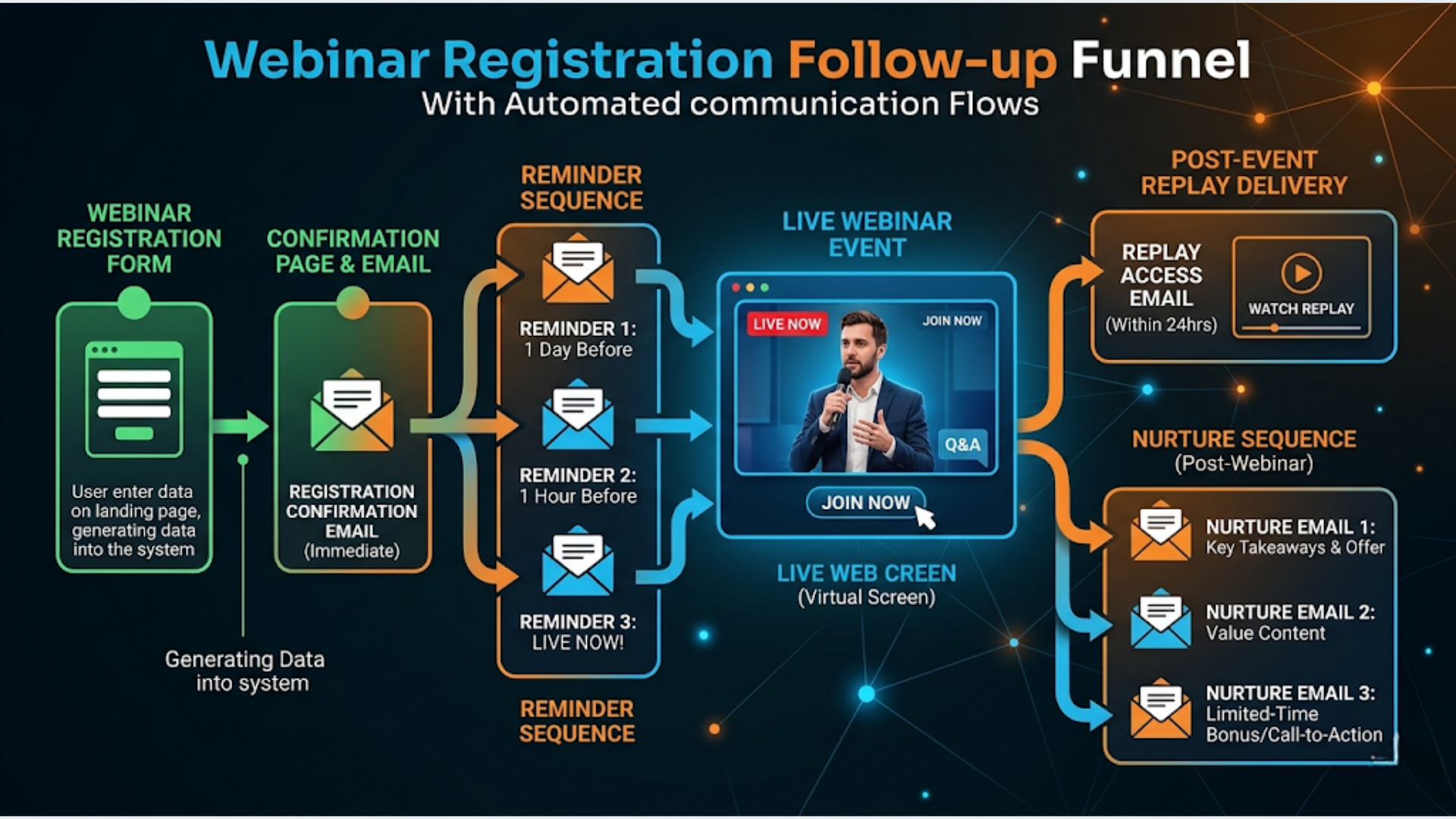
How to Automate Webinar Registration and Follow-Up
The average webinar gets 40 to 50% attendance from registrants. Automated reminders push that to 55 to 65%. Automated post-webinar follow-up converts 2 to 5x more attendees into customers compared to a single “thanks for attending” email.
Here is the full system: registration form to CRM entry, confirmation email plus WhatsApp message, reminder sequence, no-show recovery, replay delivery, and post-webinar nurture. All automated. Total cost: $0 to $50 per month.
I build these systems. The difference between a webinar that generates leads and one that generates revenue is almost entirely in the follow-up automation. The webinar content matters, sure. But most of the money is made (or lost) in the 48 hours after the event.
Registration: Capture to CRM in Real Time
Most webinar hosts use a landing page with a registration form. The form collects name, email, and maybe a phone number. The mistake is stopping there.
What your registration form should capture:
- Full Name
- Phone / WhatsApp number (critical for India)
- Company Name (optional but valuable for B2B)
- “What’s your biggest challenge with [topic]?” (open text, one line)
That last field is gold. It tells you exactly what the audience wants. Use it to customize your webinar content and follow-up messaging.
The automated workflow:
- Registrant fills out your form (Typeform, Google Forms, or your landing page tool).
- n8n webhook receives the submission in real time.
- n8n creates or updates a contact in your CRM (HubSpot, Zoho CRM, or even a Google Sheet if you don’t have a CRM yet). Tags: “Webinar: [Name]”, “Status: Registered.”
- n8n checks for duplicates. If the email already exists in the CRM, update the existing record instead of creating a duplicate.
- n8n adds the registrant to a Zoom or Google Meet webinar (via API). This auto-generates their unique join link.
- n8n triggers the confirmation sequence.
Time from registration to confirmation: under 10 seconds.
India-specific: WhatsApp number is mandatory for Indian audiences. Email open rates in India for marketing messages hover around 15 to 20%. WhatsApp open rates: 90%+. If you skip WhatsApp, you lose half your audience before the webinar even starts.
Confirmation: Email + WhatsApp Double Tap
Sending only an email confirmation is leaving money on the table. The double-tap approach works best.
Immediately after registration:
Email confirmation:
Subject: “You’re in: [Webinar Title] on [Date]”
Body:
- Date and time (with timezone, always IST + the registrant’s local time if international)
- “Add to Calendar” links (Google Calendar + Outlook + Apple Calendar)
- The unique meeting link
- What they’ll learn (3 bullet points)
- “Reply to this email if you have a specific question you want covered”
WhatsApp confirmation (via WATI or WhatsApp Business API):
“Hi [First Name]! You’re registered for [Webinar Title] on [Date] at [Time] IST.
Your meeting link: [link]
Save this message. I’ll send you a reminder before we go live.”
The WhatsApp message serves two purposes: it confirms registration and it starts a conversation thread you can use for reminders.
n8n handles both messages simultaneously. One webhook trigger, two output branches. Takes 5 minutes to set up.
Reminder Sequence: The Attendance Multiplier
This is where most webinar hosts lose 30 to 40% of their potential attendees. People register, forget, and never show up.
The reminder schedule that works:
| When | Channel | Message |
|---|---|---|
| 24 hours before | Email + WhatsApp | ”Tomorrow: [Title]. Here’s what we’ll cover…“ |
| 2 hours before | WhatsApp only | ”Going live in 2 hours. Got your questions ready?“ |
| 15 minutes before | WhatsApp only | ”Starting in 15 min! Join here: [link]“ |
| At start time | WhatsApp only | ”We’re live NOW. Join: [link]” |
Why this schedule works:
The 24-hour email is for people who plan their day the night before. The 2-hour WhatsApp catches people at work who need to block time. The 15-minute WhatsApp is the “get up and walk to your desk” nudge. The start-time message catches stragglers.
n8n implementation:
Set up a single workflow with scheduled triggers based on the webinar date stored in your database. n8n calculates the send times automatically.
For the “at start time” message, use a webhook from Zoom or Google Meet that fires when the webinar actually starts. This handles delays (you started 3 minutes late, the message still goes out at the right time).
Personalization that matters:
In the 24-hour reminder, reference their registration answer. “You mentioned [challenge] when you registered. I’m covering that in the second half.”
This single line of personalization increases open rates by 15 to 20%. n8n pulls the answer from the CRM record and inserts it into the template.
During the Webinar: Live Engagement Automation
While you focus on presenting, automation handles the logistics.
Attendance tracking:
Zoom and Google Meet APIs report who joined and when. n8n captures this data and updates each registrant’s CRM record:
- “Attended: Yes/No”
- “Join time” (did they come late?)
- “Duration” (did they stay for the whole thing?)
This data is crucial for follow-up segmentation. Someone who watched 90% of the webinar is a much warmer lead than someone who dropped off after 5 minutes.
Live poll and Q&A capture:
If you use Zoom’s built-in polls or Q&A, the data is available via API after the webinar. n8n pulls poll responses and unanswered questions, attaches them to CRM records, and compiles a summary doc for your follow-up content.
No-Show Follow-Up: Recover 20-30% of Lost Attendees
30 to 50% of registrants won’t show up. Most webinar hosts ignore them. That is a massive waste.
The no-show workflow (triggers 1 hour after webinar ends):
n8n checks the CRM. Anyone tagged “Registered” but not “Attended” gets the no-show sequence.
Message 1 (1 hour after webinar):
WhatsApp: “Hey [Name], I noticed you couldn’t make it to [Webinar Title]. No worries. I’ll send you the replay link tomorrow so you can watch on your own time.”
Message 2 (next day):
Email: Subject: “Your replay is ready: [Webinar Title]”
Body: The replay link, a 3-bullet summary of key takeaways, and a specific CTA (book a call, download a resource, join the next session).
WhatsApp: “Your replay of [Webinar Title] is ready: [link]. The best part starts at [timestamp] where I cover [topic].”
Message 3 (3 days after):
Email only: “Did you get a chance to watch the replay?” with a softer CTA.
Why this works: No-shows often had a genuine conflict. They still interested. The replay gives them a second chance. The specific timestamp recommendation reduces the barrier (“I don’t have time to watch the whole thing” becomes “I’ll just watch that 10-minute section”).
Conversion data: No-show recovery sequences typically convert 20 to 30% of no-shows into replay viewers and 5 to 10% into the next pipeline stage (book a call, purchase, etc.).
Post-Webinar Nurture: Where Revenue Happens
The webinar is a top-of-funnel event. The nurture sequence is where the conversion happens.
Segment your audience into three groups:
- Attended full webinar (highest intent)
- Attended partial (interested but distracted)
- Watched replay (interested but on their timeline)
Each group gets a slightly different sequence.
Day 0 (immediately after webinar):
All attendees get:
- Email: Thank you + slide deck or summary PDF + link to any promised bonus
- WhatsApp: “Thanks for joining! Here’s the resource I promised: [link]”
Day 1:
Full attendees: “Here’s the thing I didn’t have time to cover…” (additional value, positions your expertise)
Partial attendees: “I noticed you had to leave early. Here’s the replay for the part you missed: [link with timestamp]”
Day 2:
All groups: Social proof. “Here’s what [Name] said about today’s session: [testimonial]. They went on to [result].”
Day 3:
All groups: The offer. Direct, no fluff. “If [webinar topic] resonated, here’s how to take the next step: [CTA]. This is open for 48 hours.”
Day 5:
Deadline reminder. “Last chance: [offer] closes tonight at midnight.” Only send to those who opened Day 3 email or clicked the CTA link.
Day 7:
Soft close. “The offer has closed, but I’m hosting [next event/resource]. Here’s how to stay connected.”
n8n handles the entire sequence. Conditional branches based on segment. Click tracking via email tool (Mailchimp, ConvertKit, or Resend) determines who gets deadline reminders.
The Complete Tech Stack
| Tool | Purpose | Cost/Month |
|---|---|---|
| n8n (self-hosted) | Workflow automation | $0 + $5-12 VPS |
| Zoom or Google Meet | Webinar hosting | $0-13 (Meet) or $13+ (Zoom) |
| Typeform or Google Forms | Registration | $0-25 |
| WATI | WhatsApp automation | $40 |
| Mailchimp or ConvertKit | Email sequences | $0-13 (free tiers) |
| HubSpot CRM (free) or Google Sheet | Contact management | $0 |
Total: $5 to $50 per month depending on your choices.
Compare to dedicated webinar platforms with built-in automation like WebinarJam ($79/month), Demio ($59/month), or EverWebinar ($99/month). Those platforms bundle hosting + automation. This stack gives you more flexibility and control at a lower price, especially if you already host on Zoom or Google Meet.
FAQ
How many reminders are too many?
Four reminders (24h, 2h, 15min, start time) is the sweet spot. Testing shows that adding a 48-hour reminder provides marginal benefit and risks unsubscribes. Below four reminders, attendance drops noticeably. The key: each reminder adds value (new information, a question prompt, a specific reason to attend), not just “don’t forget!”
Should I use WhatsApp or SMS for reminders?
In India, Southeast Asia, Latin America, and Africa: WhatsApp. Open rates are 90%+ and the message thread creates an ongoing conversation. In the US, Canada, and Europe: SMS works better because WhatsApp Business adoption is lower. n8n can route based on the registrant’s phone number country code.
How do I handle time zones for international audiences?
Store the registrant’s timezone at registration (auto-detect from IP or ask). n8n’s date/time functions can convert your webinar time to their local timezone in every message. “Your webinar starts at 7:00 PM IST (9:30 AM EST).” This single detail reduces confusion and no-shows from timezone errors.
What’s a good registration-to-attendance rate?
Industry average: 40 to 50%. With this automation stack: 55 to 65%. Above 65% is exceptional and usually means your audience is highly targeted (paid traffic or existing customers). Below 40% usually means your registration-to-event gap is too long (more than 7 days) or your reminder sequence is missing.
Can I automate evergreen/on-demand webinars too?
Yes. Replace the live webinar trigger with a registration trigger. The “webinar” becomes a pre-recorded video on a private page. The same reminder, follow-up, and nurture sequences run identically. The registrant experience feels live. eWebinar and Demio specialize in this, but you can build it with n8n + a video hosting page + the same automation stack.
How do I measure ROI of webinar automation?
Track three numbers: (1) Registration-to-attendance rate (target: 55%+), (2) Attendee-to-next-step conversion (book a call, download, purchase), (3) Revenue generated per webinar. Compare these before and after automation. Most businesses see 2 to 3x improvement in the second metric because follow-up actually happens consistently instead of being forgotten.
Webinar automation is one of the highest-ROI systems I build because every percentage point improvement in attendance and follow-up directly translates to revenue. If you are running webinars without automation, you are leaving 30 to 50% of your potential results on the table.
Need help implementing this?
Book a free 30-minute discovery call. We'll map your current setup, identify quick wins, and outline what automation can do for your business.
Book a Free Discovery Call