How to Automate RFP Response Drafting with GPT-4
Step-by-step guide to automating RFP response drafting with GPT-4. Covers requirement extraction, capability matching, draft generation using n8n and OpenAI. Cut response time from 4-8 hours to 30 minutes.
How to Automate RFP Response Drafting with GPT-4
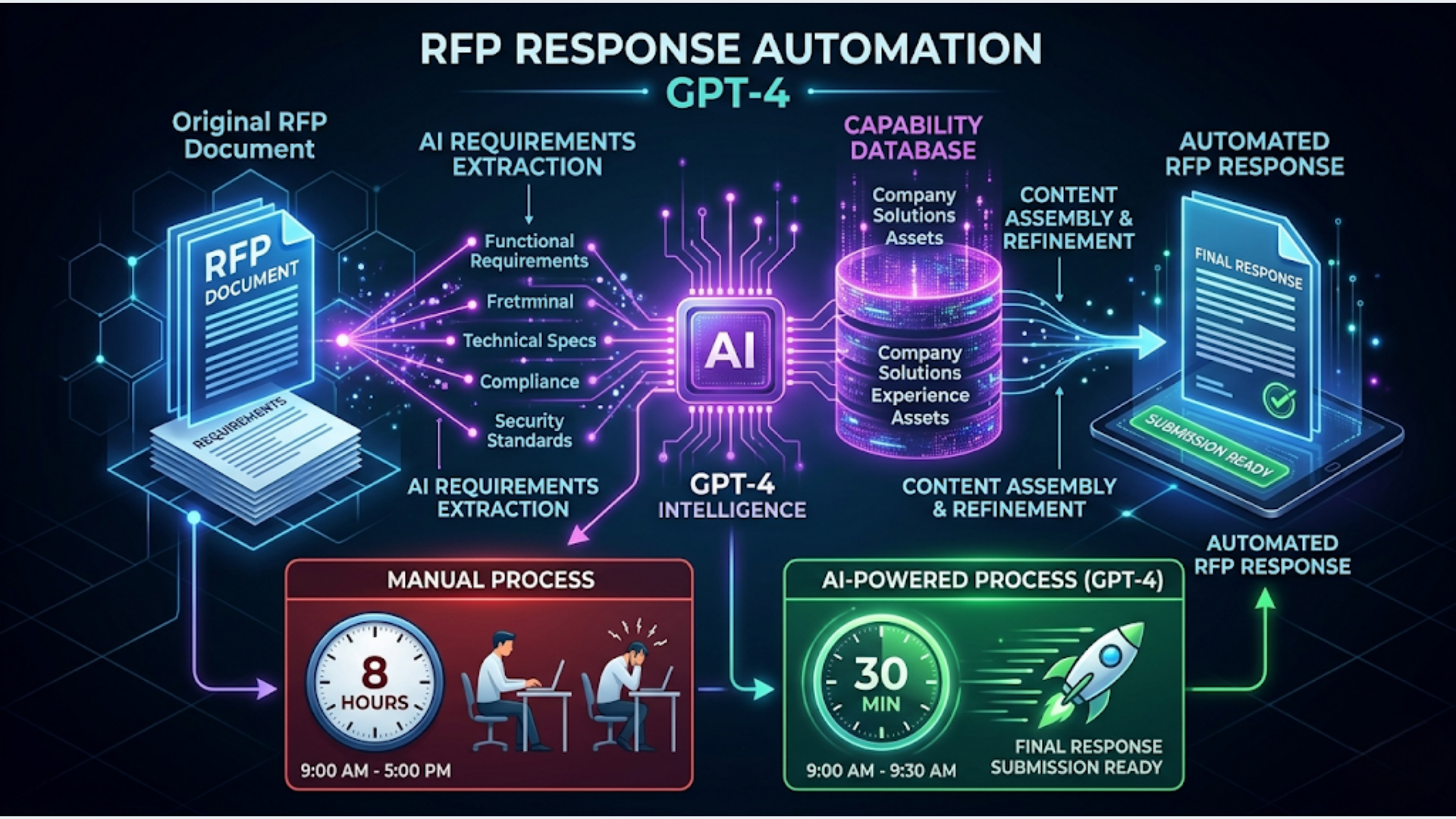
A well-built RFP automation pipeline cuts response drafting from 4-8 hours to roughly 30 minutes of human review time. The system handles requirement extraction, capability matching against your past work, and draft generation. You handle the judgment calls.
I build these systems. The pattern is the same whether you’re responding to government tenders, enterprise procurement, or agency RFPs. The RFP comes in as a document. AI extracts what they’re actually asking for. Your knowledge base provides the answers. GPT-4 assembles the draft. A human reviews, adjusts tone, adds specifics, and submits.
This guide walks through the full pipeline using n8n, OpenAI’s GPT-4, and Google Docs.
Why Most RFP Processes Waste Time
The average RFP response takes a senior team member 6-12 hours. Most of that time isn’t strategic thinking. It’s copying, reformatting, and hunting for the right case study paragraph you wrote six months ago.
Here’s where the time actually goes:
| Task | Manual Time | With Automation |
|---|---|---|
| Reading and understanding requirements | 1-2 hours | 5 minutes (AI summary) |
| Finding relevant past responses | 1-2 hours | Instant (vector search) |
| Drafting section responses | 2-4 hours | 10 minutes (AI draft) |
| Formatting and assembly | 30-60 min | Automated |
| Review and refinement | 1-2 hours | 1-2 hours (still human) |
| Total | 5.5-11 hours | 1.5-2.5 hours |
The review step stays manual. That’s by design. Nobody should submit an AI-generated proposal without reading it. But everything before the review step can be automated with high accuracy.
Three patterns make RFPs especially ripe for automation. First, they’re repetitive. If you respond to 5+ RFPs per month, you’re writing the same company overview, the same methodology description, the same team bios over and over. Second, they’re structured. RFPs have clear sections and requirements. That structure is exactly what AI needs to parse effectively. Third, the penalty for a mediocre first draft is low. You’re going to edit it anyway. A 70% accurate draft that takes 2 minutes to generate beats a blank page that takes 2 hours to fill.
The Architecture: How the Pipeline Works
The system has five stages. Each one feeds into the next.
Stage 1: RFP Intake. The RFP document arrives (email attachment, shared drive, upload form). The system extracts text from PDF/DOCX format and stores the raw content.
Stage 2: Requirement Extraction. GPT-4 reads the full RFP and extracts a structured list of requirements. Each requirement gets a category (technical, commercial, compliance, timeline) and a priority flag.
Stage 3: Capability Matching. Each extracted requirement is matched against your knowledge base of past responses, case studies, service descriptions, and team bios. This uses embeddings and vector search to find the most relevant content.
Stage 4: Draft Generation. GPT-4 takes each requirement paired with its matched content and generates a response section. The prompt includes your company voice guidelines, word count targets, and formatting rules.
Stage 5: Assembly and Output. All sections are assembled into a formatted Google Doc (or Word document) that matches the RFP’s required structure. Section headers follow the RFP’s numbering. A table of contents is auto-generated.
The whole pipeline runs in n8n. Let’s build it.
Step 1: RFP Intake and Text Extraction
You need a consistent way for RFPs to enter the system. Three options work well.
Option A: Email trigger. Set up a dedicated email address (rfps@yourdomain.com). n8n’s Email Trigger node monitors the inbox. When an RFP arrives, the workflow kicks off. This is the lowest-friction option because your team just forwards the RFP to an email address.
Option B: Google Drive folder. Create a “New RFPs” folder in Google Drive. n8n’s Google Drive Trigger node watches for new files. Drop the RFP PDF into the folder and the workflow starts. Good if you receive RFPs through multiple channels and want a central drop point.
Option C: Web form. Build a simple internal form (Typeform, Google Form, or a custom page) where your team uploads the RFP and adds metadata (client name, due date, deal size). The form submission triggers the n8n workflow via webhook.
Text extraction:
Once you have the file, extract the text. For PDFs, use n8n’s PDF Extract node or the Extract Document Text node. For DOCX files, the Read Binary File node combined with a code node handles the parsing.
The extracted text goes into a variable that flows through the rest of the pipeline. Store it in a Google Sheet row too, so you have a log of every RFP processed.
Handling messy PDFs:
Some RFPs are scanned documents (images, not text). For these, add an OCR step using Google Cloud Vision API or AWS Textract. The cost is negligible ($1.50 per 1,000 pages on Google Cloud Vision). Most RFPs are text-based PDFs though, so OCR is a fallback path, not the main flow.
Step 2: Requirement Extraction with GPT-4
This is where the automation starts paying off. Instead of a person reading a 40-page document and manually listing requirements, GPT-4 does it in under a minute.
The prompt structure matters. Don’t just say “extract requirements from this RFP.” Be specific about the output format you need.
Here’s a prompt template that works:
You are analyzing an RFP document. Extract every explicit requirement and evaluation criterion.

For each requirement, provide:
1. requirement_id: Sequential number (REQ-001, REQ-002, etc.)
2. section: The RFP section it appears in
3. category: One of [technical, commercial, compliance, timeline, team, methodology]
4. requirement_text: The exact requirement as stated
5. priority: mandatory / preferred / optional (based on language like "must", "should", "may")
6. response_needed: What type of response is expected (narrative, yes/no, table, reference)

Output as JSON array.

RFP Document:
{rfp_text}
Why JSON output? Because the next steps in the pipeline need structured data to match requirements against your knowledge base. Free-text extraction creates parsing headaches downstream.
Token limits: GPT-4 Turbo handles 128K tokens. Most RFPs fit within a single call. For very long RFPs (100+ pages), split the document into sections and process each section separately, then merge the requirement lists.
Accuracy check: In my experience, GPT-4 catches 90-95% of explicit requirements on the first pass. It occasionally misses requirements embedded in appendices or referenced in footnotes (“See Attachment C for technical specifications”). Add a second pass prompt that specifically looks for cross-references and appendix requirements.
Step 3: Build Your Knowledge Base for Matching
The draft quality depends entirely on the quality of your knowledge base. Garbage in, garbage out.
Your knowledge base should include:
- Past RFP responses (your best ones, organized by section type)
- Case studies with specifics: industry, challenge, solution, results
- Service descriptions for every offering
- Team bios for key personnel
- Company overview paragraphs (multiple versions for different contexts)
- Compliance certifications and standards you hold
- Methodology documentation
- Pricing frameworks (optional, depends on your comfort level)
How to structure it:
Create embeddings for each piece of content using OpenAI’s text-embedding-3-small model. Store them in a vector database. Pinecone, Weaviate, Qdrant, or even a Supabase pgvector setup all work. For teams processing fewer than 50 RFPs per year, a simple Supabase instance is more than enough.
In n8n, the Vector Store nodes handle embedding creation and retrieval. When a requirement comes in, the workflow embeds the requirement text and searches for the top 3-5 most relevant knowledge base entries.
Chunking strategy:
Don’t embed entire documents. Break them into logical chunks of 300-500 words, each tagged with metadata (document type, industry, service category, date). A case study becomes 3-4 chunks: problem statement, solution description, implementation details, results. This granularity means the vector search returns precisely relevant content, not an entire 10-page case study when you only need the results paragraph.
Keep it current. Every time you win a deal, add the successful response to the knowledge base. Every quarter, remove outdated case studies or pricing that’s changed. A stale knowledge base produces stale drafts.
Step 4: Draft Generation and Assembly
Now the pipeline connects extracted requirements to matched content and generates draft responses.
The generation prompt:
You are writing a section of an RFP response for {company_name}.

Requirement: {requirement_text}
Category: {category}
Response type needed: {response_needed}

Relevant reference material:
{matched_content_1}
{matched_content_2}
{matched_content_3}

Guidelines:
- Write in first person plural ("we")
- Be specific. Include numbers, timelines, and named tools where supported by the reference material
- Match the requested response type (narrative, table, yes/no with explanation)
- Target {word_count} words
- Professional tone, no marketing fluff
- If the reference material doesn't fully address the requirement, note what's missing with [NEEDS INPUT]

Generate the response section.
The [NEEDS INPUT] flag is critical. It tells your human reviewer exactly where the AI couldn’t find relevant content and needs manual input. This saves review time because the reviewer can skip well-drafted sections and focus only on flagged ones.
Assembly into Google Docs:
n8n’s Google Docs node creates a new document from a template. The template includes your company header, formatting, and placeholder sections. The workflow replaces each placeholder with the generated content, maintaining the RFP’s section numbering.
Output structure:
| Document Section | Source |
|---|---|
| Cover letter | Template + GPT-4 customization |
| Company overview | Knowledge base (mostly static) |
| Technical response | GPT-4 per requirement |
| Team and qualifications | Knowledge base + GPT-4 formatting |
| Pricing (if applicable) | Template + manual input |
| Appendices | Knowledge base documents |
The finished document lands in a “Drafts for Review” Google Drive folder. A Slack notification pings the reviewer with a link to the document and a summary: “RFP Response Draft Ready: [Client Name] - [RFP Title]. 23 requirements addressed, 4 flagged for manual input. Due date: [date].”
India-Specific Considerations
For Indian professional services firms, IT companies, and agencies, a few adjustments improve the pipeline.
Government tender formats: Indian government RFPs (from GeM, CPPP, or state procurement portals) follow specific formats with mandatory declarations, affidavits, and EMD requirements. Build separate templates for government vs. private sector RFPs. The requirement extraction prompt should be trained to identify Indian government-specific compliance sections (MSE preferences, local content requirements, Make in India clauses).
Multi-language requirements: Some state government tenders require responses in Hindi or regional languages. GPT-4 handles Hindi translation reasonably well, but have a native speaker review translated sections. Don’t auto-submit translated content without review.
Pricing in INR with cost structures: Indian RFPs often require detailed cost breakdowns with separate line items for services tax (GST), travel, per-diem rates, and resource costs. Build a pricing template that auto-calculates GST (18% for IT services) and formats costs in Indian numbering (lakhs and crores, not millions).
GeM (Government e-Marketplace) integration: If your firm responds to GeM tenders, the intake step can use GeM’s portal notifications. Set up email alerts from GeM for your service categories and route them to the RFP intake workflow. The system extracts the tender document, processes it through the pipeline, and gives your team a draft before competitors have finished reading the requirements.
Typical cost in India: Running this pipeline on n8n Cloud ($20/month) with OpenAI API costs (roughly $0.50-2.00 per RFP depending on length) and Supabase free tier for vector storage totals under ₹3,000/month. For a firm that responds to 10+ RFPs monthly, the time savings justify the cost within the first week.
FAQ
How accurate is GPT-4 at extracting RFP requirements? GPT-4 extracts 90-95% of explicit requirements from well-structured RFPs on the first pass. It handles technical, commercial, and compliance requirements equally well. The main gaps are cross-referenced requirements in appendices and implicit requirements buried in evaluation criteria language. A second-pass prompt catches most of these.
How much does it cost to automate RFP responses with GPT-4? The per-RFP cost is $0.50-2.00 for GPT-4 API calls depending on document length (a 40-page RFP with 25 requirements costs roughly $1.20). Add $20/month for n8n Cloud and $0-25/month for vector database hosting. Total monthly cost for 10-15 RFPs: $30-70. Compare that to 40-80 hours of senior staff time.
Can GPT-4 write an entire RFP response without human review? No. And you shouldn’t let it. GPT-4 generates strong first drafts based on your knowledge base, but it can hallucinate specifics, miss nuances in the requirement language, and occasionally misunderstand what the evaluator actually wants. Always have a subject matter expert review the draft. The automation saves drafting time, not review time.
What knowledge base do I need for RFP automation? At minimum: 10-15 past RFP responses (successful ones), 5+ case studies, current service descriptions, team bios, and company overview documents. The more content you feed the knowledge base, the better the drafts. Quality matters more than quantity though. Five excellent case studies beat fifty mediocre ones.
How long does it take to set up an RFP automation pipeline? Plan for 2-3 days of initial setup: half a day for n8n workflow configuration, half a day for knowledge base creation and embedding, and 1-2 days of testing with real RFPs to tune prompts and fix edge cases. After setup, each new RFP requires zero configuration unless it’s a completely new format.
Does this work with RFPs in PDF format? Yes. n8n’s PDF Extract node handles text-based PDFs directly. For scanned PDFs (images), add an OCR step using Google Cloud Vision API or AWS Textract. Most enterprise and government RFPs are text-based PDFs, so OCR is a fallback, not the standard path. DOCX format is also supported natively.
Can I use Claude instead of GPT-4 for RFP drafting? Absolutely. Claude handles long documents well (200K context window vs GPT-4 Turbo’s 128K), which is an advantage for very long RFPs. The prompt structure is the same. In n8n, swap the OpenAI node for an HTTP Request node pointing to Anthropic’s API. I’ve seen comparable quality from both models for structured business writing. Test with your specific RFP types and see which model produces drafts your team prefers.
Need help implementing this?
Book a free 30-minute discovery call. We'll map your current setup, identify quick wins, and outline what automation can do for your business.
Book a Free Discovery Call