How to Automate Recruitment and HR Workflows in 2026
How to automate recruitment and HR workflows in 2026. Job posting distribution, application screening, interview scheduling, offer letters, and onboarding using n8n, Google Forms, Cal.com, and Slack.
How to Automate Recruitment and HR Workflows in 2026
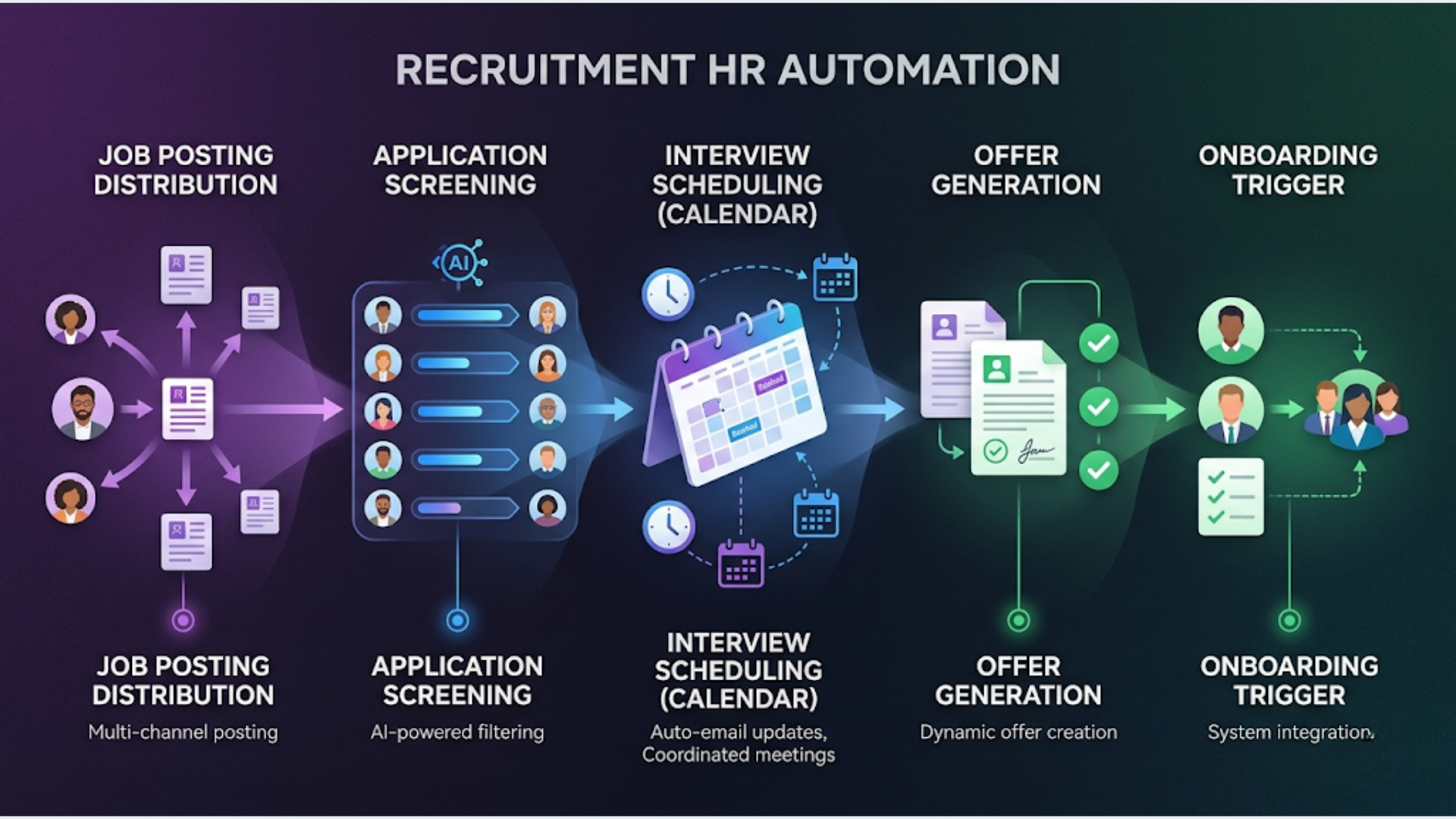
You can automate 80% of recruitment and HR busywork using n8n, Google Forms, Cal.com, Slack, and a spreadsheet. No enterprise HR software needed. Setup cost: $0 to $30 per month. Time saved: 15 to 25 hours per hire.
The average recruiter spends 23 hours on a single hire. Most of that time goes to posting jobs, screening resumes, scheduling interviews, chasing candidates for documents, and writing the same emails over and over.
I build these systems. Every step from job posting to day-one onboarding can be automated or semi-automated. You keep the human judgment parts (evaluating candidates, making offers, cultural fit calls). The machine handles the logistics.
Here is every workflow, broken down.
Job Posting Distribution: Post Once, Publish Everywhere
Manually posting the same job description to LinkedIn, Indeed, Naukri, Glassdoor, your website, and internal channels takes 30 to 60 minutes per role. For companies hiring for 5 to 10 positions simultaneously, that is half a day wasted on copy-paste.
The automated workflow:
- Write the job description once in a Google Doc or Notion page using a standard template.
- An n8n workflow detects the new posting (via Google Drive trigger or Notion database trigger).
- n8n formats the description for each platform’s requirements (character limits, formatting differences).
- Posts automatically to: your website careers page (via CMS API), LinkedIn (via LinkedIn API or a tool like Pabbly), Twitter/X, internal Slack channel, and email distribution list.
- For platforms that don’t support API posting (Indeed, Naukri), n8n sends you a pre-formatted message ready to paste. One click instead of rewriting.
India-specific: Naukri.com does not have a public posting API. Neither does Internshala. For these, the workflow generates formatted text with all the fields filled in and sends it to your Slack with a direct link to the posting page. Still saves 80% of the time.
Tools needed: n8n (free self-hosted), Google Docs or Notion (free), Slack (free tier).
Time saved per posting: 40 to 50 minutes. Over 10 positions, that is nearly 8 hours.
Application Collection and Screening Automation
This is where most manual processes break down. Resumes come in via email, LinkedIn messages, job portal inboxes, referral WhatsApp messages, and walk-ins. Nobody can track all of that in their head.
The automated workflow:
Step 1: Centralize applications.
Create a single Google Form (or Typeform) as your application gateway. Every job posting links to this form. Fields: Name, Email, Phone, Position Applied For (dropdown), LinkedIn Profile, Resume (file upload), Years of Experience, Current CTC, Expected CTC, Notice Period.
Step 2: Auto-capture to a tracking sheet.
Google Forms automatically sends responses to a Google Sheet. n8n enhances this sheet by:
- Auto-generating an Application ID
- Adding a timestamp in IST
- Setting initial status to “New”
- Parsing the resume file link for easy access
Step 3: AI-powered initial screening.
This is the big time-saver. An n8n workflow takes each new application and:
- Extracts text from the uploaded resume (using a PDF-to-text node or Google Cloud Vision for scanned PDFs).
- Sends the resume text + job description to Claude or GPT-4 with a scoring prompt.
- The AI evaluates: skills match (0-10), experience match (0-10), overall fit score, and a 2-sentence summary.
- Writes the scores back to the Google Sheet.
Important: The AI does not make hiring decisions. It scores and summarizes. A recruiter reviews the scores and decides who moves forward. The automation removes the 3 to 5 minutes per resume you spend reading, evaluating, and noting down impressions. Multiply that by 200 applications for a popular role.
Step 4: Auto-categorize and notify.
Based on the AI score:
- Score 8 to 10: Status set to “Shortlisted.” Slack notification to hiring manager.
- Score 5 to 7: Status set to “Review.” Goes into a weekly review batch.
- Score below 5: Status set to “Not a fit.” Automated polite rejection email sent after 48 hours.
India-specific: For CTC-based filtering (common in Indian hiring), add a formula that checks if Expected CTC falls within the budget range. Flag out-of-range candidates automatically.
Cost: $0 for Google Forms + Sheets. n8n self-hosted is free. AI API costs: roughly $0.01 to $0.03 per resume screening (Claude Haiku or GPT-4o mini). For 500 applications per month, that is $5 to $15 in API costs.
Interview Scheduling: Zero Back-and-Forth
The average interview takes 3 to 7 emails to schedule. Multiply by 20 candidates and your recruiter has sent 60 to 140 scheduling emails for one role.
The automated workflow:
- When a candidate is moved to “Shortlisted” status in the Google Sheet, n8n triggers.
- n8n sends the candidate an email with a Cal.com scheduling link. The link shows only available slots from the interviewer’s calendar.
- Candidate picks a slot. Cal.com creates the calendar event, sends confirmations to both parties, and adds a Google Meet or Zoom link.
- n8n updates the Google Sheet: Interview Date, Time, Interviewer, Meeting Link.
- 24 hours before the interview, n8n sends a WhatsApp reminder to the candidate with the meeting link and any preparation instructions.
- 1 hour before, a Slack reminder pings the interviewer with the candidate’s resume summary and AI screening notes.
No human involvement in scheduling. The recruiter’s job is to decide who gets interviewed. The system handles the logistics.
Cal.com vs Calendly: Cal.com is open-source and free for individual use. Calendly works too but costs $10/user/month. For cost-conscious teams, Cal.com is the obvious choice.
Time saved: 5 to 10 minutes per candidate in scheduling emails. For 20 candidates, that is 2 to 3 hours.
Post-Interview: Scorecards, Decisions, and Offers
After each interview, you need structured feedback. Most teams use verbal debriefs or scattered Slack messages. That leads to biased decisions and lost context.
The automated workflow:
- After the interview calendar event ends, n8n sends the interviewer a Google Form scorecard. Fields: Communication (1-5), Technical Skills (1-5), Problem Solving (1-5), Cultural Fit (1-5), Overall Recommendation (Strong Yes / Yes / Maybe / No), Notes.
- Responses flow to the Google Sheet, attached to the candidate’s row.
- If multiple interviewers are involved, n8n aggregates scores and calculates an average.
- When all interviewers have submitted, n8n sends a summary to the hiring manager via Slack with a recommendation.
Offer letter generation:
- Hiring manager marks candidate as “Offer” in the sheet.
- n8n triggers, pulls candidate data (name, position, CTC, start date, reporting manager) from the sheet.
- Populates a Google Doc offer letter template using the Google Docs API (find-and-replace placeholders).
- Sends the generated offer letter to the hiring manager for review.
- After approval, n8n emails the offer letter to the candidate and sends a WhatsApp message notifying them to check their email.
India-specific: Include fields for PAN number, Aadhaar (optional), current employer notice period buyout terms, and relocation allowance in the template. These are standard in Indian offer letters.
Onboarding Automation: Day-One Ready
A new hire just accepted the offer. Now you need to collect documents, set up accounts, assign equipment, schedule orientation, and get them productive. Most companies do this manually and something always falls through the cracks.
The automated workflow:
Trigger: Candidate status changed to “Accepted” in the tracking sheet.
Day 0 (immediately after acceptance):
- Send a welcome email with a document collection Google Form (Aadhaar, PAN, bank details, emergency contact, photo, educational certificates).
- Send a WhatsApp message with the same link and a personal welcome note.
- Create a row in an “Onboarding Tracker” sheet with all checklist items.
Day -3 (three days before start date):
- n8n sends requests to IT for account creation: email, Slack, project management tool.
- n8n sends request to admin for desk/equipment setup.
- n8n sends orientation schedule to the new hire.
Day 1:
- Automated welcome message in the team Slack channel introducing the new hire.
- Calendar invites for first-week meetings (1:1 with manager, team intro, HR orientation).
- Shared document access granted for role-specific folders.
Day 7:
- n8n sends a check-in survey to the new hire (Google Form): “How is your first week going?” with structured questions.
- Results sent to the HR team and manager.
Day 30:
- 30-day feedback form to both the new hire and their manager.
- n8n compiles responses and flags any concerns to HR.
Every step is triggered automatically by dates and status changes. Nothing falls through.
The Complete Tech Stack and Cost
| Tool | Purpose | Cost |
|---|---|---|
| n8n (self-hosted) | Workflow automation engine | $0 + $5-12/mo VPS |
| Google Forms | Application forms, scorecards, surveys | $0 |
| Google Sheets | Candidate tracking database | $0 |
| Cal.com | Interview scheduling | $0 (individual) |
| Slack | Internal notifications | $0 (free tier) |
| Claude API (Haiku) | Resume screening | ~$5-15/mo for 500 resumes |
| Google Docs | Offer letter templates | $0 |
| WhatsApp Business API | Candidate notifications | $0 (first 1,000 conversations) |
Total: $5 to $30 per month. Compare that to an ATS (Applicant Tracking System) like Greenhouse ($6,000/year), Lever ($3,600/year), or even Zoho Recruit ($25/user/month).
For companies hiring 5 to 20 people per year, this stack handles everything an ATS does. For companies hiring 50+ per year, you will eventually want a proper ATS. But this system works as your V1 and saves you $3,000 to $6,000 annually while you grow.
FAQ
Does AI screening create legal risk?
Yes, if you use it as the sole decision-maker. The key: AI scores are a filter, not a decision. A human reviews all shortlisted candidates AND samples rejected candidates regularly to check for bias. Document that your process includes human oversight. This matters in India under the Digital Personal Data Protection Act for automated decision-making.
Can this system handle high-volume hiring (100+ positions)?
For 100+ open positions with thousands of applications, you need a proper ATS with built-in workflow automation. This stack works for 1 to 30 simultaneous openings. Beyond that, the Google Sheets backend becomes a bottleneck. Consider Airtable as a mid-tier upgrade before jumping to enterprise ATS.
What about GDPR and data protection for candidate data?
Google Sheets and Forms are GDPR-compliant when used under Google Workspace (paid). Set a data retention policy: delete candidate data 6 months after the position is filled. Add a consent checkbox to your application form. For Indian compliance, the DPDP Act requires clear purpose limitation and consent. Your form should state why you collect each piece of data.
How do I handle referrals in this system?
Add a “Source” field to the application form with options: Job Portal, LinkedIn, Referral, Direct, Other. For referrals, add a “Referred By” field. n8n can track referral counts per employee and trigger referral bonus reminders to HR when a referred candidate is hired.
Can this integrate with existing HRMS like Zoho People or greytHR?
Yes. n8n has native Zoho modules. For greytHR (popular in India), use their API or webhook integration through n8n’s HTTP module. The onboarding automation can push new hire data directly into your HRMS, eliminating double entry.
What if candidates apply through email or LinkedIn instead of the form?
Set up an n8n workflow that monitors a specific email inbox (like careers@yourcompany.com). When a new email arrives with a resume attachment, n8n extracts the details and creates a row in the tracking sheet. For LinkedIn, you will need to manually move candidates to the form since LinkedIn’s API is restricted. Send them the form link via LinkedIn message.
Recruitment and HR workflow automation is one of the systems I build at triggerAll. If your hiring process still runs on email chains and manual tracking, there is a better way. Check out what we set up for teams like yours.
Need help implementing this?
Book a free 30-minute discovery call. We'll map your current setup, identify quick wins, and outline what automation can do for your business.
Book a Free Discovery Call