How to Automate Proposal Generation for Services Businesses
Automate proposal generation for services businesses. CRM deal trigger, GPT-4 drafts from templates, PDF output, sent for review in 15 minutes instead of 2 hours. Full n8n + Google Docs + OpenAI workflow.
How to Automate Proposal Generation for Services Businesses
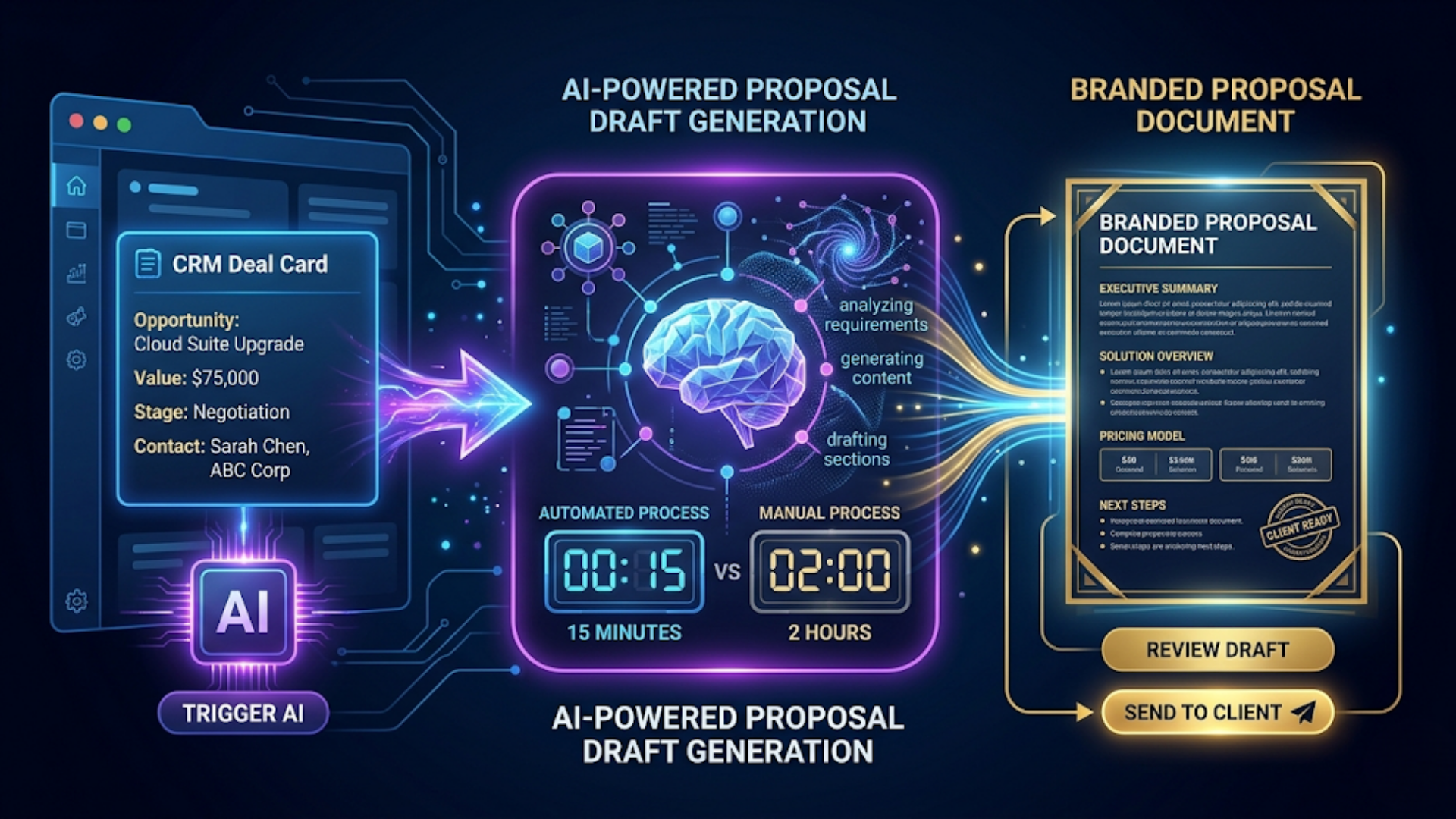
Automated proposal generation cuts the time from CRM deal creation to client-ready PDF from 2 hours to 15 minutes. The workflow: CRM deal reaches proposal stage, client data gets pulled automatically, GPT-4 drafts from your proven template, a formatted PDF is generated, and it lands in your inbox for a quick review before sending. No copy-pasting. No hunting for client details. No staring at a blank document.
The average services business sends 15 to 25 proposals per month. At 2 hours each, that’s 30 to 50 hours of someone’s time on a repetitive task. Most of that time isn’t creative thinking. It’s pulling data from a CRM, copying it into a template, adjusting language for the client’s industry, and formatting a PDF.
That’s automation territory.
I build these systems for services businesses. The pattern is always the same: the proposal itself is 80% identical across clients. The remaining 20% is client-specific details, scope adjustments, and pricing. AI handles both parts well when given the right template and data.
The Complete Proposal Automation Workflow
Here’s the full architecture from trigger to delivery.
CRM deal moves to "Proposal" stage
    |
    v
n8n webhook triggers
    |
    v
Pull client data from CRM (name, company, industry, deal size, requirements)
    |
    v
Select proposal template based on service type
    |
    v
GPT-4 drafts proposal sections (scope, timeline, deliverables, pricing)
    |
    v
Insert into Google Docs template
    |
    v
Convert to PDF
    |
    v
Email to internal reviewer with one-click approve/request changes
    |
    v
On approval: send to client via email
Tools and costs:
| Component | Tool | Cost |
|---|---|---|
| Workflow engine | n8n (self-hosted) | $12-24/month |
| CRM | Zoho CRM, HubSpot, or Pipedrive | Varies |
| AI drafting | OpenAI GPT-4 API | ~$0.15-0.30 per proposal |
| Document formatting | Google Docs API | Free |
| PDF conversion | Google Docs export or DocRaptor | Free or $15/month |
| Email delivery | Gmail API or SMTP | Free |
Total cost: $25 to $50/month for the complete system, plus pennies per proposal for the AI calls. Compare that to the value of 35+ hours saved monthly.
The key design decision: keep a human in the loop. The AI drafts, a human reviews. This catches edge cases and maintains quality while eliminating 85% of the manual work.
Setting Up the CRM Trigger
The workflow starts when a deal reaches the right pipeline stage. Every major CRM supports this.
Zoho CRM setup:
Create a workflow rule that fires when a deal’s stage changes to “Proposal Sent” or whatever you call your proposal stage. The action: call an n8n webhook URL with the deal ID.
In n8n, your Webhook node receives the deal ID. The next node calls the Zoho CRM API to pull the full deal record: contact name, company, industry, deal value, custom fields with requirements, and any notes your sales team added.
HubSpot setup:
Use HubSpot’s workflow tool to trigger on deal stage change. Send the deal ID to n8n via webhook. Pull the deal, company, and contact properties through HubSpot’s API.
Pipedrive setup:
Pipedrive has native webhook support for deal stage changes. Configure it in Settings > Webhooks. Filter for the proposal stage and forward to n8n.
Critical data points to pull:
- Client name and company
- Industry vertical
- Deal size and pricing tier
- Specific requirements or notes from discovery calls
- Timeline expectations
- Decision maker’s name and title
- Any custom fields relevant to scoping
The more context you feed the AI, the better the first draft. I’ve found that including even rough notes from discovery calls dramatically improves output quality. The AI picks up on specific pain points and mirrors them back in the proposal language.
India-specific note: If you’re using Zoho CRM (popular in India for its INR pricing), the Zoho API works well with n8n. There’s a native Zoho CRM node in n8n that handles OAuth and pagination. No custom API work needed.
Building the AI Proposal Engine
This is where the magic happens. You need two things: a solid prompt template and structured client data.
The prompt architecture:
Don’t send GPT-4 a vague instruction like “write a proposal.” That gives you generic garbage. Instead, build a structured prompt that includes:
- System prompt: Your company’s voice, proposal structure, and hard rules (no jargon, specific formatting requirements, tone guidelines)
- Template sections: Each section of your proposal as a separate prompt call
- Client context: All the CRM data injected into the prompt
- Few-shot examples: Two or three excerpts from your best proposals
Example system prompt:
You are a proposal writer for [Company Name], a [services description] company.
Write in first person plural (we/our). Be specific about deliverables.
Every timeline must include calendar dates, not just "4 weeks."
Pricing must match the provided tier. Do not invent services not listed.
Tone: professional, confident, specific. No filler paragraphs.
Section-by-section generation:
I recommend generating each proposal section separately rather than the whole document in one call. This gives you more control and better output.
| Section | Token budget | Key inputs |
|---|---|---|
| Executive summary | 200-300 tokens | Client pain points, proposed solution overview |
| Scope of work | 400-600 tokens | Requirements, service type, deliverables list |
| Timeline and milestones | 200-300 tokens | Start date, duration, phases |
| Team and approach | 200-300 tokens | Methodology, team structure |
| Pricing | 150-250 tokens | Tier, line items, payment terms |
| Terms and next steps | 150-200 tokens | Standard terms, CTA |
Cost per proposal: At GPT-4’s current pricing, a full 6-section proposal costs roughly $0.15 to $0.30 in API calls. That’s about Rs 12 to 25 per proposal if you’re tracking in INR. Negligible.
Pro tip: Cache your system prompt and few-shot examples. OpenAI’s prompt caching reduces costs by 50% on repeated prefixes. If you’re generating 20 proposals a month with the same system prompt, that adds up.
Google Docs Template and PDF Generation
The AI gives you raw text. Now you need it formatted professionally.
Google Docs template approach:
Create a master Google Docs template with placeholders. Use n8n’s Google Docs node to:
- Copy the master template to a new document
- Replace placeholders with AI-generated content using the
replaceAllTextmethod - Insert the client’s logo if available
- Update headers, footers, and page numbers
- Export as PDF
Placeholder format in your template:
{{client_name}}
{{company_name}}
{{executive_summary}}
{{scope_of_work}}
{{timeline}}
{{pricing_table}}
{{terms}}
The n8n flow for document generation:
- Google Drive node: Copy template file to proposals folder
- Google Docs node: Batch replace all placeholders
- Google Drive node: Export as PDF
- Move PDF to organized folder (by client, by date)
Formatting considerations:
Google Docs handles most formatting through the template itself. Headers, fonts, colors, margins, your company logo, everything stays intact from the template. Only the placeholder content changes.
For complex pricing tables, I recommend building the table structure in the template and having the AI output pipe-delimited values that n8n parses into table cells. This avoids formatting issues with AI-generated tables.
Alternative: DocRaptor or Puppeteer
If your proposals need pixel-perfect formatting beyond what Google Docs offers, consider DocRaptor ($15/month) or a self-hosted Puppeteer instance. Build your template in HTML/CSS, inject the content, render to PDF. More work to set up but unlimited design flexibility.
The Human Review Step
Never skip this. I’ve seen businesses try to fully automate proposal delivery and it backfires within a week.
Why human review matters:
- AI occasionally hallucinates deliverables you don’t offer
- Pricing edge cases need human judgment
- Client relationships have context that CRM fields don’t capture
- One bad proposal can kill a $50,000 deal
The review workflow:
When the PDF is ready, n8n sends an email (or Slack message) to the designated reviewer with:
- The PDF attached
- A summary of the deal details
- Two buttons: “Approve and Send” and “Needs Changes”
Approve: Triggers the delivery workflow. Email goes to the client with the PDF attached, along with a personalized cover message (also AI-drafted, also from your template).
Needs Changes: Opens the Google Doc in edit mode. The reviewer makes changes directly, then clicks a custom “Ready” button (a Google Apps Script trigger) that re-exports the PDF and sends it.
Average review time: Most reviewers spend 5 to 10 minutes scanning the document. They catch real issues maybe 15% of the time. The other 85%, they approve as-is. That’s the target: a system good enough that human review is a quick sanity check, not a rewrite.
India context: For businesses dealing with GST-registered clients, make sure your template includes proper GST details, SAC codes for services, and the right tax breakdowns. Automate this by pulling the client’s GST number from CRM and computing CGST/SGST or IGST based on their state versus yours.
Handling Multiple Service Types
Most services businesses offer more than one thing. Your automation needs to handle this.
Template routing logic:
In n8n, use a Switch node after pulling the CRM data. Route based on the deal’s service type or a custom field:
Service type = "Web Development" --> Template A
Service type = "Marketing Retainer" --> Template B
Service type = "Consulting" --> Template C
Service type = "Custom Project" --> Template D (most flexible)
Each template has its own:
- Google Docs master template with appropriate sections
- GPT-4 system prompt tuned for that service
- Pricing structure and line items
- Terms specific to that service type
Scaling the template library:
Start with one template for your most common service. Get it working end to end. Then duplicate and modify for your second most common service. I’ve seen businesses try to build 10 templates at once. They never finish. Start with one, prove it works, expand.
Combination proposals:
When a deal involves multiple services, the Switch node sends data to multiple template generators. A merge step combines the sections into one coherent proposal. The AI’s executive summary gets regenerated at the end to unify the narrative.
Pricing calculation:
For straightforward pricing (fixed packages), store your price list in a Google Sheet or Airtable base. n8n looks up the service type and tier, pulls the price, and injects it into the proposal.
For custom pricing, include a “pricing notes” field in your CRM deal. The reviewer adjusts the numbers during the review step. Over time, you can train the AI on your historical pricing data to suggest appropriate rates based on scope and client size.
Measuring Results and Optimizing
Set up tracking from day one. You need to know if automated proposals perform as well as manual ones.
Key metrics to track:
| Metric | Before Automation | Target After |
|---|---|---|
| Time per proposal | 2 hours | 15 minutes (including review) |
| Proposals sent per month | 15-20 | 30-40 (capacity increase) |
| Win rate | Baseline | Same or better |
| Time to send after deal stage change | 1-3 days | Same day |
| Client feedback on proposal quality | Baseline | Same or better |
The speed advantage:
The biggest win isn’t just time saved. It’s response speed. When a prospect says “send me a proposal,” getting it to them the same day instead of three days later dramatically improves win rates. Some studies show a 50% increase in close rate when proposals arrive within 24 hours of the request.
Optimization loop:
- Track which proposals win and which lose
- Feed winning proposals back into your few-shot examples
- A/B test different executive summary approaches
- Monitor reviewer override rates. If reviewers change the same section repeatedly, fix the prompt
Google Sheets dashboard:
Log every proposal to a Google Sheet: date, client, service type, deal value, time from trigger to delivery, reviewer changes made (yes/no), outcome (won/lost/pending). n8n handles all this logging automatically.
After 50 proposals, you’ll have enough data to see patterns. Which templates win more? Which service types need more reviewer intervention? Where is the AI consistently weak?
FAQ
How long does it take to set up this system?
Plan for 8 to 12 hours of initial setup. That includes building your first template, writing the AI prompts, configuring the CRM trigger, and testing the full flow. After that, each new service template takes 2 to 3 hours.
Can I use Claude instead of GPT-4 for the drafting?
Yes. Claude works well for proposal writing, especially for longer, more nuanced sections. The n8n HTTP Request node works with any API. I’ve tested both and the quality difference is minimal. Choose based on pricing and your preference.
What if my CRM doesn’t support webhooks?
Most modern CRMs do. If yours doesn’t, use a polling approach: n8n checks your CRM every 15 minutes for new deals in the proposal stage. Slightly delayed but functionally identical. Zoho, HubSpot, Salesforce, and Pipedrive all support webhooks natively.
Will clients notice the proposals are AI-generated?
Not if your templates and prompts are well-built. The AI adapts to your voice and structure. Reviewers catch anything that sounds off. After 30 to 50 proposals, your prompts will be tuned enough that output is indistinguishable from manually written proposals.
What about proposals that need custom diagrams or architecture drawings?
Keep those manual for now. The automation handles text content and standard formatting. For proposals requiring custom visuals, the system generates the text portions and flags the reviewer to add diagrams before approving. This still saves 60 to 70% of the time.
How do I handle multi-currency proposals for international clients?
Add a currency field to your CRM deal. The n8n flow reads it and adjusts the pricing template accordingly. Store exchange rates in a Google Sheet that updates daily (another simple n8n automation). For India-based businesses quoting in both INR and USD, maintain two pricing columns in your price list.
What’s the ROI on this automation?
At 20 proposals per month and 1.75 hours saved each, that’s 35 hours per month. Value that at your hourly rate or your employee’s cost. For most services businesses, the system pays for itself in the first week. The real ROI is the deals you win because you responded faster.
I build proposal automation systems and AI-powered workflows for services businesses. If your team is spending more time formatting proposals than closing deals, triggerAll can set this up for you.
Need help implementing this?
Book a free 30-minute discovery call. We'll map your current setup, identify quick wins, and outline what automation can do for your business.
Book a Free Discovery Call