How to Set Up Automated Expense Reporting in 2026
Set up automated expense reporting in 2026. Receipt capture via photo or email, OCR extraction, AI categorization, approval workflows, and accounting sync. Full n8n + OpenAI Vision + Google Sheets + Slack guide with India GST tracking.
How to Set Up Automated Expense Reporting in 2026
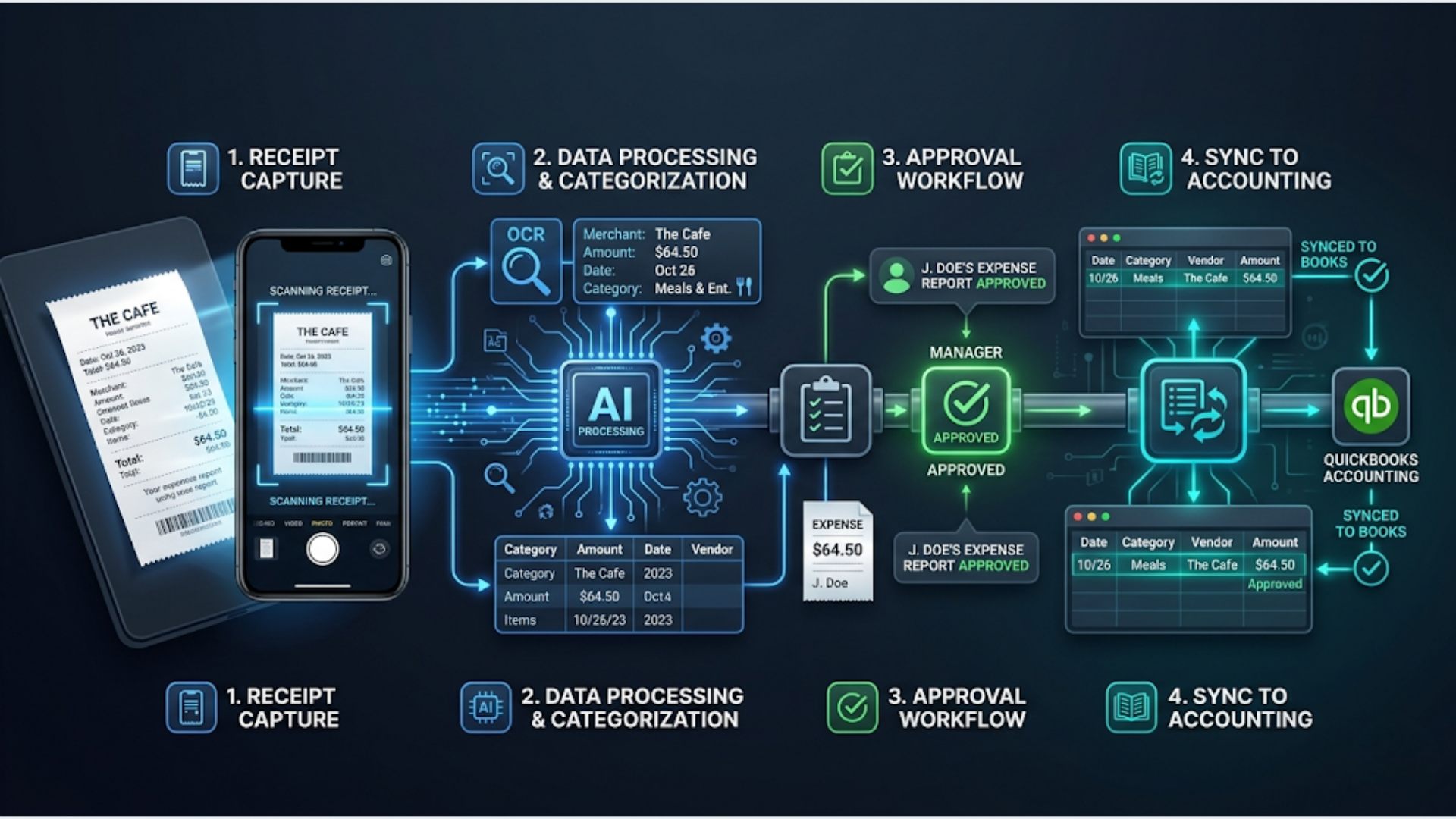
Automated expense reporting turns a 4-hour monthly chore into a 20-minute review. The workflow: snap a photo of a receipt or forward an email receipt, AI extracts the vendor, amount, date, and category via OCR, the expense gets logged and categorized automatically, an approval workflow routes it to the right manager, and everything syncs to your accounting software. No spreadsheets. No lost receipts. No month-end scramble.
The average employee spends 20 minutes per expense report. A 50-person company processes 200+ expense reports monthly. That’s 66+ hours per month on a task that’s almost entirely automatable. The error rate on manual expense reports is 19% according to the Global Business Travel Association. Nearly one in five reports has mistakes that require correction.
I build these systems. The technology in 2026 makes this straightforward. OCR is 95%+ accurate. AI categorization handles edge cases. Approval workflows run in Slack or email. The whole thing connects to QuickBooks, Xero, Zoho Books, or Tally in India. Here’s the complete setup.
The Complete Expense Automation Workflow
Two entry points, one processing pipeline, one output.
Entry Point 1: Photo capture (WhatsApp or email)
Entry Point 2: Email receipt forwarded to expenses@company.com
    |
    v
n8n receives image/PDF
    |
    v
OpenAI Vision API extracts:
  - Vendor name
  - Amount (with currency)
  - Date
  - Line items (if available)
  - Tax amount (GST/VAT if applicable)
    |
    v
AI categorizes: Travel, Meals, Software, Office, Marketing, Other
    |
    v
Log to Google Sheets expense tracker
    |
    v
Attach original receipt image to record
    |
    v
Route for approval:
    +--> Under threshold (e.g., $50): Auto-approved
    +--> Over threshold: Slack message to manager with approve/reject buttons
    |
    v
Approved expenses sync to accounting software (monthly or real-time)
    |
    v
Monthly summary report auto-generated
Tools and costs:
| Component | Tool | Cost |
|---|---|---|
| Workflow engine | n8n (self-hosted) | $12-24/month |
| OCR / extraction | OpenAI Vision API (GPT-4o) | $3-8/month |
| Expense database | Google Sheets | Free |
| Receipt storage | Google Drive | Free (15GB) |
| Approval routing | Slack | Free |
| Accounting sync | Zoho Books, QuickBooks, or Xero API | Varies |
| Receipt capture | WhatsApp (WATI) or Email | $0-49/month |
Total cost: $15 to $80/month for a complete expense automation system. Compare that to Expensify ($5/user/month, $250/month for 50 users) or SAP Concur ($8/user/month, $400/month for 50 users). For small businesses, the DIY approach saves 60 to 80%.
Receipt Capture: Two Methods That Work
The system needs to accept receipts from wherever employees have them. Two channels cover 95% of scenarios.
Method 1: WhatsApp Photo Capture
Employees snap a photo of a physical receipt and send it to a designated WhatsApp number (your company’s WATI number with a specific keyword like “expense”).
How it works:
- Employee sends photo to WhatsApp with message “expense” or just the photo to a dedicated expense number
- WATI receives the message and triggers an n8n webhook
- n8n downloads the image
- Processing begins
Why WhatsApp works: Everyone has their phone. The photo is taken and submitted in 10 seconds. No app to install. No login. No form to fill out. Adoption rate is near 100% because there’s zero friction.
India context: WhatsApp is the default communication app. Using it for expense capture means zero training required. Employees already send photos through WhatsApp daily. WATI or Interakt handles the business API side.
Method 2: Email Forward
Digital receipts (SaaS subscriptions, online purchases, airline bookings) arrive by email. Employees forward them to expenses@yourcompany.com.
How it works:
- Email arrives at the dedicated inbox
- n8n’s Email Trigger node (IMAP) picks it up
- Extracts the attached receipt (PDF or image) and the email body
- Processing begins
Setting up the email trigger in n8n:
Configure an IMAP Email Trigger node with your expenses@company.com credentials. Set it to check every 5 minutes. Filter for emails with attachments. The body of the forwarded email often contains useful metadata (original sender, date, amount) that supplements the receipt extraction.
Handling both methods in one workflow:
Both entry points feed into the same processing pipeline. Use a Merge node or have both triggers connect to the same OCR extraction node. Add a “source” tag (whatsapp or email) so you can track which channel employees prefer.
AI-Powered Receipt Extraction
This is the core of the automation. OpenAI’s Vision API reads the receipt image and extracts structured data.
The extraction prompt:
Analyze this receipt image and extract the following information as JSON:
{
  "vendor_name": "string",
  "date": "YYYY-MM-DD",
  "total_amount": number,
  "currency": "string (USD, INR, EUR, etc.)",
  "tax_amount": number or null,
  "tax_type": "string (GST, VAT, sales tax, etc.) or null",
  "line_items": [
    {"description": "string", "amount": number}
  ],
  "payment_method": "string (cash, card ending XXXX, UPI, etc.) or null",
  "receipt_number": "string or null"
}

If any field is not visible or unclear, use null.
If the receipt is in a non-English language, still extract in English.
For Indian receipts, also extract:
  "gstin": "vendor GSTIN if visible",
  "cgst": number or null,
  "sgst": number or null,
  "igst": number or null,
  "hsn_sac_code": "string or null"
Accuracy: GPT-4o’s Vision API achieves 93 to 97% accuracy on standard receipts (printed text, reasonable quality). Handwritten receipts drop to 80 to 85%. Crumpled or faded receipts: 70 to 80%. For best results, ask employees to flatten the receipt and take a clear photo in good lighting.
Cost per receipt: GPT-4o Vision costs approximately $0.01 to $0.03 per receipt image (depending on image size and token output). At 200 receipts per month, that’s $2 to $6/month. Trivially cheap.
Handling difficult receipts:
When confidence is low (the AI returns multiple null fields), flag the expense for manual review instead of auto-processing. Add a “confidence_score” to your prompt output (have the AI rate its confidence 1 to 10). Anything below 7 goes to the manual queue.
Alternative OCR options:
| Tool | Accuracy | Cost | Best For |
|---|---|---|---|
| OpenAI Vision (GPT-4o) | 93-97% | $0.01-0.03/receipt | General purpose, multilingual |
| Google Document AI | 95-98% | $0.01/page | High volume, structured forms |
| AWS Textract | 94-97% | $0.015/page | AWS ecosystem users |
| Mindee | 92-96% | Free tier (250/month) | Budget option |
GPT-4o Vision is the simplest to integrate with n8n (just an HTTP Request node to the OpenAI API). Google Document AI is slightly more accurate for structured receipts but requires more setup.
Smart Categorization
Once the receipt data is extracted, AI categorizes the expense automatically.
Categorization prompt:
Categorize this expense into one of these categories:
- Travel (flights, trains, taxis, fuel, tolls, parking)
- Accommodation (hotels, Airbnb, hostels)
- Meals (restaurants, food delivery, groceries for business)
- Software (SaaS subscriptions, tools, licenses)
- Office (supplies, equipment, furniture)
- Marketing (ads, sponsorships, promotional materials)
- Professional Services (legal, accounting, consulting)
- Telecommunications (phone bills, internet)
- Miscellaneous (anything that doesn't fit above)

Expense details:
Vendor: {{vendor_name}}
Amount: {{total_amount}} {{currency}}
Line items: {{line_items}}

Return JSON: {"category": "string", "subcategory": "string", "confidence": 1-10}
Accuracy: Category classification runs at 90 to 95% accuracy for common expenses. Edge cases (a meal at a hotel restaurant: is it Meals or Accommodation?) are handled by the subcategory field and the confidence score.
Custom categories:
Every business has different expense categories. Modify the prompt to match your chart of accounts. If your accounting software uses specific category codes, include those in the prompt and have the AI return the code directly.
Learning from corrections:
When a reviewer recategorizes an expense, log the correction. Monthly, review the corrections and update your categorization prompt with new examples. After 3 to 6 months, your accuracy will be 97%+.
The Approval Workflow
Expenses need approval. The workflow should be fast, mobile-friendly, and non-blocking.
Approval routing rules:
| Condition | Action |
|---|---|
| Amount under $50 (or Rs 4,000) | Auto-approved. No human review |
| Amount $50-500 (Rs 4,000-40,000) | Manager approval via Slack |
| Amount over $500 (Rs 40,000) | Manager + finance head approval |
| Category: Travel (any amount) | Manager approval required |
| New vendor (first time) | Flag for review regardless of amount |
Slack approval workflow:
When an expense needs approval, n8n sends a Slack message to the manager:
New Expense for Approval
-----
Employee: Rahul Sharma
Vendor: Uber India
Amount: Rs 1,200
Category: Travel (Taxi)
Date: 2026-04-25
Receipt: [View Receipt]

[Approve] [Reject] [Ask for Details]
The Approve and Reject buttons are Slack interactive components. When clicked, they send a webhook back to n8n, which updates the expense status in Google Sheets.
Mobile-first design: Managers approve expenses from their phone. The Slack message shows everything they need: who, what, how much. One tap to approve. This beats email-based approvals because Slack notifications are harder to miss and the action buttons are immediate.
Escalation: If no approval within 24 hours, n8n sends a reminder. After 48 hours, escalate to the next approver. No expense sits in limbo indefinitely.
Rejection handling: When rejected, n8n notifies the employee via Slack DM with the rejection reason. The employee can resubmit with corrections or additional context.
Accounting Software Sync
Approved expenses need to reach your accounting software without manual data entry.
Zoho Books integration (India):
n8n’s HTTP Request node calls Zoho Books API to:
- Create an expense record with vendor, amount, category, and date
- Attach the receipt image
- Map the category to the correct Zoho Books account code
- Add GST details (CGST, SGST, IGST) for input tax credit tracking
QuickBooks integration:
Similar approach. n8n calls QuickBooks API to create expense entries. Map your categories to QuickBooks account codes. QuickBooks handles the chart of accounts mapping.
Xero integration:
Xero’s API accepts expense claims with receipt attachments. n8n posts the expense data and attaches the receipt file. Xero’s bank reconciliation then matches it against bank transactions.
Sync frequency options:
- Real-time: Each approved expense syncs immediately. Best for companies that need up-to-date books
- Daily batch: n8n runs nightly, syncing all approved expenses from the day. Reduces API calls, simpler to debug
- Monthly batch: All approved expenses sync at month-end. Least complex but delays book updates
I recommend daily batch for most businesses. It’s the right balance of timeliness and simplicity.
India: GST Input Credit Tracking
This is where automated expense reporting delivers outsized value for Indian businesses.
Every business receipt with a valid GSTIN contains GST that can be claimed as input tax credit (ITC). Manually tracking this across hundreds of receipts is error-prone. The automation handles it:
- OCR extracts the vendor’s GSTIN, CGST, SGST, and IGST amounts
- Categorization flags whether the expense qualifies for ITC
- A separate Google Sheet tab aggregates monthly GST input credits by tax type
- Monthly summary matches against GSTR-2B for reconciliation
ITC qualification rules (automated):
| Expense Category | ITC Eligible | Notes |
|---|---|---|
| Software / SaaS | Yes | Full ITC |
| Office supplies | Yes | Full ITC |
| Travel (business) | Yes | Except personal travel |
| Meals (business) | Partial | Only if for clients/events, not personal |
| Fuel | No | Blocked credit under GST |
| Insurance premiums | No | Blocked credit |
Build these rules into your categorization step. The AI applies the correct ITC flag based on category and vendor type.
Monthly Reporting and Analytics
The expense data in your Google Sheet powers automated monthly reports.
Auto-generated monthly report (via n8n scheduled workflow):
n8n runs on the 1st of each month and generates:
Monthly Expense Report - April 2026
------------------------------------
Total expenses: Rs 4,85,000 ($5,800)
Approved: Rs 4,72,000
Rejected: Rs 13,000
Pending: Rs 0

Category Breakdown:
  Travel:         Rs 1,20,000 (25%)
  Software:       Rs 85,000 (18%)
  Marketing:      Rs 75,000 (15%)
  Meals:          Rs 65,000 (13%)
  Office:         Rs 55,000 (11%)
  Other:          Rs 85,000 (18%)

Top Vendors:
  1. AWS - Rs 45,000
  2. Uber India - Rs 38,000
  3. Google Workspace - Rs 22,000

GST Input Credit Available: Rs 52,000
  CGST: Rs 24,000
  SGST: Rs 24,000
  IGST: Rs 4,000

Approval Metrics:
  Avg approval time: 3.2 hours
  Auto-approved: 145 (72%)
  Manager-approved: 52 (26%)
  Rejected: 4 (2%)
This report gets emailed to finance and leadership automatically. Zero manual compilation.
Trend analysis:
After 3+ months of data, add trend charts to your Google Sheet dashboard:
- Monthly spend by category (line chart)
- Budget vs actual by department
- Top 10 vendors by cumulative spend
- Average expense amount trend
- Approval turnaround time trend
Budget alerts:
Set category-level monthly budgets in a separate sheet. n8n checks spending against budgets daily. When spending hits 80% of budget, alert the team. When it hits 100%, alert leadership. Prevents month-end surprises.
FAQ
How accurate is AI receipt extraction compared to manual entry?
GPT-4o Vision achieves 93 to 97% accuracy on clear receipt photos. Manual entry has a 19% error rate (per GBTA data). The AI is more accurate than humans for routine receipts. The remaining 3 to 7% of AI errors are caught during the approval review step. Net accuracy with human review: 99%+.
Can this handle receipts in multiple languages?
Yes. GPT-4o Vision processes receipts in English, Hindi, Tamil, Japanese, German, French, and dozens of other languages. It extracts the data and returns it in English regardless of the source language. This is particularly useful for Indian businesses dealing with receipts in regional languages.
What if an employee loses the physical receipt?
For digital expenses (SaaS, online purchases), the email receipt is the record. For physical expenses without a receipt, the employee submits a “no receipt” declaration via the same WhatsApp or email channel. The AI skips the OCR step and the employee manually enters the details. The approval workflow flags these for extra scrutiny.
How do I handle corporate credit card expenses?
Import the monthly credit card statement as a CSV. n8n processes each line item, matches it against receipts already submitted (by amount and date), flags unmatched transactions, and generates a reconciliation report. Employees are asked to submit missing receipts for unmatched transactions.
Is this system compliant with tax audit requirements?
The system stores original receipt images, maintains an audit trail of every extraction, categorization, and approval decision, and timestamps everything. For Indian businesses, ensure you retain receipts for the period specified by the Income Tax Act (typically 6 years). Google Drive storage handles retention. Consult your CA for specific compliance requirements.
Can I use this for per diem and mileage expenses?
Yes, with modifications. For per diem, employees submit a simple form (date, city, purpose) instead of a receipt. n8n looks up the per diem rate for that city and auto-calculates the amount. For mileage, employees submit start and end locations. n8n uses the Google Maps API to calculate distance and applies your per-kilometer rate.
What’s the setup time for the complete system?
Budget 12 to 16 hours for initial setup. That includes configuring both entry points (WhatsApp and email), building the extraction and categorization prompts, setting up the approval workflow in Slack, creating the Google Sheets tracker, and connecting to your accounting software. After setup, ongoing maintenance is minimal (prompt tuning based on accuracy, adding new categories as needed).
I build expense automation and financial workflow systems for businesses. If your team is still chasing receipts and typing numbers into spreadsheets, that time is recoverable. triggerAll automates the entire expense lifecycle.
Need help implementing this?
Book a free 30-minute discovery call. We'll map your current setup, identify quick wins, and outline what automation can do for your business.
Book a Free Discovery Call