How to Automate Employee Onboarding Workflows in 2026
Automate employee onboarding from offer letter to 90-day check-in. Cut onboarding from 8 hours to 30 minutes per hire using n8n, Google Workspace, Slack, and Notion.
How to Automate Employee Onboarding Workflows in 2026
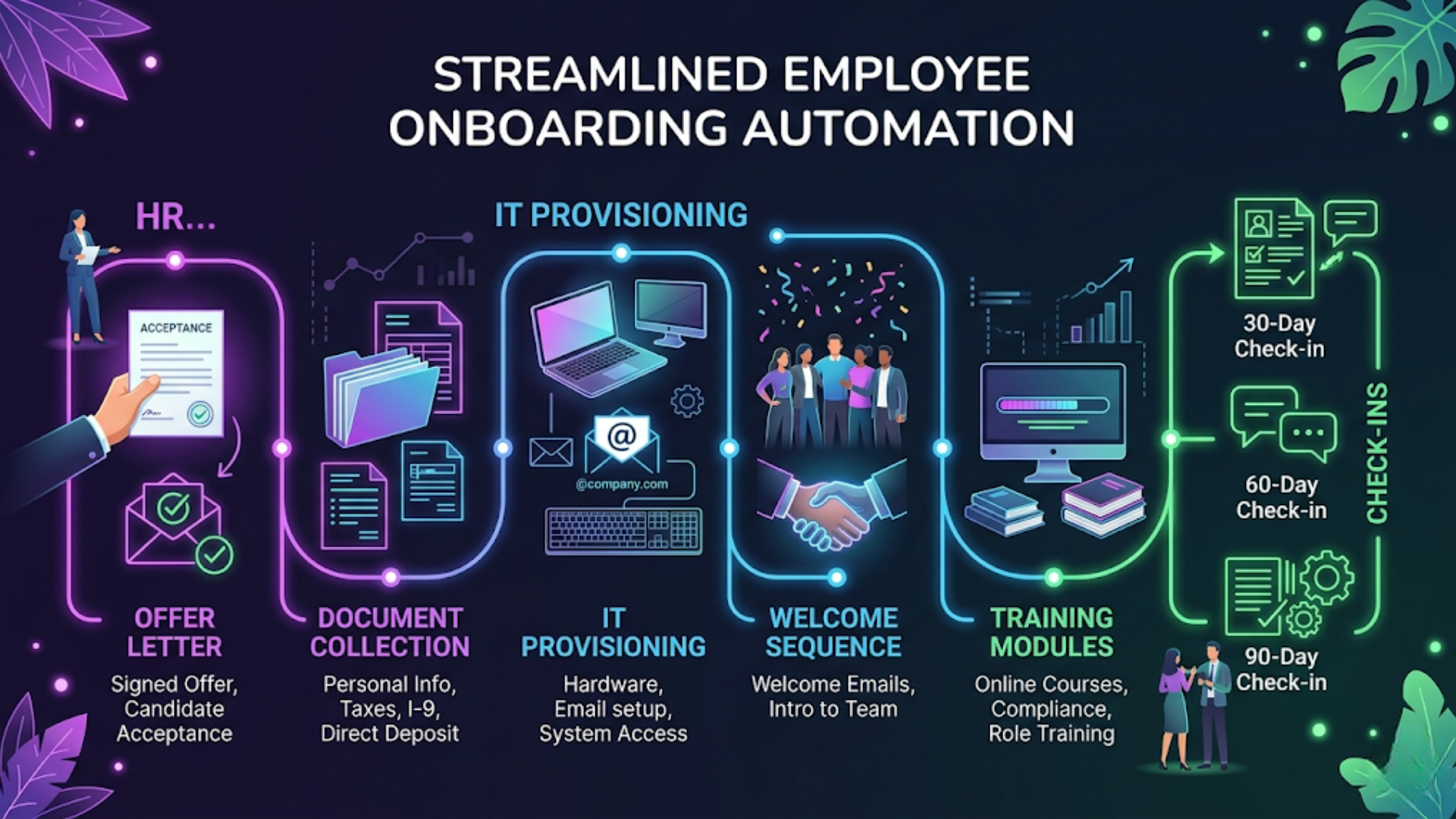
Automated employee onboarding cuts the process from 8 hours of manual work per hire to about 30 minutes of oversight. The workflow covers everything: offer acceptance trigger, document collection, IT account provisioning, welcome sequences, training schedules, and 30/60/90 day check-ins.
Most companies do onboarding manually. HR sends an email. Waits for documents. Sends another email to IT. Waits for accounts. Sends the welcome packet. Forgets the training schedule. Follows up on day 30. Maybe.
The result: new hires spend their first week confused, waiting for access, and wondering if anyone actually prepared for their arrival. Bad first impressions cost retention.
Here’s how to automate the entire onboarding pipeline using tools you probably already have.
The Automated Onboarding Pipeline (End to End)
Before diving into individual steps, here’s the complete flow. Every step triggers automatically from the one before it.
| Stage | Trigger | Actions | Tools |
|---|---|---|---|
| 1. Offer accepted | Candidate status changes in ATS/HRIS | Generate offer letter, send for e-signature, notify HR | n8n + Google Docs + DocuSign/Zoho Sign |
| 2. Pre-boarding | Offer signed | Document collection form, background check initiation, welcome email | n8n + Google Forms + email |
| 3. IT provisioning | Start date minus 3 days | Create email, Slack, tool accounts, assign hardware | n8n + Google Workspace Admin + Slack API |
| 4. Day 1 welcome | Start date | Welcome Slack message, onboarding Notion page, first-day schedule | n8n + Slack + Notion |
| 5. Training schedule | Day 1 trigger | Calendar invites for training sessions, buddy assignment | n8n + Google Calendar + Slack |
| 6. Check-ins | Day 30/60/90 | Survey form, manager reminder, calendar block | n8n + Google Forms + Google Calendar |
One trigger (offer acceptance) cascades through the entire pipeline. No manual handoffs between HR, IT, and the hiring manager. Each step fires at the right time without anyone remembering to initiate it.
The core tool stack:
- n8n (workflow orchestrator): Connects everything. Handles timing, logic, and data flow.
- Google Workspace (email, calendar, docs): Where accounts live and communication happens.
- Slack (team communication): Welcome messages, buddy introductions, IT notifications.
- Notion (knowledge base): Onboarding pages, training materials, company handbook.
- Google Forms (data collection): Document uploads, surveys, feedback forms.
Total additional cost beyond tools you already use: $12 to $24/month for self-hosted n8n. Everything else is part of your existing Google Workspace and Slack subscriptions.
Step 1: Offer Trigger and Document Collection
The moment a candidate accepts an offer, the clock starts. Every day between acceptance and start date is time you could be using to prepare.
The automated trigger:
If you use an ATS (Applicant Tracking System) like Lever, Greenhouse, or Zoho Recruit, the trigger is a status change. Candidate moves to “Offer Accepted.” n8n webhook catches this and starts the pipeline.
If you don’t use an ATS, the trigger can be as simple as HR adding a row to a Google Sheet with the new hire’s details: name, email, role, department, start date, manager.
What fires immediately after the trigger:
-
Offer letter generation: n8n pulls a Google Docs template, populates it with the hire’s details (name, role, salary, start date, reporting manager), and creates the final document.
-
E-signature request: The generated document is sent via DocuSign, Zoho Sign, or even a simple Google Forms acknowledgment for smaller companies.
-
Document collection form: A Google Form link goes to the new hire requesting: ID proof, address proof, bank details, emergency contact, tax forms (Form 16 / W-4 depending on country), and a photograph.
-
HR notification: Slack message to the HR channel confirming the new hire’s details and start date.
-
Manager notification: Email to the hiring manager with the start date and a link to the onboarding checklist they need to complete (meeting schedule, buddy assignment, first-week project).
Document tracking:
The n8n workflow checks the Google Form responses daily. If documents are missing 5 days before start date, an automated reminder goes to the new hire. If still missing 2 days before, HR gets flagged.
This eliminates the most common onboarding failure: the new hire shows up on day 1 and HR is still waiting for their PAN card.
Template for the document request message:
Keep it warm and practical. “Welcome to [Company]! Before your first day on [date], we need a few documents to get everything set up. Here’s the link: [form]. Takes about 10 minutes. Let me know if you have any questions.”
No corporate jargon. No 47-page welcome packet. Just what they need to do, how long it takes, and who to ask if stuck.
Step 2: IT Provisioning (Accounts and Access)
IT provisioning is the biggest bottleneck in manual onboarding. New hire arrives Monday. IT ticket was submitted Friday afternoon. Accounts won’t be ready until Wednesday. The new person sits there with nothing to do.
Automate it. Three days before start date, n8n fires the provisioning workflow:
Google Workspace provisioning:
n8n calls the Google Workspace Admin API to:
- Create the email account (firstname.lastname@company.com)
- Add the user to department-specific Google Groups
- Share relevant Google Drive folders
- Add to the company calendar
Slack provisioning:
n8n calls the Slack API to:
- Create the Slack account (or send an invite)
- Add to default channels (#general, #random, #announcements)
- Add to department channels
- Add to the new hire’s team channel
Tool-specific provisioning:
Depending on the role, the workflow provisions access to:
| Role | Tools to Provision |
|---|---|
| Engineering | GitHub, Jira, AWS/GCP console, staging environments |
| Sales | CRM (Zoho/HubSpot), sales enablement tools, call recording |
| Marketing | Social media tools, analytics, CMS access |
| Support | Helpdesk (Freshdesk/Zendesk), knowledge base |
| Finance | Accounting software, expense management |
| Everyone | Google Workspace, Slack, Notion, password manager |
Not all tools have APIs for automatic provisioning. For those that don’t, the workflow creates a task in the IT team’s project management tool (Notion, Jira, Linear) with the specific accounts to create manually. This still saves time because IT gets a pre-formatted, complete request instead of a vague email from HR.
Hardware assignment:
If your company tracks hardware inventory (even in a simple Google Sheet), the workflow can:
- Check available laptops in inventory
- Assign one to the new hire
- Create a hardware pickup/shipping task
- Update the inventory sheet
The verification step:
On start date minus 1 day, n8n runs a verification check. Can the email account send/receive? Is the Slack account active? Are the right Google Drive folders shared? Any failures get flagged to IT for same-day resolution.
This single verification step prevents the most frustrating first-day experience: “Your account isn’t working, let me submit a ticket.”
Step 3: Welcome Sequence and Day 1 Experience
Day 1 sets the tone. Automated doesn’t mean impersonal. It means the personal touches actually happen consistently, instead of depending on whether the manager remembered.
Pre-day-1 (sent the Friday before start date):
The new hire receives an email with:
- Start time and office location/remote login instructions
- First day schedule (meetings, lunch, setup time)
- Dress code (if applicable)
- Parking information or directions
- Who to ask for when they arrive
- A brief “what to expect” summary
This email is templated in n8n but personalized with the hire’s name, manager’s name, and specific schedule.
Day 1 automated sequence:
| Time | Action | Channel |
|---|---|---|
| 9:00 AM | Welcome message in #general from the bot | Slack |
| 9:00 AM | DM to new hire with onboarding Notion page link | Slack |
| 9:00 AM | DM to assigned buddy: “Hey, [New Hire] starts today. Please reach out!” | Slack |
| 9:15 AM | Calendar invite: 30-min setup session with IT (or self-service guide) | Google Calendar |
| 10:00 AM | Calendar invite: Welcome call with manager | Google Calendar |
| 11:00 AM | Calendar invite: Team introduction meeting | Google Calendar |
| 12:00 PM | Calendar invite: Lunch with buddy | Google Calendar |
| 2:00 PM | Calendar invite: HR orientation (policies, benefits, questions) | Google Calendar |
| 4:00 PM | DM: “How’s your first day going? Anything you need?” | Slack |
The onboarding Notion page:
Every new hire gets a personalized Notion page (created automatically from a template) containing:
- Company handbook link
- Team structure and who does what
- Key tools and how to access them
- First-week reading list
- 30-day expectations from their manager
- FAQ for new hires
- Feedback form link
This page is their single source of truth for the first month. Instead of asking 15 people 15 questions, they check the page first.
The buddy system:
The workflow assigns a buddy based on department and seniority (peer-level, not a manager). The buddy gets a Slack DM with their responsibilities: check in daily for the first week, answer informal questions, invite to lunch.
Buddy assignment is one of those things that always gets forgotten in manual onboarding. Automating the assignment and the reminder ensures it actually happens.
Step 4: Training Schedule and Knowledge Transfer
Training is where most onboarding programs fall apart. Week 1 is structured. Week 2 is “figure it out.” By week 3, the new hire is expected to be productive without ever being formally trained on half the tools they use.
Automated training schedule:
Based on the new hire’s role (stored in the onboarding data), n8n creates a training calendar:
| Day | Training Topic | Format | Duration |
|---|---|---|---|
| Day 1 | Company overview, values, how things work here | Live (manager) | 30 min |
| Day 2 | Tool walkthrough (role-specific) | Recorded video + Notion guide | 1 hour |
| Day 3 | Team processes and workflows | Live (team lead) | 45 min |
| Day 4 | Product/service deep dive | Recorded video | 1 hour |
| Day 5 | First small task assignment | Async | Ongoing |
| Week 2 | Department cross-training | Live (other dept leads) | 2 hours total |
| Week 3 | Advanced tool training | Self-paced + office hours | 2 hours |
| Week 4 | First project review with manager | Live | 30 min |
n8n creates Google Calendar invites for each session, sends Slack reminders 30 minutes before, and shares relevant Notion pages or video links.
Training content delivery:
Instead of dumping a 200-page handbook on day 1, drip the content:
- Day 1: Just what they need to survive (email, Slack, where to find things)
- Day 2-3: Role-specific tools and processes
- Week 2: Broader context (company strategy, other teams, how their work fits)
- Week 3-4: Advanced topics, edge cases, institutional knowledge
n8n handles the drip schedule. Each morning during the first two weeks, the new hire gets a Slack DM with that day’s learning content. Short, focused, actionable.
Recording completion:
When training sessions happen via Google Meet, the workflow can check if the calendar event was attended (via Google Calendar API). If a session was missed, it auto-reschedules. No HR follow-up needed.
For self-paced content, a simple Google Form quiz at the end of each module confirms completion. n8n tracks progress and flags any modules not completed by the target date.
Step 5: 30/60/90 Day Check-Ins
The first 90 days determine whether a new hire becomes a long-term employee or starts looking elsewhere. Automated check-ins ensure these critical touchpoints don’t get skipped.
Day 30 check-in:
n8n triggers:
- A Google Form survey to the new hire: “Rate your onboarding experience (1-5). What’s working? What’s not? Do you have everything you need?”
- A Slack reminder to the manager: “It’s [New Hire]‘s 30-day mark. Schedule a 1:1 to discuss progress and any concerns.”
- A calendar block for the manager-employee check-in (if the manager uses Google Calendar with open scheduling)
Day 60 check-in:
Same structure, different questions:
- Survey: “Are you hitting your targets? Where do you need more support? How’s the team dynamic?”
- Manager reminder with a note: “Review initial performance metrics. Discuss any training gaps.”
- Calendar block for the meeting
Day 90 check-in:
This is the big one. Many companies tie it to probation completion.
- Survey: “Would you recommend this company to a friend? What would you change about the onboarding? Rate your confidence in your role.”
- Manager reminder: “90-day review. Confirm probation status. Discuss career path.”
- HR notification: “90-day review due for [New Hire]. Probation decision required.”
- Calendar block for formal review meeting
Why automated check-ins matter:
Without automation, 30/60/90 reviews happen about 40% of the time. Managers are busy. HR is busy. The date passes. Nobody notices until the new hire is already disengaged.
The automation doesn’t do the review. It ensures the review happens. The manager still has the conversation. The survey still captures genuine feedback. But the system guarantees that nobody forgets.
Feedback loop:
Aggregate survey responses across all hires over 6 months. Patterns emerge. If every new hire rates IT provisioning as 2/5, you know where to invest. If the buddy system consistently scores high, double down on it. This data-driven approach to improving onboarding only works if the data is collected consistently, which requires automation.
India-Specific Considerations
Document requirements:
Indian onboarding has specific document needs: PAN card, Aadhaar (with consent as per UIDAI guidelines), previous employer experience letters, relieving letters, Form 12B for tax carryover. Automate collection with a dedicated form that lists exactly what’s needed for Indian employees.
PF and ESI registration:
For companies with 20+ employees, Provident Fund (PF) and Employee State Insurance (ESI) registration for new hires is mandatory. The workflow should create a task for the payroll/compliance team with the new hire’s UAN (if existing) or flag that a new PF account needs creation.
Multi-language communication:
Large Indian companies hire across language lines. The welcome sequence can be configured to send communications in the hire’s preferred language using templated translations. n8n supports conditional logic to select the right template.
Notice period handling:
Indian notice periods run 30 to 90 days. The pre-boarding automation needs to account for this gap. Instead of one follow-up 5 days before start, create a drip sequence: welcome email at offer acceptance, monthly check-in during the notice period, and intensive pre-boarding 1 week before start. This keeps the hire engaged and reduces the risk of them accepting a counter-offer during a long notice period.
Cost in INR:
| Tool | Monthly Cost |
|---|---|
| n8n self-hosted | Rs 1,000 - 2,000 |
| Google Workspace (per user) | Rs 136/user (Starter) |
| Slack (free tier for small teams) | Rs 0 |
| Notion (free tier) | Rs 0 |
| DocuSign / Zoho Sign | Rs 800 - 2,000 |
| Total infrastructure | Rs 2,000 - 5,000 |
That’s the cost of about 15 minutes of HR time per hire. If you onboard more than 2 people per month, it pays for itself immediately.
FAQ
How much time does automated onboarding save per new hire? Typically 6 to 8 hours of manual HR and IT work per hire. The biggest savings come from automated document collection (1-2 hours saved), IT provisioning (2-3 hours saved), and eliminating follow-up emails for missing items (1-2 hours saved). The 30-minute estimate is for oversight and exception handling.
What tools do I need to automate employee onboarding? The minimum stack is a workflow automation tool (n8n), an email/calendar platform (Google Workspace), and a communication tool (Slack). Add Notion for knowledge base, Google Forms for data collection, and an e-signature tool. Most companies already have most of these.
Can I automate onboarding without an HRIS or ATS? Yes. The trigger can be as simple as adding a row to a Google Sheet. The automation doesn’t require enterprise HR software. It works with spreadsheets, forms, and basic communication tools that any company already uses.
How do I handle different onboarding tracks for different roles? Store the role/department in the initial onboarding data. Use conditional logic in n8n to branch the workflow: engineering hires get GitHub provisioning and technical training. Sales hires get CRM access and product training. The core structure (documents, welcome, check-ins) stays the same. The specifics change per branch.
Is automated onboarding impersonal? Only if you design it to be. The automation handles logistics (accounts, documents, scheduling). The personal touches (manager welcome call, buddy lunch, team introductions) still happen in person. Automation ensures the personal moments actually get scheduled instead of forgotten.
What about remote employee onboarding? The same workflow applies with minor adjustments. Replace “office directions” with “remote setup guide.” Ship hardware earlier (account for delivery time). Add a virtual coffee chat instead of in-person lunch. The automation works identically since it’s all digital communications anyway.
How do I measure if my automated onboarding is working? Track three metrics: time-to-productivity (when does the new hire complete their first meaningful task), 90-day retention rate, and new hire satisfaction scores from the automated surveys. Compare before and after automation. Most companies see 30 to 50% improvement in time-to-productivity.
Need help implementing this?
Book a free 30-minute discovery call. We'll map your current setup, identify quick wins, and outline what automation can do for your business.
Book a Free Discovery Call