How to Automate Customer Feedback Collection and Analysis
Automate customer feedback collection and analysis. Post-purchase triggers, NPS/CSAT surveys via email and WhatsApp, AI sentiment analysis, dashboards, and negative feedback alerts. Full n8n + Typeform + OpenAI workflow.
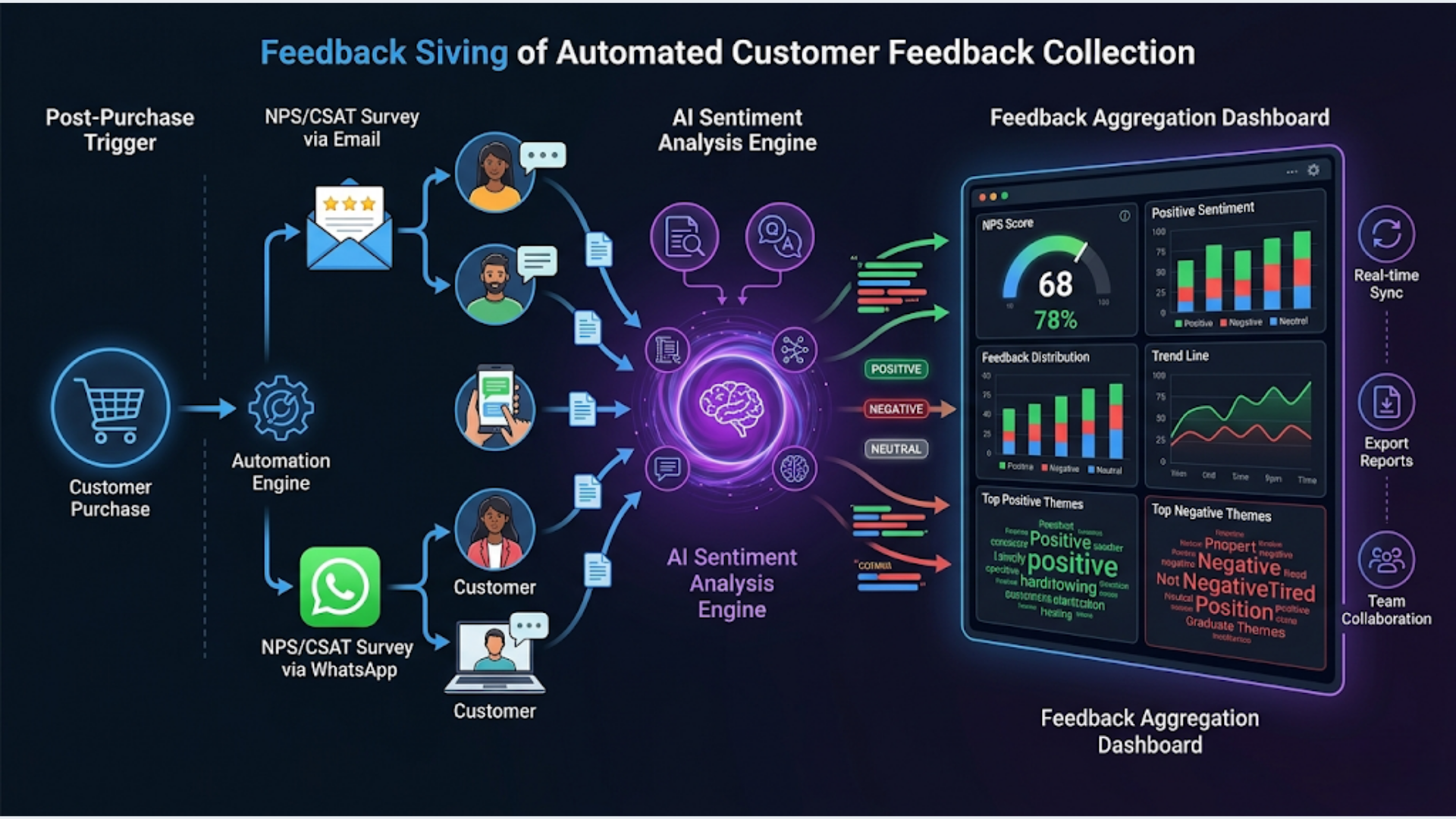
How to Automate Customer Feedback Collection and Analysis
Automated feedback collection increases response rates from 5 to 10% (email-only) to 25 to 40% (multi-channel with smart timing). The workflow: trigger a survey after a purchase or service completion, send via email and WhatsApp, run AI sentiment analysis on responses, aggregate everything into a live dashboard, and alert your team instantly when negative feedback arrives. Total setup cost: $50 to $100/month.
Most businesses collect feedback badly. They send a survey link once, get a handful of responses, dump them in a spreadsheet nobody checks, and call it “voice of customer.” That’s not a feedback system. That’s a checkbox exercise.
A real feedback system is automated, multi-channel, and action-oriented. Every response gets analyzed. Every negative response triggers an immediate follow-up. Every trend shows up on a dashboard your team actually looks at.
I build these systems. Here’s the complete architecture.
The Feedback Collection Workflow
The system starts with a trigger event and ends with action. Everything in between is automated.
Purchase/service completed (CRM, Shopify, or POS update)
    |
    v
Wait (timing depends on business type)
    |
    v
Send survey via email + WhatsApp (simultaneous)
    |
    v
Customer responds
    |
    v
AI analyzes sentiment + categorizes feedback
    |
    v
Log to Google Sheets dashboard
    |
    +--> Positive (NPS 9-10): Send thank-you + ask for public review
    |
    +--> Neutral (NPS 7-8): Log for trend analysis, no action
    |
    +--> Negative (NPS 0-6): Instant Slack alert + manager follow-up
    |
    v
Weekly digest: trends, scores, actionable insights
Tools and costs:
| Component | Tool | Cost |
|---|---|---|
| Workflow engine | n8n (self-hosted) | $12-24/month |
| Survey forms | Typeform or Google Forms | Free to $25/month |
| WhatsApp delivery | WATI or Interakt | $49/month or Rs 999/month |
| Email delivery | Gmail API or SendGrid | Free to $20/month |
| AI analysis | OpenAI GPT-4o-mini | $2-5/month |
| Dashboard | Google Sheets | Free |
| Alerts | Slack | Free |
Total cost: $65 to $125/month depending on your WhatsApp provider and survey tool. If you’re already using n8n and WATI for other automations, the incremental cost is just the OpenAI API calls.
Designing Surveys That Actually Get Responses
The survey itself matters as much as the delivery channel. A bad survey sent through a perfect automation still gets bad data.
The golden rules:
- One question per screen. Multi-question pages kill completion rates. Typeform nails this by default
- Start with a number. NPS (0-10) or CSAT (1-5) as the first question. It’s low effort and gives you a quantifiable score
- Follow up based on the score. Detractors (0-6) get “What went wrong?” Promoters (9-10) get “What did we do well?” This conditional logic means nobody answers irrelevant questions
- Keep it under 3 minutes. Aim for 3 to 5 questions maximum. Every additional question drops completion by 10 to 15%
- End with an open text field. “Anything else you’d like to share?” catches insights your structured questions miss
Recommended survey structure:
| Question | Type | Who Sees It |
|---|---|---|
| How likely are you to recommend us? (0-10) | NPS scale | Everyone |
| What’s the main reason for your score? | Open text | Everyone |
| What could we improve? | Open text | Detractors (0-6) |
| What did we do well? | Open text | Promoters (9-10) |
| Can we share your feedback publicly? | Yes/No | Promoters only |
Typeform vs Google Forms:
Typeform has better UX and higher completion rates (typically 10 to 15% higher than Google Forms). But Google Forms is free and integrates easily with n8n via Google Sheets. If you’re collecting fewer than 100 responses per month, Google Forms is fine. Above that, Typeform’s conversion rate advantage pays for itself.
India-specific: For markets where WhatsApp is the primary communication channel (India, Brazil, Southeast Asia), consider building your survey directly in WhatsApp using interactive message buttons instead of linking to an external form. WATI supports interactive list messages and button replies. Response rates for in-WhatsApp surveys are 2 to 3x higher than link-out surveys.
Multi-Channel Delivery: Email Plus WhatsApp
Sending through a single channel caps your response rate. Email alone gets 5 to 10%. WhatsApp alone gets 15 to 25%. Both together, with smart deduplication, gets 25 to 40%.
The dual-channel approach:
Trigger fires
    |
    v
Send email with survey link (immediately)
    |
    v
Wait 4 hours
    |
    +--> If response received: Stop. Don't send WhatsApp
    |
    +--> If no response: Send WhatsApp with survey link
    |
    v
Wait 48 hours
    |
    +--> If still no response: Send one final reminder (email only)
    |
    +--> If response received at any point: Stop all sequences
Why this order matters: Email first because it’s less intrusive. WhatsApp second because it’s harder to ignore but more personal. The 4-hour gap prevents the “bombarded” feeling. The deduplication check (did they already respond?) prevents annoying customers who already gave feedback.
n8n implementation details:
Use n8n’s Wait node for the 4-hour delay. Before sending the WhatsApp message, check your Google Sheet for whether a response from that customer already exists. If the Typeform webhook has fired for that customer’s email, skip the WhatsApp send.
Email template that works:
Keep it short. Subject line: “Quick question about your recent [purchase/service].” Body: two sentences max, then the survey link as a button. No images, no long preamble. The highest-performing feedback emails I’ve seen are under 50 words.
WhatsApp template that works:
WhatsApp Business API requires pre-approved templates. Submit something like:
Hi {{customer_name}}, thanks for choosing {{business_name}}.
We'd love your honest feedback (takes 60 seconds).

{{survey_link}}

Your input directly improves our service.
Keep it conversational. No corporate language. No “Dear valued customer.”
Timing by business type:
| Business Type | Optimal Send Time |
|---|---|
| E-commerce (physical product) | 3-5 days after delivery |
| SaaS / digital product | 7 days after signup or milestone |
| Restaurant / food delivery | 2 hours after order completion |
| Professional services | 1 day after project delivery |
| Healthcare / clinic | 4 hours after appointment |
| Hotel / hospitality | Morning after checkout |
Timing matters because the experience needs to be fresh but the customer shouldn’t be mid-experience. A restaurant survey 2 hours after the meal works. A survey while they’re still eating doesn’t.
AI Sentiment Analysis on Every Response
Raw feedback text is useless at scale. You can’t read 200 open-text responses a month and spot patterns. AI handles this in seconds.
What the AI extracts from each response:
- Sentiment score: Positive, neutral, or negative (with confidence percentage)
- Category: Product quality, customer service, pricing, delivery, UX, other
- Key phrases: The specific things mentioned (slow delivery, friendly staff, confusing checkout)
- Urgency: Is this something that needs immediate attention?
- Actionable insight: One-sentence summary of what the customer wants
The n8n implementation:
When a Typeform response arrives via webhook, n8n sends the open-text fields to GPT-4o-mini with this prompt:
Analyze this customer feedback. Return JSON with:
- sentiment: "positive", "neutral", or "negative"
- sentiment_score: 1-10
- category: one of ["product", "service", "pricing", "delivery", "ux", "other"]
- key_phrases: array of specific things mentioned
- urgency: "low", "medium", "high"
- summary: one sentence actionable insight

Feedback: {{response_text}}
Cost: GPT-4o-mini processes each response for less than $0.001. At 500 responses per month, you’re spending $0.50. Sentiment analysis used to require expensive NLP services. Now it’s essentially free.
Accuracy: For straightforward feedback (which most customer responses are), GPT-4o-mini achieves 90 to 95% accuracy on sentiment and categorization. Edge cases: sarcasm and mixed-sentiment responses. These are rare enough in customer feedback that the system works well without fine-tuning.
Storing the results:
Append every analyzed response to a Google Sheet with columns:
Date | Customer | NPS Score | Sentiment | Category | Key Phrases | Urgency | Summary | Raw Response | Channel (email/whatsapp)This becomes your feedback database. Formulas and pivot tables handle the rest.
Building the Feedback Dashboard
A dashboard nobody checks is worthless. Build something that surfaces the signal automatically.
Google Sheets dashboard layout:
Tab 1: Live Feed Every response as it arrives. Sorted by date, color-coded by sentiment (green/yellow/red). This is your real-time pulse.
Tab 2: Weekly Summary Auto-calculated using Google Sheets formulas:
| Metric | Formula Approach |
|---|---|
| Average NPS | AVERAGE of NPS column, filtered by last 7 days |
| Response rate | Surveys sent vs responses received |
| Sentiment breakdown | COUNTIF for each sentiment category |
| Top 3 categories | QUERY function to rank categories by frequency |
| Trend vs previous week | WoW comparison formulas |
Tab 3: Alerts Log Every negative response that triggered an alert. Status column: Open, In Progress, Resolved. Assigned to column. Resolution notes.
Tab 4: Monthly Trends Charts showing NPS over time, sentiment distribution, category trends. Google Sheets’ built-in charting handles this. Not beautiful, but functional.
Automated weekly digest:
n8n runs a scheduled workflow every Monday morning:
- Query the Google Sheet for last 7 days of data
- Calculate summary stats (average NPS, sentiment split, top issues)
- Format as a Slack message or email
- Send to the team
Sample digest format:
Weekly Feedback Digest (Apr 19-26)
---
Responses: 47 (32% response rate)
NPS: 42 (up from 38 last week)
Sentiment: 68% positive, 22% neutral, 10% negative

Top issues this week:
1. Delivery speed (mentioned 12 times)
2. Checkout confusion (mentioned 8 times)
3. Product packaging (mentioned 5 times)

Negative alerts: 5 (3 resolved, 2 open)
This digest takes 30 seconds to read and tells you everything you need to know about customer sentiment that week.
The Negative Feedback Alert System
This is the highest-value part of the automation. A negative review left unaddressed costs you the customer and everyone they talk to. A negative review addressed within 1 hour can turn a detractor into a promoter.
Alert trigger rules:
| Condition | Action |
|---|---|
| NPS 0-3 | Critical alert: Slack DM to manager + email to owner |
| NPS 4-6 | Warning alert: Slack channel post |
| Negative sentiment + “urgent” flag from AI | Critical alert regardless of NPS |
| Keyword match: “cancel”, “refund”, “never again” | Critical alert |
The Slack alert includes:
- Customer name and contact info
- Their NPS score and full response text
- AI summary and category
- Purchase/service history (pulled from CRM)
- One-click button to open their CRM profile
Response protocol:
The alert is useless without a defined response process. Recommended:
- Manager acknowledges the alert in Slack (reaction emoji or reply) within 30 minutes
- Customer contacted within 2 hours via their preferred channel
- Resolution logged in the Alerts Log tab
- If no acknowledgment in 30 minutes, n8n escalates (sends a second alert to the next person up)
India context: If your team uses WhatsApp internally (common in Indian businesses), send the alert to a dedicated WhatsApp group instead of or in addition to Slack. Use WATI’s API to send templated alert messages to the group.
The business impact: Businesses that respond to negative feedback within 2 hours retain 70% of those customers. Businesses that respond within 24 hours retain 45%. Businesses that never respond retain 15%. Automation closes the gap between “feedback received” and “team notified” to zero.
FAQ
What’s a good NPS score to target?
For B2B SaaS: above 40 is good, above 50 is excellent. For B2C/e-commerce: above 30 is good, above 50 is excellent. For services businesses: above 50 is good, above 70 is excellent. Industry benchmarks vary widely. Focus on trending upward rather than hitting a specific number.
How often should I survey customers?
For transactional businesses (e-commerce, food delivery): after every transaction. For subscription businesses: quarterly, plus after key milestones (onboarding, support interaction, renewal). For services businesses: after project completion plus a 30-day follow-up. Never survey more than once per month for the same customer.
Can I use this for B2B feedback collection?
Yes, with adjustments. B2B surveys should be shorter (2 to 3 questions max), sent to the primary contact only, and followed up with a personal email from the account manager. WhatsApp works for B2B in India and Southeast Asia but may not be appropriate in Western markets where it’s considered personal.
What if my response rate is still low after automation?
Check three things: timing (are you catching customers at the right moment?), channel (are you using the channel they prefer?), and incentives (a small discount on next purchase can boost rates by 15 to 20%). Also check your survey length. If it takes more than 90 seconds, people abandon it.
How do I handle feedback in multiple languages?
GPT-4o-mini handles sentiment analysis in over 50 languages without any configuration changes. Your survey can be in one language, but if customers respond in another (common in India with Hindi/English code-switching), the AI still processes it accurately. For survey delivery, Typeform supports multilingual forms.
Should I use CSAT or NPS?
Use NPS for overall relationship measurement (quarterly or post-project). Use CSAT for specific interaction measurement (post-support, post-delivery). They measure different things. Most businesses benefit from running both. Start with NPS if you can only pick one.
What’s the ROI of automating feedback collection?
Direct ROI: negative feedback recovery saves 10 to 15% of at-risk customers. Indirect ROI: trend data informs product and service improvements that reduce churn long-term. Setup cost: 8 to 12 hours of initial configuration. Ongoing cost: $65 to $125/month. If each saved customer is worth $100+/year, you break even by saving one customer per month.
I build automated feedback systems that turn customer responses into real-time intelligence. If you’re still collecting feedback manually or ignoring it entirely, triggerAll can set up the complete pipeline.
Need help implementing this?
Book a free 30-minute discovery call. We'll map your current setup, identify quick wins, and outline what automation can do for your business.
Book a Free Discovery Call