How to Automate Contract Signing with DocuSign + CRM
Automate contract signing with DocuSign or Zoho Sign and your CRM. Deal stage triggers, auto-generated contracts, signature tracking, CRM updates. n8n orchestration with India-specific Aadhaar eSign options.
How to Automate Contract Signing with DocuSign + CRM
The deal is closed. Verbal agreement confirmed. Now someone has to generate the contract, fill in the client details, send it for signing, follow up when it is not signed in 48 hours, update the CRM when it is signed, and notify the delivery team to start onboarding.
That sequence takes 3-7 days manually. During which time the client’s enthusiasm is cooling, their competitor might swoop in, and your revenue recognition is delayed.
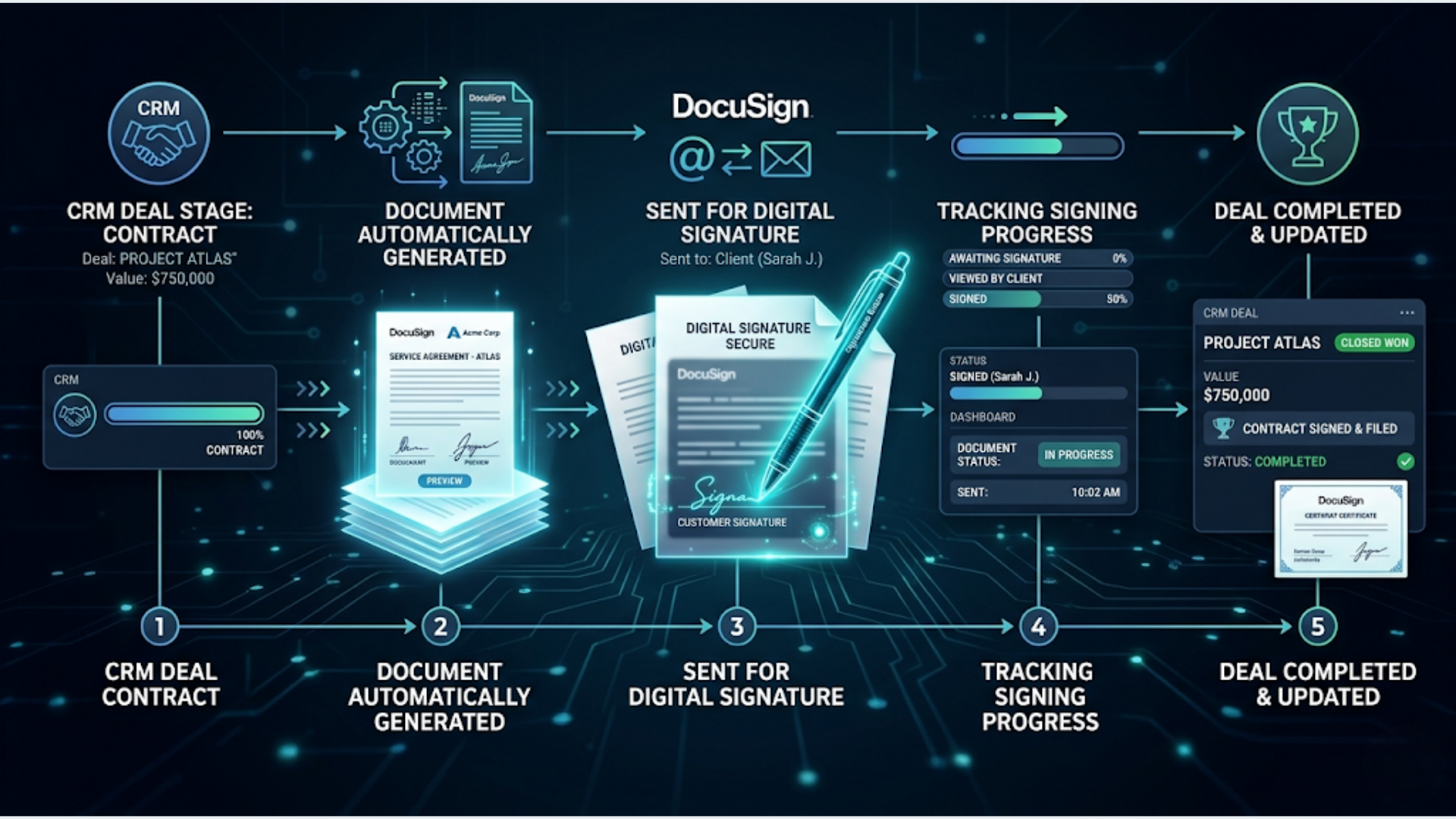
I build these systems. The automated version takes 3-7 minutes. CRM deal stage changes, contract generates, signature request sends, client signs, CRM updates, team gets notified. No human touches the process unless the contract needs custom terms.
Why Contract Signing Is the Bottleneck Nobody Talks About
Sales teams obsess over pipeline velocity, lead conversion, and demo-to-close ratios. Nobody measures the gap between “deal won” and “contract signed.”
In professional services firms, that gap averages 5-8 business days. For agencies, 3-5 days. For SaaS companies with standard terms, 1-3 days.
Every day in that gap is risk. A study by Gartner found that 20% of “won” deals that take more than 7 days to get a signature end up stalling, renegotiating, or falling through entirely. The buyer’s decision fatigue sets in. Internal priorities shift. The urgency that drove the “yes” fades.
The financial impact is straightforward. If your average deal is worth Rs 5 lakh and you close 10 deals per month, a 20% stall rate on delayed contracts costs you Rs 10 lakh per month in at-risk revenue. Automating the contract flow does not guarantee zero stalls, but reducing the signing window from 5 days to same-day eliminates the time-based risk almost entirely.
The operational cost is equally clear. If your sales coordinator spends 30 minutes per contract on generation, sending, follow-up, and CRM updates, that is 5 hours per month at 10 deals. At 50 deals per month, it is a full-time role. An automated workflow handles it in zero human hours.
The Architecture: Deal Won to Contract Signed
Here is the complete automated flow:
- Sales rep moves the deal to “Closed Won” in the CRM
- n8n detects the stage change via webhook
- n8n pulls deal data: client name, company, deal value, service type, start date, payment terms
- n8n generates a contract from a template using the deal data
- n8n sends the contract for e-signature via DocuSign or Zoho Sign
- Client receives signing link via email (and optionally WhatsApp)
- DocuSign/Zoho Sign sends a webhook when the contract is signed
- n8n updates the CRM: deal stage to “Contract Signed,” attaches the signed PDF
- n8n notifies the delivery team via Slack or email
- If not signed within 48 hours, n8n sends an automated reminder
What you need:
- CRM with webhooks or API access (HubSpot, Zoho, Salesforce, Pipedrive)
- DocuSign (international) or Zoho Sign (India-friendly)
- n8n for orchestration
- Google Docs or a template engine for contract generation
- Slack or email for team notifications
Step-by-Step: CRM Trigger to Contract Generation
Trigger setup depends on your CRM:
HubSpot: Create a workflow that fires a webhook when a deal moves to “Closed Won.” The webhook sends the deal ID to n8n. In n8n, use the HubSpot node to pull full deal details: company name, contact info, deal amount, custom properties for service type and terms.
Zoho CRM: Use Zoho Flow or the Zoho CRM webhook feature to trigger on deal stage change. Alternatively, n8n can poll the Zoho CRM API every 5 minutes for deals that moved to “Closed Won” since the last check. Polling is simpler to set up but introduces a delay.
Salesforce: Use Salesforce Flow to fire an outbound message on Opportunity stage change. The outbound message hits n8n’s webhook URL with the Opportunity ID.
Pipedrive: Pipedrive’s webhook feature fires on deal stage changes natively. Set up a webhook for “deal.updated” and filter for stage changes to “Won” in n8n.
Contract generation from template:
The simplest approach: maintain your contract as a Google Doc template with placeholder variables. Variables look like: {{client_name}}, {{company}}, {{deal_value}}, {{start_date}}, {{payment_terms}}.
In n8n, use the Google Docs node to:
- Copy the template to a new document
- Replace all placeholder variables with actual deal data
- Export the document as a PDF
For more complex contracts with conditional sections (different terms for different service tiers, optional clauses based on deal properties), use a Code node in n8n to build the document content dynamically, then write it to Google Docs.
Template management tip: Keep a master template for each service type. Name them clearly: “MSA-Template-Growth-Tier”, “SOW-Template-Starter”, “NDA-Template-Standard.” Store the template ID mapping in a Google Sheet so you can add new templates without editing the workflow.
Sending for Signature: DocuSign vs Zoho Sign
DocuSign:
The global standard. 1 billion+ users worldwide. Legally binding in 180+ countries.
Integration with n8n: Use the HTTP Request node to call DocuSign’s eSignature API. The workflow: create an envelope, add the PDF as a document, define signing locations (where the client signs, dates, initials), add the recipient, and send.
DocuSign’s API requires OAuth2 authentication. Set this up once in n8n using the OAuth2 credential type. After that, all API calls use the access token automatically.
Pricing: Personal at $15/month (5 envelopes). Standard at $45/month (unlimited). Business Pro at $65/month (advanced features like payment collection and bulk send).
Zoho Sign:
India’s pragmatic alternative. INR pricing. Aadhaar eSign support (more on this below). Deep integration with Zoho CRM if you are already in the Zoho ecosystem.
Integration with n8n: Zoho Sign has a REST API. Use the HTTP Request node with Zoho OAuth2 credentials. The API flow is similar to DocuSign: create a document, add fields, add recipients, send for signing.
Pricing: Standard at Rs 600/month (5 documents). Professional at Rs 1,000/month (unlimited). Enterprise at Rs 1,600/month (advanced workflows).
If you are using Zoho CRM: Use Zoho Sign. The native integration means you can trigger signing from within Zoho CRM without n8n for the basic flow. n8n adds value when you need to generate the contract dynamically, add conditional logic, or integrate with non-Zoho systems.
If you are using HubSpot, Salesforce, or Pipedrive: DocuSign has better native integrations with these platforms. But n8n as an orchestration layer makes the choice of eSign platform almost irrelevant. n8n talks to both equally well.
India-Specific: Aadhaar eSign and Legal Validity
E-signatures in India are governed by the Information Technology Act, 2000 and the Indian Contract Act, 1872.
Three levels of electronic signatures in India:
-
Basic electronic signature. Click-to-sign, type-to-sign, or draw-to-sign. Legally valid for most contracts under the IT Act. Both DocuSign and Zoho Sign provide this. Sufficient for service agreements, NDAs, vendor contracts, and most business-to-business agreements.
-
Aadhaar eSign. Government-certified electronic signature using Aadhaar authentication (OTP sent to Aadhaar-linked mobile number). Legally equivalent to a handwritten signature under the IT Act. Required for government-facing documents, certain financial instruments, and high-value transactions.
-
Digital Signature Certificate (DSC). Issued by certified authorities (eMudhra, Sify, NCode). Required for company incorporation documents, patent filings, and income tax filings. Not relevant for typical business contracts.
For most business contracts between private parties, basic electronic signatures are sufficient. DocuSign’s standard signatures are legally enforceable in Indian courts. Multiple High Court rulings have upheld e-signatures in commercial disputes.
When you need Aadhaar eSign: Government contracts, real estate transactions, insurance policies, loan agreements, and any transaction where the counterparty specifically requires Aadhaar-based authentication. Zoho Sign supports Aadhaar eSign natively. DocuSign supports it through a partnership with eMudhra.
Stamp duty consideration: Many Indian states require stamp duty on certain contracts. Electronic stamping through the Stock Holding Corporation of India (SHCIL) or state e-stamping portals is the legal way to handle this. Neither DocuSign nor Zoho Sign handles stamp duty automatically. You need to purchase e-stamps separately and attach them to the contract before sending for signature.
Practical advice for Indian businesses: Start with basic e-signatures via Zoho Sign. They are legally valid, significantly cheaper than physical contracts (printing, courier, storage), and accepted by virtually all private businesses. Move to Aadhaar eSign only when specifically required by a counterparty or regulation.
Automated Follow-Up and Tracking
Contracts sent for signature need follow-up. The industry average: 30% of contracts are not signed within 48 hours of sending. Without follow-up, 10% are never signed at all.
Automated reminder workflow:
After sending the contract, n8n starts a parallel tracking flow:
- Wait node: 48 hours
- Check signing status via DocuSign/Zoho Sign API
- If signed: do nothing (the completion webhook already handled the CRM update)
- If not signed: send a reminder email to the signer
- Wait node: another 48 hours
- Check again
- If still not signed: alert the sales rep via Slack to follow up personally
- Wait node: 72 hours more
- If still not signed: mark the deal as “Contract Stalled” in CRM and create a task for the sales manager
The tone of automated reminders matters. Do not make them sound robotic. A good reminder: “Hi [name], the [service] agreement is waiting for your signature. It takes about 30 seconds. Here is the direct signing link: [link]. Let me know if you have any questions.” A bad reminder: “REMINDER: Document pending signature. Please sign at your earliest convenience.”
WhatsApp reminder option for India: Many Indian business contacts respond faster to WhatsApp than email. Add a WATI node to your follow-up sequence. Send the first reminder via email. If not signed after 24 more hours, send a WhatsApp message with the signing link. In my experience, WhatsApp reminders have a 3x higher response rate than email for Indian contacts.
CRM tracking fields to maintain:
- Contract_sent_date
- Contract_signed_date
- Time_to_sign (calculated: signed_date minus sent_date)
- Reminder_count (how many reminders were sent)
- Signing_method (email link, WhatsApp link, in-person)
Over time, this data tells you which deals sign quickly (loyal clients, smaller deals) and which drag (new clients, large deals, multiple signers). Adjust your follow-up timing based on the patterns.
Handling Multi-Signer Contracts
Some contracts require multiple signatures. Joint ventures, partnership agreements, contracts where both the client’s CEO and CFO need to sign.
DocuSign and Zoho Sign both support sequential signing (Person A signs first, then Person B) and parallel signing (both receive the request simultaneously).
In n8n, the multi-signer flow:
- Define the signing order in the contract template (or derive it from deal properties)
- When creating the envelope/document, add multiple recipients with their signing order
- The eSign platform handles the routing automatically
- You receive a webhook only when ALL parties have signed
- If any signer stalls, the follow-up logic targets that specific signer
Counterparty edits and negotiations: Sometimes the signer wants to modify terms before signing. DocuSign has a “suggest changes” feature (Business Pro plan). Zoho Sign supports comments. If a signer requests changes, the workflow should route the request to the sales rep rather than auto-processing it. Add an IF node after the “change requested” webhook: if change_requested = true, alert sales rep and pause the automation.
Common multi-signer problem: The first signer takes 2 days. The second signer takes 3 days. Total time: 5 days. Solution: send all signers simultaneously (parallel signing) unless there is a legal or procedural reason for sequential signing. Most commercial contracts do not require sequential signing.
FAQ
How long does it take to set up this automation? For a basic flow (single signer, one contract template, one CRM): 4-6 hours including DocuSign/Zoho Sign API setup and testing. For a complex flow (multiple templates, multi-signer, conditional terms): 8-12 hours. Most of the time goes into template design and API credential configuration, not the n8n workflow itself.
Is DocuSign worth the price over Zoho Sign? For Indian businesses using Zoho CRM: no. Zoho Sign at Rs 1,000/month does everything DocuSign does at a fraction of the cost. For international businesses or those using HubSpot/Salesforce: DocuSign’s broader integrations and global recognition justify the premium. Clients outside India are more familiar with DocuSign, which reduces friction.
What if my contract requires physical signatures for legal reasons? Some contracts in India still require physical signatures (certain government contracts, real estate registrations, notarized documents). In these cases, use the automation for contract generation and delivery, but skip the e-signature step. Send the PDF for printing and physical signing. The CRM tracking still applies: mark the deal as “contract sent for physical signing” and follow up manually.
Can I use this with free CRM plans? HubSpot Free CRM supports webhooks through third-party tools (n8n polling the API works). Zoho CRM Free does not support webhooks or API access. Pipedrive and Salesforce do not have free plans. The minimum viable CRM for this automation is HubSpot Free (with n8n polling) or Zoho CRM Standard (Rs 800/user/month).
How do I handle different contract templates for different services? Store a mapping in Google Sheets: service type (from the CRM deal) maps to a Google Docs template ID. In n8n, look up the template ID based on the deal’s service type property. This lets you add new templates by adding a row to the sheet, not editing the workflow.
What about contract storage and compliance? DocuSign stores signed contracts on their servers with audit trails. Zoho Sign does the same. For compliance, you should also save the signed PDF to your own storage (Google Drive, SharePoint, or your CRM’s file attachment). In n8n, add a step after the “signed” webhook that downloads the signed PDF and uploads it to your preferred storage. Many industries in India (financial services, healthcare) require document retention for 7-10 years.
Can this work with PandaDoc instead of DocuSign? Yes. PandaDoc has a full API that works with n8n via HTTP Request. PandaDoc also includes document generation features (not just signing), which can replace the Google Docs template step. Pricing is comparable to DocuSign. If you want contract generation and signing in one platform, PandaDoc is worth evaluating.
The contract signing workflow is one of those automations where speed directly converts to revenue. Every day between “yes” and a signed contract is a day of risk. Eliminate that gap and you close the loop on every deal within hours, not days.
If you need help automating your contract workflow, triggerAll builds these systems for sales teams and professional services firms.
Need help implementing this?
Book a free 30-minute discovery call. We'll map your current setup, identify quick wins, and outline what automation can do for your business.
Book a Free Discovery Call