How to Automate Affiliate Commission Tracking
Build an automated affiliate commission tracking system. Referral link tracking, conversion attribution, commission calculation, payout scheduling. n8n + Google Sheets + Razorpay/PayPal. India TDS and GST implications covered.
How to Automate Affiliate Commission Tracking
You are running an affiliate program from a spreadsheet. Affiliates send you screenshots of sales they claim they drove. You manually cross-reference orders, calculate commissions, and send payments once a month (or whenever you remember). Some affiliates get overpaid. Some get underpaid. Everyone is unhappy.
This is how most small affiliate programs operate. It works until you hit 20 affiliates and 200 orders per month. Then it collapses.
I build these systems. The fix is straightforward: automate referral tracking, attribution, commission calculation, and payout scheduling. No expensive affiliate platform needed. n8n orchestrates the whole thing. Google Sheets stores the data. Razorpay or PayPal handles payouts.
Why Manual Affiliate Tracking Breaks
Manual tracking fails in predictable ways.
Attribution disputes. Affiliate A says they drove a sale. Your records show the customer also clicked Affiliate B’s link. Who gets the commission? Without automated click and conversion tracking, you are guessing.
Delayed payments. When commissions are calculated manually, payments slip. The average affiliate program pays 30-45 days after the sale. Manual programs often stretch to 60-90 days because nobody prioritized the spreadsheet work. Late payments kill affiliate motivation. Motivated affiliates drive 80% of your affiliate revenue.
Calculation errors. Different commission rates for different products. Tiered commissions based on volume. Bonuses for hitting targets. Refund deductions. One wrong formula in a spreadsheet and you are either leaking money or underpaying affiliates who will notice and leave.
Scaling wall. 5 affiliates and 50 orders per month? A spreadsheet handles it. 50 affiliates and 500 orders? You need a system. 200 affiliates and 2,000 orders? You need automation or a full-time person doing nothing but commission math.
Dedicated affiliate platforms solve these problems. Impact charges $30,000+/year. PartnerStack starts at $800/month. Even budget options like Rewardful ($49/month) or FirstPromoter ($49/month) add up. For a business running a modest affiliate program, that cost might not make sense yet.
An n8n-based system costs your server and your time to build it.
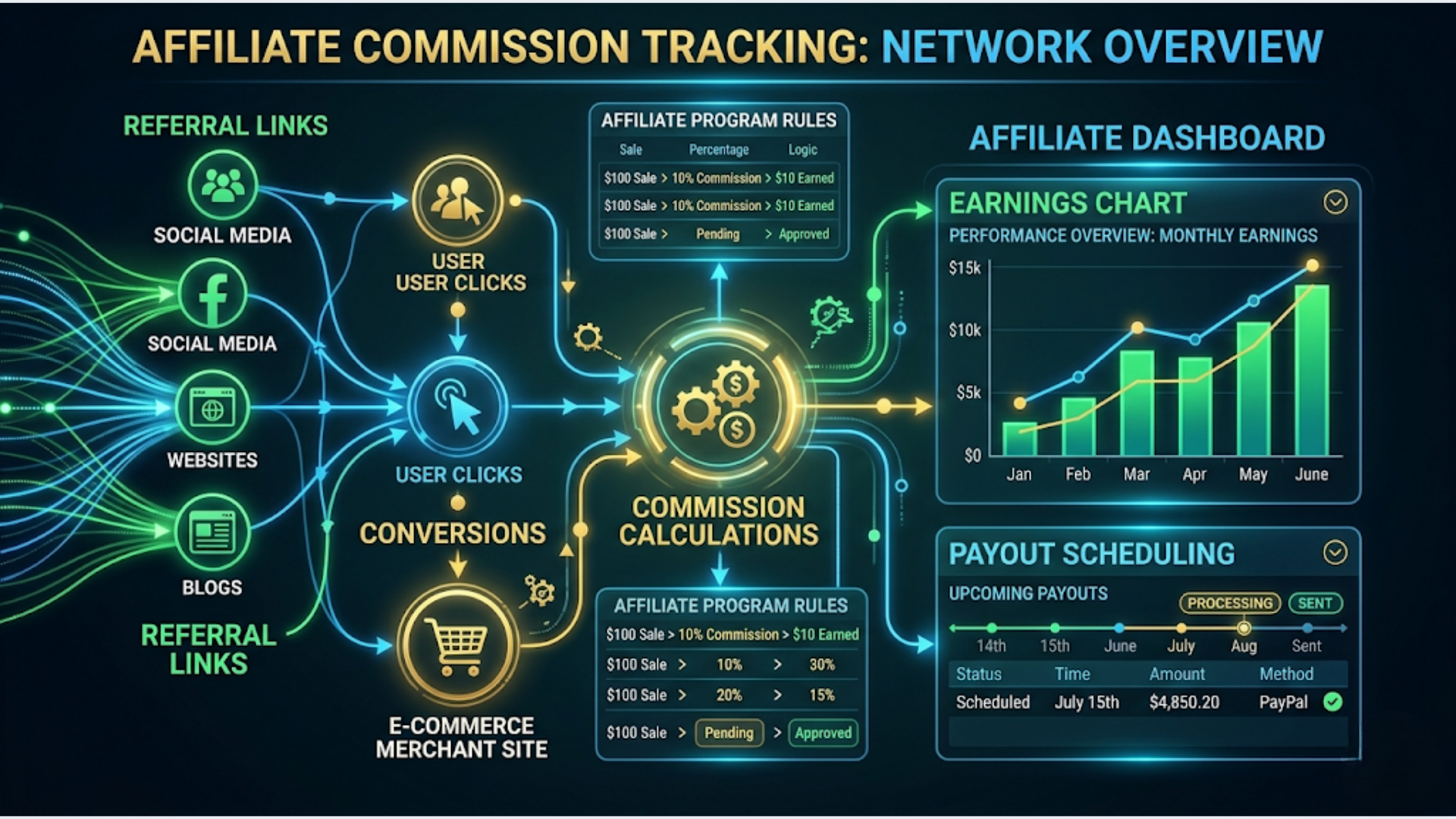
The Architecture: Click to Payout
The complete affiliate tracking system has five stages:
Stage 1: Link tracking. Each affiliate gets a unique referral link. Clicks on these links are logged with timestamp, source, and affiliate ID.
Stage 2: Conversion attribution. When a sale happens, the system looks up the last referral click for that customer within the attribution window (typically 30 days). The affiliate associated with that click gets credit.
Stage 3: Commission calculation. Based on the product sold, the sale amount, and the affiliate’s commission tier, calculate the exact commission owed.
Stage 4: Approval and adjustment. Hold commissions for a cooling period (typically 14-30 days) to account for refunds, chargebacks, and disputes. Automatically deduct commissions for refunded orders.
Stage 5: Payout. Once approved, batch commissions by affiliate and trigger payouts via Razorpay (India) or PayPal (international).
What you need:
- n8n instance for orchestration
- A redirect service for referral links (you can build this in n8n or use a simple serverless function)
- Google Sheets for commission data
- Your e-commerce platform’s webhooks (Shopify, WooCommerce, or Razorpay for payments)
- Razorpay Payouts or PayPal Payouts for disbursement
Building the Referral Link System
Every affiliate gets a unique tracking link. The structure: yourdomain.com/ref/AFFILIATE_CODE. When someone clicks this link, two things happen: the click is logged and a cookie is set on the visitor’s browser.
Option 1: n8n webhook as redirect. Create a Webhook node in n8n. When a request hits /ref/AFFILIATE_CODE, n8n logs the click (affiliate ID, timestamp, IP, referrer) to Google Sheets, sets a cookie on the response, and redirects to your main site. This works for low traffic (under 1,000 clicks per day). Beyond that, n8n’s webhook latency adds noticeable delay to the redirect.
Option 2: Serverless redirect function. Deploy a simple Cloudflare Worker or AWS Lambda function that handles the redirect and cookie setting. Log clicks to a queue. n8n picks up click events from the queue every 5 minutes for processing. Better performance, slightly more complex setup.
Option 3: UTM parameters. The simplest approach. Affiliate links are just your regular URLs with UTM parameters: yourdomain.com?ref=AFFILIATE_CODE. Your analytics platform (GA4) tracks these. You extract the data via the GA4 API or BigQuery export. Less accurate (UTMs can be stripped, ad blockers remove them) but zero custom infrastructure needed.
For most small programs (under 50 affiliates), Option 1 with n8n webhooks works fine. The redirect adds 200-400ms of latency, which visitors will not notice.
Cookie duration matters. Standard is 30 days. Amazon’s affiliate program famously uses 24 hours. Longer cookies are better for affiliates (more sales attributed). Shorter cookies are better for you (less commission paid on organic sales that happened to have a click 29 days ago). I recommend 30 days as the default.
Last-click vs first-click attribution. If a customer clicks Affiliate A’s link on Monday and Affiliate B’s link on Wednesday, who gets credit for Thursday’s purchase? Last-click (Affiliate B) is standard and easier to implement. First-click (Affiliate A) rewards the original referrer. Your choice, but be consistent and transparent with affiliates about which model you use.
Commission Calculation Engine
This is where most manual processes fall apart. The calculation logic needs to handle multiple scenarios.
Base commission calculation:
- Flat rate per sale: straightforward. Every sale earns Rs 500 or $10 regardless of order value.
- Percentage of sale: 10% of order value. Simple but requires handling edge cases like shipping charges (typically excluded) and taxes (definitely excluded).
- Tiered rates: 10% for the first Rs 50,000 in monthly sales, 15% for the next Rs 50,000, 20% above Rs 1,00,000. This requires tracking cumulative monthly sales per affiliate.
Product-specific commissions. Different products carry different margins. High-margin products might offer 20% commission. Low-margin products might offer 5%. Your commission table needs a product-to-rate mapping. Store this in a Google Sheet that n8n references during calculation.
In n8n, the calculation flow looks like this:
- Shopify/WooCommerce webhook fires on new order
- n8n checks if the customer has a referral cookie or UTM parameter
- If yes, look up the affiliate and their commission tier
- Look up the product-specific commission rate
- Calculate: order_value * commission_rate (or flat amount)
- Apply any tier adjustments based on the affiliate’s cumulative monthly sales
- Write the commission record to Google Sheets with status “pending”
Handling refunds: When a refund webhook fires, n8n looks up the original order, finds the associated commission record, and marks it as “refund_deducted.” If the commission was already paid, create a negative adjustment for the next payout cycle. Never chase affiliates for refund clawbacks after the fact. Build the cooling period into your system so refunds are caught before payout.
Payout Automation: Razorpay and PayPal
Payouts are the part affiliates care about most. Late or incorrect payouts destroy trust faster than anything else.
Razorpay Payouts (for India):
Razorpay’s Payouts API lets you send money to any bank account, UPI ID, or Paytm wallet. Charges: Rs 5-10 per transaction for bank transfers, Rs 2-5 for UPI. Minimum payout: Rs 1.
Setup: Create a Razorpay account, enable Payouts, get your API keys. In n8n, use the HTTP Request node to call Razorpay’s Payout API. Each payout requires: account number and IFSC (for bank), or UPI ID (for UPI), or phone number (for Paytm), plus the amount and a reference ID.
PayPal Payouts (for international):
PayPal’s Payouts API sends money to any PayPal email address. Charges: 2% of payout amount (capped at $20 per transaction for US recipients). International fees vary by country.
The payout workflow in n8n:
- Schedule trigger runs on your payout date (1st and 15th of each month, or weekly)
- Read all commission records with status “approved” from Google Sheets
- Aggregate by affiliate (sum all approved commissions per affiliate)
- Check minimum payout threshold (common: Rs 1,000 or $50)
- For each affiliate above the threshold, call the payout API
- Update commission records to “paid” with payout date and transaction ID
- Send payout notification to the affiliate via email or WhatsApp
Pro tip: Always run payouts in a test mode first. Razorpay and PayPal both offer sandbox environments. Process your entire payout batch in sandbox, verify the amounts and recipients, then switch to live mode. One wrong decimal point in a commission rate can mean paying 10x what you owe.
India Tax Compliance: TDS and GST
If you are running an affiliate program in India, tax compliance is not optional. The penalties for getting this wrong are significant.
TDS (Tax Deducted at Source):
Under Section 194H of the Income Tax Act, commission payments are subject to 5% TDS (10% if the affiliate has not provided their PAN). This means if you owe an affiliate Rs 10,000, you pay them Rs 9,500 and deposit Rs 500 with the government as TDS.
Your system needs to:
- Collect PAN from every affiliate during onboarding
- Deduct 5% TDS from every payout (10% for missing PAN)
- Issue TDS certificates (Form 16A) quarterly
- File TDS returns (Form 26Q) quarterly via the TRACES portal
In n8n, add a TDS calculation step to your payout workflow. Before sending the payout, multiply the commission by 0.95 (or 0.90 for no-PAN affiliates). Log the TDS amount separately. Generate a TDS summary report monthly for your accountant.
Threshold: TDS is mandatory when total commission to a single affiliate exceeds Rs 15,000 in a financial year. Below that, TDS is optional (but recommended for clean records).
GST implications:
If your affiliate is a registered GST business (which they should be if their annual revenue exceeds Rs 20 lakh), they should invoice you for their commission. The invoice includes 18% GST. You pay the commission plus GST, and you can claim input tax credit on the GST paid.
If your affiliate is an individual without GST registration, they receive the commission minus TDS. No GST invoice needed.
Your payout system needs to differentiate between:
- GST-registered affiliates: pay commission + 18% GST, receive their GST invoice, deduct TDS on the base commission
- Non-GST affiliates: pay commission minus TDS, no GST
Store each affiliate’s PAN, GST registration status, and GSTIN in your affiliate master sheet. The n8n payout workflow references these fields to apply the correct deductions.
This is the part where most bootstrapped affiliate programs fail. The commission math is easy. The Indian tax compliance is not. Get it wrong and you face interest, penalties, and angry affiliates whose TDS credits do not show up in their Form 26AS.
Building the Affiliate Dashboard
Affiliates need visibility into their performance. Without a dashboard, they will message you constantly asking about clicks, conversions, and pending payouts.
The cheapest dashboard: a shared Google Sheet. Create a per-affiliate sheet (or use sheet tabs) that n8n updates in real time. Columns: date, click count, conversions, sales amount, commission earned, commission status (pending/approved/paid), payout date.
Protect the sheet so affiliates can view but not edit. Share via Google Sheets link with view-only access.
Better option: Looker Studio dashboard. Connect your Google Sheets data to Looker Studio (free). Build a simple dashboard with: total clicks, conversion rate, total commissions earned, pending payouts, and a line chart of daily performance. Use Looker Studio’s embed feature to create a shareable link per affiliate (filtered by their affiliate ID).
Best option: a simple web dashboard. If you have the technical skills, build a basic Next.js or Streamlit dashboard that reads from your Google Sheet or database. Add authentication so each affiliate sees only their data. This is the most professional approach but takes 2-3 days to build.
For most programs with under 50 affiliates, the shared Google Sheet works surprisingly well. Affiliates check it when they want and you never have to answer “what’s my balance?” again.
FAQ
What is a reasonable commission rate for affiliate programs? Industry averages: SaaS products pay 20-30% recurring for the first year. E-commerce pays 5-15% per sale. Digital products (courses, ebooks) pay 30-50%. Physical products in India typically offer 5-10%. Set rates based on your margins, not industry averages. If your margin is 40%, offering 15% commission still leaves you profitable.
How do I prevent affiliate fraud (fake clicks, self-referrals)? Flag suspicious patterns: high click counts with near-zero conversions, multiple orders from the same IP address, orders that get refunded immediately. In n8n, add a fraud check node that screens for these patterns before approving commissions. Also, explicitly disallow self-referrals in your affiliate agreement and auto-detect when an affiliate’s email matches a customer email.
What is the ideal cooling period before approving commissions? 14-30 days depending on your refund policy. If you offer a 30-day money-back guarantee, set the cooling period to 35 days. This ensures you never pay commissions on refunded orders. Shorter cooling periods make affiliates happier but increase your risk.
Can I use this system for a referral program (not just affiliates)? Yes. A referral program is just an affiliate program where your customers are the affiliates. The tracking and payout mechanics are identical. The difference is typically simpler commission structures (flat reward per referral, often a discount or credit rather than cash) and a different signup flow (embedded in your product rather than a standalone affiliate signup page).
Do I need a written affiliate agreement? Absolutely. Cover: commission rates and calculation method, attribution model, cookie duration, payment terms, prohibited activities (PPC bidding on brand terms, spam, self-referrals), termination conditions. For India, also cover TDS responsibility and GST expectations. A lawyer can draft this for Rs 5,000-10,000. Worth every rupee.
What happens when affiliates dispute commission amounts? This is why detailed logging matters. Every click, every conversion, every calculation step should be logged with timestamps. When a dispute comes up, pull the data trail. Automated systems with transparent logs generate 90% fewer disputes than manual spreadsheet tracking.
How many affiliates can this system handle? The n8n + Google Sheets setup comfortably handles 100 affiliates with 2,000 orders per month. Beyond that, migrate your data store from Google Sheets to PostgreSQL. The n8n workflow logic stays the same. Only the read/write nodes change.
Affiliate programs are a growth engine, but only when affiliates trust the system. Automated tracking, transparent reporting, and on-time payouts are the baseline. Everything else is optimization.
If you need help building an automated affiliate tracking and payout system, triggerAll sets these up end to end.
Need help implementing this?
Book a free 30-minute discovery call. We'll map your current setup, identify quick wins, and outline what automation can do for your business.
Book a Free Discovery Call